George Loves Weather

Have a Better Life By Using Weather Instruments

  • Mounting
  • Reviews
    • AcuRite
    • Ambient
    • Davis Instruments
    • La Crosse
  • Kids
  • Learning
  • About
    • All About George
    • About George Loves Weather
    • I Own and Develop George Loves Weather-My Background
  • Contact Us
You are here: Home / Home

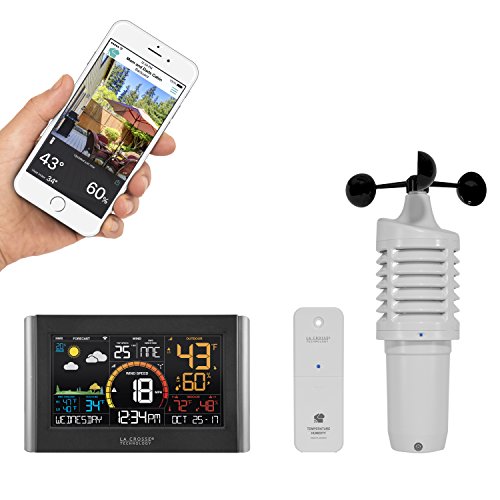
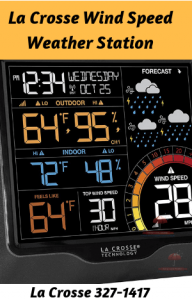
La Crosse Color Weather Station-Model V22-WRTH

La Crosse Color Weather Station

Introducing a La Crosse Color Weather Station

I was interested in a La Crosse color weather station. So I found the La Crosse V22 WRTH station is a very intriguing choice.

I thought I would write a quick review. My review will provide information about this weather station that isn’t readily easy to come by.

So I will do the research and then you can examine the La Crosse color weather station as I see it.

Then you can make your decision whether you are in or out on this selection from La Crosse Scientific Technologies.

They are designed and built-in right there in La Crosse, Wisconsin.

An Accurate Weather Station From La Crosse

I find this weather station to be a great choice for steady weather data gathering. My experience with a La Crosse Scientific Technology weather station is that they provide you with solid scientific readings.

The data from your local area is collected by an accurate weather station. This is an advantage to you.

So I need to put you on notice that, this review is complete with the exception, that I do not own this unit myself.

I do own two La Crosse weather stations and I know the quality that is built into a La Crosse wireless forecast station.

I know the company and the people that work there. I have visited the La Crosse headquarters personally. The La Crosse area is full of really nice people.

For More Great Reading in response to your interest in who La Crosse is and their products

I encourage you to read these three posts before you move on

George Loves Weather Visits La Crosse Scientific Technologies-Manufacturer of Weather Instruments

La Crosse Technology 308-1412S Color LCD Wireless Weather Station Review

La Crosse V40-PRO Weather-a Complete Weather Station Review

So What Is the V22-WRTH Like

So I initially looked at the benefits of owning the La Crosse V22-WRTH and there are some really cool things that it gives you to enjoy.

La Crosse Color Weather Station

Here is a shortlist of features I found that I needed to see for me to look further.

  • *****Weather forecast and seasonal foliage tree icons*****
  • Wind speed & rain measurements you can select what history you wish to look at.
  • Built-in wifi it uses the La Crosse View App For you to check what is going on at your station’s location
  • It has a full calendar features-like day of the week, month, and dater as well. It has the year and months already programmed in for you.

So why do I need these are the following thoughts.

Well, the first thing is that I personally just simply prefer a color weather station. I find that the black and white or gray screens are harder to see.

I also find the La Crosse color weather stations to just pop out at you. The colors are bright, cheery, and easily seen and read.

This is very important to me. How do you feel about this?

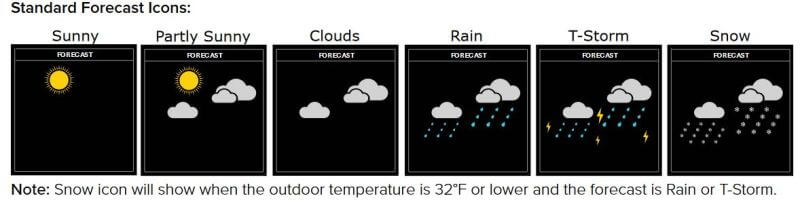
Since I have owned my forecast stations I love the way these weather stations now can give you a forecast for the next 12-24 hours and they use very cool and colorful icons to depict them for you.

Here is a picture of some of the icons they will show you in your local area weather forecast.


Standard Forecast Icons

One more word here on a favorite of mine. It is supplied with Wi-Fi access. You are able to access the La Crosse View App which is an easily installed, and easily used app for your mobile device.

I use my La Crosse View app many times in the day to easily see my local weather conditions. This adds to my ease of knowing the outside weather for my current and next few hours plans in my day.

All fun and very helpful for me.

How are all of the Sensors and Display Powered

PLEASE remember it is always recommended to use Lithium batteries for all outdoor sensors that you are using. Lithium handles the temperature weather condition that changes best for you.

They will give you the best and longest-lasting power.

Here is the list of your required needs for the V22-WRTH model.

  • 2-“C” batteries into the Wind speed sensor
  • 2-“AA” batteries into the Thermo-hygro sensor
  • 2-“AA” batteries into the Rain sensor
  • 2-“AAA” batteries into LTV-D1 bonus station. This is the small black and gray display that is provided as a BONUS
  • 5-volt power cord (required) into the V22-WRTH station display. So it’s 3-AA batteries for optional backup of your time and date. Please note that if you only use batteries in your display unit you will not be getting any automatic updating of sensor and Wi-Fi information. In order for constant updating to occur properly, it is a requirement to have your display powered in your home by the power cord. The batteries are used in the display only as a backup power supply in case of a power outage. Since this is inside normal alkaline batteries will be fine for use here.

Instrument Sensors

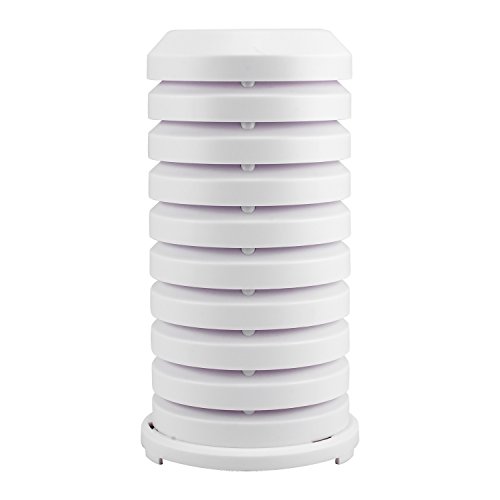
The sensors available on this model are the wind speed, and temperature, and relative humidity (the Thermo-hygro sensor).

The unit also has rain collection and measuring, basically in the form of a self-emptying rain gauge. Make sure you mount it at least 6 feet above the ground, and use the provided bubble level, to make sure it is mounted level. This is for the best possible results.

So you have three separate sensors you need to mount and locate.

Types of Transmission

All of the transmissions are wireless. The range is the usual up to 400 feet for good transmission results.

These results could vary widely depending on any obstacles or natural boundaries that exist between your sensors and the home-based display unit.

Things that I extensively talk about in this great article “What’s Involved in Weather Station Mounting-Getting the Most From Your Weather Station”

Display

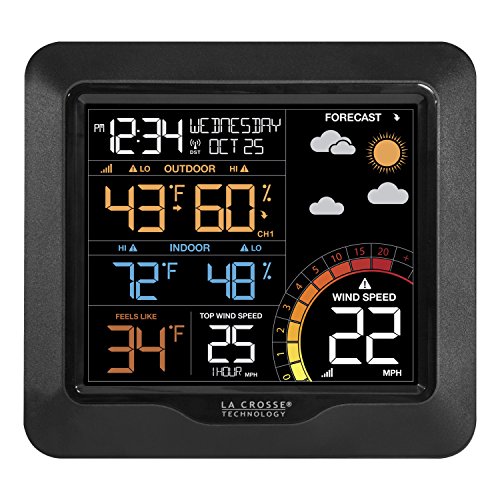
A brilliantly colored weather station display. The display has a high-low switch for adjusting the brightness of the screen for your viewing preferences.

The facing will display the following information for you to view. The settings are being constantly updated throughout the 24 hour period.

Here is what you can see on your display.

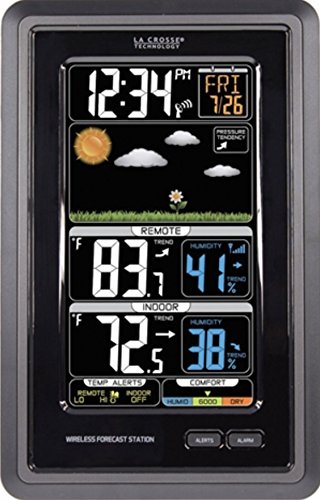
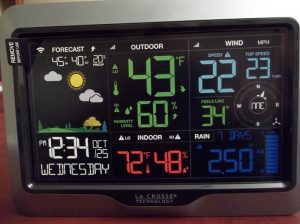
  • Across the bottom is your calendar info, such as day of the week, month, and date. The current time is featured as well.
  • Next, you can see the weather forecast icons for the next 12-24 hour period of time.
  • It will display the current temperature and relative humidity both outside and inside.
  • The center is where you will see the current wind speed and the top wind speed today. The amount of rain measured today will be listed prominently for you as well.
  • One more thing that can be seen is the current real feel temperature outside

Software

La Crosse has recently developed the La Crosse View App for you. It uses Wifi and connects all the pieces of your weather station together cohesively.

The App is free to you and can have added storage of history limits added to it by purchasing a monthly subscription for using the View App.

Dimensions & Mounting Needs

The large color display: 8.98″ L x 1.00″ W x 5.43″ H
The Thermo-hygro sensor or listed as LTV-TH2: 1.97″ L x 0.75″ W x 5.73″ H
The wind sensor listed as LTV-W1: 7.10″ L x 7.10″ W x 18.57″ H (with mounting bracket/pole)
The rain gauge sensor and collection unit is known by La Crosse as LTV-R2: 7.14″ L x 3.43″ W x 4.94″ H
The BONUS small-time/temperature and relative humidity display measures at 2.64” L x 1.32” W x 3.62” H

Pros

✅ You may use this whole unit of sensors and displays in two ways. Option one is as a free-standing weather station without any Wi-Fi app connections or you may use it to its full potential by using both displays in your house, in separate rooms of your choice, and then using all three outside sensors at three different locations as you desire. Then max out its usage by connecting everything together, by adding all sensors, and both displays to your La Crosse View App. This is a definite benefit from maximum usage.
✅ You are given the BONUS small display unit, for use in another indoor location
✅ Full-color display unit which is easily viewed from different angles, especially for night viewing

Cons

❌ The station comes with three separate sensors for the outdoors. So you will need to scout out the best location for the mounting. So you need to mount three sensors in three probably different locations. If you aren’t that handy you may find three installations, all though may be simple to some, to be a bother to you.

❌ The colored display while well lite and colorful, can only be seen legibly at only certain direct angles. This will need your attention in successfully setting up the best viewing for you.

Consumer Ratings

La Crosse V22-WRTH Weather StationLa Crosse V22-WRTH Weather StationLa Crosse V22-WRTH Weather StationSo I find with this weather station that the value is there. The ease of setup is presented to you and with these things in mind I would rate this a must purchase for the up-and-coming weather expert.

It is definitely more exciting and provides more options than the lower price ranged weather stations.

This one I rate as a great choice, for what I call the “Mildly More Than a Casual Observer” level of weather interest.

I believe this is a great learning tool and a solid stepping stone on your way to using weather instruments to better your daily life.

The La Crosse Technology V22-WRTH-INT is a worthwhile choice to look at if you are a mildly more than a casual observer of weather. Well, what do I mean by that?

Read More About Mid-Price Ranged Stations-View Related Posts Below

The La Crosse Technology V21-WTH
This is my look at a La Crosse weather station with wind speed.
The La Crosse V21-WRTH is talked about, and I discuss what it’s like to not have wind direction in your collected weather data
La Crosse V40-PRO Weather

The La Crosse V40 Pro Weather station is a complete weather instrument kit. After I opened It, I then walk you through the weather station from my personal view.

A NOAA Weather Alert Radio Is Important to Your Family

A NOAA Weather Alert Radio Is Easy to Use

An NOAA Weather Alert Radio is a great thing to have in your home. An NOAA weather alert radio is probably the type of alert radio you would best be served by.

I have seen that some people like to follow the weather as a hobby. However, many others do it out of necessity. It is so much better to be safe than sorry.

If this sounds like you, investigate NOAA weather alert radios. These radios provide owners with all NOAA weather alerts.

A Little Background on NOAA

Weather information starts with the National Oceanic and Atmospheric Administration, known as NOAA. NOAA is an arm of the U.S. Department of Commerce.

What is known as NOAA Weather Radio All Hazards or NOAA Weather Radio (NWR) is a national network of radio stations that work in conjunction with the government.

This national alert system works with authorities from all states down to the county levels of each state. This tying everyone together system alert network is making it your single source for comprehensive weather and emergency information.NOAA Weather Alert Radio
NWR has over a thousand transmitters that cover all fifty states, surrounding coastal waters, and the country’s territories.

NWR airs weather alerts in addition to emergency and hazard alerts. NOAA Weather Alerts are issued in a series of warnings, watches, and forecasts seven days a week, 24 hours a day.

A NOAA Weather Alert Radio Is Much More Than Weather

In addition to national weather service alerts, the network airs alerts about a variety of emergencies. These include earthquakes, oil spills, AMBER alerts, and terrorist attacks. To receive NOAA Weather Alerts, one must have a special radio.

I would like to suggest other great readings on the subject of alerts. Please go to these other resources

Using Weather Alerts

Check Your Local Weather-Some Suggestions From Us

Exactly, what is a NOAA weather alert radio? This radio receives all the information from NOAA weather alert stations. Experts insist that every home should have one. It is the best way to be prepared.
A weather radio can be programmed to stay silent until NOAA Weather Alerts are issued. In the event of an alert, the radio gives a warning tone followed by detailed information.
USING NWR SAME To Receive Alerts

SAME weather radios can be programmed to receive alerts that are only relevant to your area. SAME stands for “Specific Area Message Encoding” a system that is used by many different counties in many different states across the US. Special codes are written and are available to be set up by you in your NOAA Weather alert radio. Take a look at these downloadable codes at the NOAA SITE CODES.

Since much information may be gleaned from the NOAA website, you may go to this page How To Program NWR SAME Codes Into Your Receiver, to get all the direct scope on setting up these codes to be used by you locally.

Being Local with these is the key. Local information and local alerts are everything to you. Your family and you depend on correct and timely information to be possible life-saving to you.

Some examples of successfully built and popular selling NOAA Weather Alert Radios are the following two that I would recommend for covering your protection needs.

NOAA Weather Alert Radios Are A Must

In just general daily life observing, anywhere you live in the United States you see examples multiplied by many, reasons you should own an NOAA Weather Alert Radio.

Unfortunately, terrorist attacks and natural disasters are dominating the news. A weather radio can save lives in these troubling times. For example, a homeowner may be unaware there are tornadoes in the area unless they have a radio.

Residents with radio were warned about the recent terrorist attack in New York City. This information is useful for anyone who lives near the attack. Likewise, others will know to stay away from a dangerous area.

In the last couple of years, hurricane season was devastating for residents of Florida, Texas, South Carolina, North Carolina, the Pan Handle of Florida /Eastern Alabama, Puerto Rico, and the U.S. Virgin Islands as examples.

Owning a battery-operated weather radio protected many families during this time. Here are two great NOAA Weather Alert Radios to take an in-depth look at.

Midland-ER310 Emergency Crank NOAA Weather Alert Radio, AM/FM W/Multiple Power SourcesMidland-ER310 Emergency Crank NOAA Weather Alert Radio, AM/FM W/Multiple Power SourcesMidland-ER310 Emergency Crank NOAA Weather Alert Radio, AM/FM W/Multiple Power Sources

The Midland ER310 Features 3 emergency sustainable ways to keep it powered. It has a solar panel, a Hand Crank, and a rechargeable 2600mAh battery to power up with.

The solar panel will recharge the lithium batteries in it. The batteries will power the radio and can be recharged by electricity for normal powering up and usage.

These batteries will last up to 32 hours of use. You may also use the normal 6 AA batteries that are installed in it.

The ER310 is equipped with an EMERGENCY FLASHLIGHT-The SOS FLASHLIGHT BEACON flashes Morse code in an emergency scenario.

It also has a powerful beam for signaling for help.

Last but nowhere least is the ability to scan through 7 bands of broadcasts to pick up needed communications during emergencies.

NOAA Weather Alert will sound an alarm indicating that there is a risk of severe weather in your area. AM/FM radio is also available.


Midland Consumer Radio Weather Radio All Hazard Radio Gray (WR400)Midland Consumer Radio Weather Radio All Hazard Radio Gray (WR400)Midland Consumer Radio Weather Radio All Hazard Radio Gray (WR400)

This unit is a staple in the weather radio alert area of communication. Here are 5 points that need to be emphasized.

  • It has the ability to receive all available NOAA weather channels
  • It uses the S.A.M.E. Technology. Any of the Same Codes for local coverage may be programmed and set up to cover you where you live.
  • Many people like multiple purposed products. This is one of them. It is an AM/FM radio and it also can serve as an alarm clock and you can always get the current time from it.
  • It has 4 radio presets that can be used to increase your flexibility.
  • You may add and remove as many alerts as you need to cover you and your family.

Learn What The Information Means

Watches and warnings are broadcast based on weather information for a particular area. Basically, it means your area could be in store for a particular type of weather. Warnings are more serious than watches and residents should begin to take precautions.

  • Tornado Watches
  • Tornado Warnings
  • Hurricane Watches
  • Hurricane Warnings

These are just four examples of alerts you can receive on your Midland NOAA Weather Alert Radio

For example, go to an emergency shelter if there is a tornado warning. Further, a flash flood warning means moving to the higher ground temporarily.

Buying A Radio

NOAA weather radios are available in a variety of styles and in a wide range of prices. One of the most valuable features is having multiple power sources. If the electricity is out, the radio should operate by battery.

Radios are available that include flashlights, beacons, and other survival tools. Indeed, consumers can purchase a weather radio with a smartphone charger for less than fifty dollars.

Fifty dollars is a small investment for something to protect the family.Kaito KA500IP Voyager Solar/Dynamo AM/FM/SW NOAA Weather Radio with Alert and Cell Phone ChargerKaito KA500IP Voyager Solar/Dynamo AM/FM/SW NOAA Weather Radio with Alert and Cell Phone ChargerKaito KA500IP Voyager Solar/Dynamo AM/FM/SW NOAA Weather Radio with Alert and Cell Phone Charger

The Kaito-KA500IP NOAA Weather Alert Radio is powered in 5 different ways. YOU WILL NOT BE CAUGHT WITHOUT POWER!!!

Specially designed and engineered for emergency situations, the KA500IP offers different methods to power itself. Those methods include an AC/DC adapter (not included),

Also powered by three AA batteries (not included), a solar panel, the built-in rechargeable Ni-MH battery which can be recharged from the AC adapter, by hand crank, or by a PC.

**** A special extra that MOST LOVE- It comes with the ability to charge your cell phone through it.

It is a featured AM/FM/Shortwave radio with 7 pre-set NOAA weather channels with alert set capabilities.

The 180-degree adjustable solar panel is a unique weather radio feature. You will be able to capture solar energy in most situations.

It is also a 5-LED reading lamp and as a bonus, it has a back-lit frequency display

Read More About NOAA Weather Alerts And Weather Alerts-View Related Posts Below

NOAA Weather Alerts Can Protect Your Family
NOAA Radio Alerts can be very important to help you protect your family. The NOAA weather alerts will let you know when there are extremely important weather developments that could be very dangerous conditions to your family and your property as well.
Using Weather Alerts
A popular way to keep abreast of weather changes is using weather alerts. Weather updates or weather alerts can be set up on your computer or your mobile device. You may also set up numerous weather alerts on your personal weather station at home.

Extreme Whiteout Winter Weather Conditions-Driving in a Whiteout

Whiteout Winter Conditions Are Dangerous

As I write this today, it is January 19. The heart of the winter in Western New York. It is also winter in the Northern Hemisphere. We are experiencing firsthand, whiteout winter conditions.

Well if you live in southern states of the United States, or maybe the southwestern area of the United States, you may not even know what a whiteout winter weather is.[toc]

A whiteout is actually an extremely, quite harmful climate condition. Whiteouts take place in the cool, snowy regions of the world, consisting of the northern place of the lower 48 states of the United States as well as in Alaska.

Like I said maybe the areas I mentioned plus the state of Hawaii, may not know of whiteouts.

Conditions Where Whiteout Winter Weather May Exist

Whiteouts may take place in these various kinds of weather conditions. Please read carefully as these could help you out someday.

  • When there is actually a hefty snowstorm or a snowstorm accompanied by very strong winds, the snowfall comes down fast and furious. Sometimes it is snowing so hard that you can not see the road surface in front of you. I have had this literally happen to me many times.
  • A whiteout can occur when you have a condition where the snow is or at least it appears to be blowing directly straight at you. It will look to you like a thousand arrows have been shot directly at you at the same moment. You will have an extremely difficult time looking forward to that point when driving.
  • A TIP To Help You: I have always found great success on these occasions looking at the edge of the road on the outside. Which is to say the right-hand edge of the highway.
  • You end up slowing down very, very much in order to continue on your way to your destination. Otherwise, you would probably hit something, or go off the road. It can be an extremely tough driving situation.

Extreme Whiteout Winter Weather

  • There are times, that you can with virtual certainty, cannot find your hand in front of your face.
  • Whiteouts may additionally develop when there is actually no snow falling from the sky. The cloud cover can diffuse the illumination of the sunshine. Within this circumstance, a person can’t decipher or situate the area of the snowy property as well as distinguish the ground from the cloud cover. In other words, you will not be able to tell where the snow starts and where the snow ends literally. You are totally fooled by what you are not seeing in your mind’s eye.

3 Quick Tips For Driving In a Winter Whiteout

Here are 3 quick tips for handling the whiteout better, if you are out driving in one. Please remember these come up very suddenly and are not very pleasant to drive into.

Always be prepared. You should seriously consider these 3 tips when you are dealing with the winter weather.
Tip #1
Never ever be caught in a whiteout. You can try to plan out your life so you don’t need to even be out in the whiteout. Observe your weather.

Don’t ever take whiteout conditions too lightly, they are very serious

Be aware of your weather conditions daily. know what you are dealing with today. You could look into buying yourself a more inexpensive, good weather station that you may observe before you do anything. You may check out these two recommended readings from earlier posts I have written.

You can read La Crosse Technology 308-1412S Color LCD Wireless Weather Station Review and Using Weather Alerts for more information. Another good one would, if I may suggest Checking Your Local Weather-Some Suggestions From Us.

Tip #2
LED Pods Power Plus 2Pcs 7'' 144W LED Light BarLED Pods Power Plus 2Pcs 7” 144W LED Light BarLED Pods Power Plus 2Pcs 7'' 144W LED Light BarYou can look into having some fog lights installed on your vehicle. This isn’t essential but it most likely would help you out much with your visibility seeing in the shooting arrows of snowing and/or snow blowing as well.

This is a very good-looking and highly rated set of power LED fog lights, they are rated highly by satisfied customers.

These lights help prevent visual fatigue which will happen very quickly when driving in these conditions.

They deliver over 14,000 lumens and 144 watts of light to your visibility. it’s time to at least take a serious look.

Now this tip isn’t for everyone, but I am sure drivers in Colorado, New York, Wisconsin, Minnesota, North Dakota, South Dakota, Pennsylvania, Vermont, New Hampshire, Maine, Wyoming, Montana, and need I go on where you do experience whiteout very often during the winter season, this should be thought about and considered.

There are things not to hit, in certain states. You know things like Elk, Moose, and Deer, to name a few. So you will need to be able to see all obstacles.


Tip #3
LED Road Flares Emergency Lights - Roadside Warning Car Safety Flare KitLED Road Flares Emergency Lights – Roadside Warning Car Safety Flare KitLED Road Flares Emergency Lights - Roadside Warning Car Safety Flare Kit

So if you do have an accident, or you decide you can’t keep attempting to drive, you will need to STAND OUT or be seen in the whiteout conditions.

Your answer is to have a set of road flares with you, that can be seen. These flares will cut through the whiteout and help other drivers to see you and your vehicle pulled off the road.

Very important that you are seen and not hit. If you need to pull off the road, from visual fatigue, or your nerves are shot, then you need to consider a few things.

So you can consider how much your safety is worth to you? How much is your family’s safety worth to you?

  • These flares are extra special in the value they bring to you. They are super bright, crushproof, and rainproof (snowproof) as well.
  • A few extra bells and whistles would, 9 different flashing modes, 15 super-bright LEDs. 12 Amber and 3 white.
  • CRUSHPROOF & MAGNETIC: super-strong rare earth magnets will keep them secured to the side of your truck or RV
  • Also, they have a special tool (a key chain screwdriver) included to help you with changing the batteries quickly and EASY.
  • It comes with pre-installed “AAA” batteries. PLUS they are also included with a special bonus tool-a combo glass breaker and a seat belt cutter in case these are needed at the time of an accident.

You can rest with peace of mind, knowing you and your family are protected sitting on the side of a highway.


Take winter weather conditions seriously. Use your weather knowledge and your weather information provided to you by your weather station as a tool to help you figure out how to best live your life, and make the best winter weather decisions.

Some Miscellaneous Truths About Whiteout Weather

There are instances wherein the more northern polar locations it can be that massive mountain ranges that are actually covered with powder snow could be concealed under white cloud cover.

In these situations, an individual can’t distinguish the perspective from the slants of a mountain range in the entire snowy landscape. The only method to make the ground visible is to put a dark item on it.

During a whiteout, vehicle drivers cannot identify the road surface area against the snow-covered fields along the public highway. Thus it is quite typical that auto collisions are frequently happening during whiteouts.

Airplanes have actually crashed into the sides of hills during whiteouts. So you can see air travelers and motorists alike can find these conditions hazardous to their health.

Whiteouts threaten alpinists, skiers, and snowboarders as well. So these people show give respect to the possibility that whiteout may occur at any time.

Weather Station Mounting Pole Kit-How I Set Up My La Crosse V40-Pro

Setting Up A La Crosse Mounting Pole

I Mounted My La Crosse Technology Wireless Forecast Station

You have just purchased or received as a gift your very own personal weather station.

Using a weather station pole mounting kit was my first step.

So first what you will want to do is learn how it operates, read the instruction pamphlet, and then figure out how you will be setting up the sensor suite. 

This will then ensure that I successfully use my La Crosse Technology wireless weather station.

So installing a weather station pole mounting kit is a big step. I needed to figure out for myself, where I would be happy to set up my new La Crosse V40 Pro on my property.

You can read my other two posts on the Lacrosse V40 Pro Wireless Weather Station by going to the posts, The Unboxing of the La Crosse V-40-Pro Weather Station-a Remote Monitoring Station, and also my review of the La Crosse V40-PRO Weather-a Complete Weather Station Review.

These two articles will help you see how these three posts are a complete story on how to buy, and set up your very own, La Crosse Technology wireless weather station

Weather Station Pole Mounting Kit

So I went outside and did a walk around to look at everything and to decide where I would get the most out of my gift.

The Site Survey For the Mounting of a Personal Weather Station

I was looking for a location that would be more out in the open, and would not be out of distance for the transmission of information back to the display unit in my office in my home.

Here’s a list of checkpoints that I use for a mounting site survey.

  • No trees between the remote sensor and the receiver inside (the display is the receiver)
  • Location no more than 300 feet from the receiver. Rated at 400 feet, I want the best reception
  • Triplett remote sensor is out in the open. No trees and tree branches to impede collecting rainfall, or snowfall, and to get a good reading on wind speed and the wind direction
  • The Thermal-Hygro sensor must be either on the north side or out of the direct sunlight. The sun through prolonged periods of time will bake the sensor and cause its readings to be very unreliable
  • Should be at least 5 to 8 feet above the ground. This will ensure any rain splashback, and or animal interference. Also, lawn equipment and lawn related chemicals could interfere with the readings as well
  • The location should not be on the sun side, that would be the south, southwest, and west sides of a roof. Any excessive exposure to the sun would not be good. You don’t want to fry your temperature sensor.
  • The remote should not be set up on the other side of fences, or a shed, or a tree, etc. All of these scenarios would interfere with the transmission-reception signals. Do not make any transmissions have to go through a count of many barriers. The fewer the number of barriers the better.

Where I Decided To Set My Weather Station Pole Mounting Kit

I recorded three short videos as I walked my property to give you an idea of my mindset when doing my site walk-through for mounting my personal weather station.

I edited the three videos of my scouting tour into one three-minute video for you.

As you can see in the pictures, I believe I made a wise choice for mounting my La Crosse Technology wireless weather station.

So far a few days into the process, I am very pleased with all of the results of data being collected and transmitted to my cell phone as well as my office. I am really enjoying this so far.


What My Weather Station Pole Mounting Kit Is

So when I have done research online for a weather station mounting kit, I have found a specific kit to purchase.

What I have found is several different really interesting weather station mounting brackets, and you can choose a particular weather station mounting pole for your need as well.

So when I received this La Crosse wireless forecast station as a gift from my wife, I knew that this time I get to actually choose which weather station mounting pole I would buy.

CHANNEL MASTER Antenna Mast Steel Antenna Mast (5ft) (CM-1805)CHANNEL MASTER Antenna Mast Steel Antenna Mast (5ft) (CM-1805)CHANNEL MASTER Antenna Mast Steel Antenna Mast (5ft) (CM-1805)

My Decisions Were These Two Choices

1. The Mounting Pole
First I choose the CHANNEL MASTER Antenna Mast a Steel Antenna Mast, from Amazon.

I tried to purchase from a local hardware store such as Ace Hardware, and also tried local Best Buys, Home Depots, and Lowes.

None of these local large box stores has what I needed. So I looked no further. This is a great deal at the price I got it for.

One big thing that would like to point out is that the inside diameter of the bottom of the remote sensor suite needs to be measured out very carefully. The reason is that many of the TV antenna mast poles that are for sale are 1 1/2 inches in diameter or larger.

Find a pole that the sensor will set down over the top of and then you will be able to screw it onto the mounting pole. I didn’t find too many weather station mounting poles that were small enough for the La Crosse V40-Pro to be clamped tightly onto them.

Please measure the pole attachment on your sensor suite carefully. It is very important to match up the pole diameters, as one must be small enough to fit inside the other one.

The La Crosse remote sensor suite pole attachment needed a 1.3-inch diameter.

The Channel Master Mounting Pole is almost 5 feet long, it was the diameter I needed to set the remote sensor suite onto, and it is strong steel to withhold the high winds and cold we get at times.


Channel Master 3079 Antenna Mount Kit - 2 PackChannel Master 3079 Antenna Mount Kit – 2 PackChannel Master 3079 Antenna Mount Kit - 2 Pack

2. The Mounting Pole Brackets
For the weather station mounting brackets that I needed I purchased the Channel Master 3079 Antenna Mount Kit – 2 Pack. This I also purchased from Amazon.com again.

This was for the same reason as the purchase of the weather station mounting pole I mentioned I was purchasing as well. So my choices are these two products from online at Amazon.

These brackets are heavy-duty, they are very strong, and many people have used them to strongly hold and support their poles. I have found these brackets to be extremely easy to set up and to use.

Here is a collage of pictures to help you see how everything came together outside in my weather station mounting pole kit.

Weather Station Mounting Pole Brackets

La Crosse V40 Pro On A Mounting Pole

My Completed Weather Station Pole Mounting Kit

The process of using the brackets, and the weather station mounting pole was an easy process.

We (my son and I) needed to pre-drill a couple of holes for the Channel Master Antenna Brackets.

We used a level to make sure the bracket would be level once we screwed it into the peak of the wooden tool shed.

Next we had to screw the remote sensor suite down over the end of the Channel Master Mounting Pole, and once it was in place we used to screws to tighten the suite onto the top of the remote sensor unit.

The process was more time-consuming just getting the tools around that we needed than it was to actually do the work of setting it up.

Some Tips For You

  • I would recommend setting the weather station sensor suite onto the pole inside before you then take it outside to fasten it to the tool shed.
  • When set up you will need to have it level. Remember you will also need to have the rain gauge level with the ground.
  • You may use the small bubble level on top of the sensor suite to help you level it up. This is very important in the correct operation of the rain gauge.

Completed Pole Mounting Kit on Video

So I thought I would give you a completed project tour of what the finished use of a weather station mounting pole kit looks like. It was a learning experience as well as fun to do this project with my son.

I hope this helps you with using your personal weather station the best you can so that you will get as much enjoyment from yours as I am from mine.


Read More About The La Crosse V40-Pro-View Related Posts Below

The Unboxing of the La Crosse V-40-Pro
What will you find in the unboxing of the La Crosse V-40-Pro weather station is gone over step by step.
La Crosse V40-PRO Weather Review
A detailed list of features and Pro and Cons are provided. This review will give you a personal owner’s view of what I have found to be true for me

La Crosse V40-PRO Weather-a Complete Weather Station Review

La Crosse V40-PRO Weather Station

The La Crosse V40-Pro Weather a Personal Review

So I received the La Crosse V40-Pro weather station for a Christmas present. What a terrific gift!

It works out perfectly as I didn’t own this particular model from La Crosse. So it was exciting to get going with checking out all of its features.

With this model, I have found that there are several things that I personally get excited about.

I will bring all of these great things I like in the review as you read on.

La Crosse Scientific Technologies has hit a home run with this model.

La Crosse V40-PRO Weather

Features That Are Provided

This unit provides wind speed, wind direction, precipitation amounts, and a 12 and 24-hour future cast. I love the future forecast part of the display unit.

The display is a brilliantly colored display. It is very eye-catching, and easily seen both during the day as well as the night.

The remote monitoring weather station features wind, rain, indoor and outdoor temperature, and humidity data, daily high and low-temperature records, dynamic forecast icons, and a new Wi-Fi connected option. 

La Crosse View App
La Crosse View App

This option will allow you to see all of your sensor data in the new La Crosse View app.  I probably spent a total of ten minutes getting the app set up on my iOS phone.

I also probably spent 20-25 minutes, researching and setting up my weather station to Weather Underground. It is now giving the Weather Underground community constantly, updated weather data from where I live. You may see it by going to this link, George’s Weather Underground.

Please see the video on using the La Crosse View app below in the manufacturer’s support heading. The video explains very well how to set the app up.

 How Powered

  • Display:5.0-Volt 500mA  This power cord is and is a requirement to use with the entire system. The power cord is 70 inches long.  Optional 3 “AA” Alkaline batteries backup
  • LTV-TH3 Sensor: This sensor is a small temperature/humidity sensor. 2 “AA” alkaline batteries are needed.
  • LTV-WR1: This is the main large housing remote sensor, (the one with the rain gauge, the wind vane, and the anemometer), 3 “AA” Alkaline batteries. I would highly recommend Lithium batteries

Display For the La Crosse V40-Pro Weather

The display is a color display. It can be seen very well at most times of the day and night. However, if the sun is shining into your room, I have found it to be very hard to see the screen. Too much light you know!

However probably over 95% of the time, it is not very difficult to view and see everything displayed so nicely and clearly.

The display measures: 8.05″ L x 1.18″ W x 5.70″ H

The display sets upright and is supported by a very firm and easily moved leg support. The settings are along the backside of the entire length of the top of the display. All settings may be changed

Useful Tips

Be aware of two things that aren’t that obvious to a newer person. On the top of the larger remote sensor, the one with the rain gauge, please notice there are small engraved polar directions for North, South, East, and West marked for you to use.

There is also a small bubble level gauge for you so so may use it when setting up your rain gauge level as directed.

The screws for all of the setup are packed in the bottom of the display’s power cord box. The power cord is approximately 70 inches.

I believe when you plan to plug it into your power outlet, then plan to hang it loosely at probably 66 inches maximum distance.

You will be doing well if you plan that 66 inches are the length you are going to need to be under. Remember the display unit should have 3 “AA” batteries inserted in the back of it as a backup power supply.

La Crosse V40 Power cord
La Crosse V40 Pro Power Cord
Length of La Crosse V40 Power cord
Length of La Crosse V40 Power Cord Is 70″

Another tip pertaining to powering up is to be noted that the power cord area of attachment, is small and not seen easily at first glance.

So you will please notice on my provided picture where the cord attaches to the back of the display unit.

Types of Instruments & Sensors

La Crosse Technology V40-PRO-INT Color Wireless Wi-Fi Professional Weather StationLa Crosse Technology V40-PRO-INT Color Wireless Wi-Fi Professional Weather StationLa Crosse Technology V40-PRO-INT Color Wireless Wi-Fi Professional Weather StationThe type of instruments that are provided is the following. These are outdoor readings.

  • Rain gauge
  • Wind vane
  • An anemometer
  • Relative humidity sensor
  • Temperature sensor

These are all the instruments that collect data for you from your remote sensors outside where you live.
The sensors have the following dimensions. This will give you an idea of the size that they are.

  • LTV-TH3 (The three-member sensor, includes wind both vane and anemometer) and then other sensor measures: 1.97″ L x 0.75″ W x 5.73″ H
  • LTV-WR1 (the temperature and relative humidity) measures 13.61″ L x 5.14″ W x 8.55″H

The indoor readings provided for you are the temperature currently in the room where your display is as well as the relative humidity indoors.

It also gives you the current time, the date and month, what day of the week it is as well as, plus the current year.

Types of Transmission

The transmissions are wireless and the connections all use Wi-Fi.

  • Transmission range: Up to 400 feet (121 meters) in the open air
  • Transmission frequency: 915 MHz
  • My current personal range is at around 100 feet. I can vouch for it working well at that distance.

Software

The app will be sending constantly updated weather data to your mobile telephone, or i-pad etc. It will send you new weather data and this includes any alerts you have set up.

A note of worthy attention: Please be aware that the La Crosse View App is a limited 24-hour period for data and it stores a week’s worth of rolling data. 

If you are expecting to have access to a lot of history and data beyond a 24-hour period and a week’s worth of collected data, please beware of the fact that the View App will cost you some money per month for more historical data collection.

Please see my screenshot of the La Crosse View app page. You will see the current subscriptions that are available for purchase.

La Crosse View Subscription Costs

So here are a few things that the app will present to you. These are free to a point of time as I explained and showed you in the screenshot. 

  • Alerts that are available are indoor temperature alerts for both high reading and low reading. Ditto for inside relative humidity as well.
  • Also, I set up alerts for both outdoor high and low temps, and high and low relative humidity readings. If you are using alerts because you are a gardener or a farmer. Alerts can be very handy to have to prevent crop failure for you.
  • The app will also set up the time and date to National Institute of Standards and Technology times with a Wi-Fi connection.

Manufacturer Support

The latter part of this video covers setting up the La Crosse View App on your mobile device. In fact, I thought it covers how to set it up very well.


Setting Up Weather Underground
To set up the La Crosse V40 Pro to the weather underground website and community. You follow these great directions on this video from about the 7 minutes 30 second point and beyond. ⏬⏬⏬⏬

Good Luck, it is pretty easy to get your personal station set up to be working with the Weather Underground community.⏬⏬⏬⏬


Pros

✅ Time and Date-12/24 Hour Setting
Displays Day of the Week, Month, Date & Year
Perpetual Calendar: Date, Month, & Full Day

✅ Temp and relative humidity readings are very accurate.
✅ The forecast icons are very colorful and the seasonal trees’ background changes every 3 months to cover the four seasons. The forecast seems to be right in line with what is coming up. No discrepancies here on that.
✅ Color display screen
✅ 4 stages of brightness available on the display
✅ La Crosse View App made available free at a limited availability
✅ I could reset any setting by holding the button down 4 seconds. Convenient to remember

Cons

❌ Mounting pole not included. It does come with a shorter mounting bracket,

V40 Pro Mounting Extension

which may be used for limited mounting choices. But many consumers will have need a more extensive mounting pole to extend to greater heights for their mounting location.
❌ La Crosse View App more expansive coverage costs money
❌ Did not see the tiny pressed white N S E W symbols on the top of the remote sensor. You have to dig in the manual to see a mention of them.
❌ Hard to see the screen on the display at certain angles
❌ Hard to see the screen on display with sunshine coming into the room during the daylight and especially bright sunshine.
❌ The rain gauge is very touchy. For many customers, it has been a problem. It must be level when setting up. You will need to be very specific in following the directions for the gauge. They do have a piece of very thorough testing information on the rain gauge to help you out.

Consumer Ratings & Pricing

La Crosse Technology V40-PRO-INT Color Wireless Wi-Fi Professional Weather StationLa Crosse Technology V40-PRO-INT Color Wireless Wi-Fi Professional Weather StationLa Crosse Technology V40-PRO-INT Color Wireless Wi-Fi Professional Weather Station

This is the top end of the middle range for lower-priced value-added weather stations. Let me explain.

Many weather stations fall in the $35-$75 dollar range. These are what I would term value-priced, beginner weather stations. They are offered to beginners and lower interests but STILL Interested in, weather folks.

When you start out, you are “interested”, but probably not “$125-$200 interested” in weather. So you will spend the $35-$75 to get a value personal weather station, but the unit you buy will not be that expansive in the weather data it presents to you.

So as I look at the La Crosse V40-Pro Weather station I see a fairly priced, upper-ended value, personal weather station. I believe it would be very hard to come across any other weather station that will give you this many weather readings and data, from this price point.

As you check around I am sure that you will be hard-pressed to find the accuracy in the data provided and the number of sensors that provide that data at this low of a price.

In looking at what customers see, the majority of consumers have recognized the value for the price in owning the La Crosse V40-Pro Weather equipment. I have been impressed and am a proud owner of this station.

Other Reading on the La Crosse V40-Pro Weather Station
Remember you may check out my other page on what’s inside the box when you purchase the V40-Pro from La Crosse.

This article may be found at The Unboxing of the La Crosse V-40-Pro Weather Station-a Remote Monitoring Station.

Read More About The La Crosse V40-Pro-View Related Posts Below

The Unboxing of the La Crosse V-40-Pro
What will you find in the unboxing of the La Crosse V-40-Pro weather station is gone over step by step.
How I Set Up My La Crosse V40-Pro
Using a Weather Station Mounting Pole Kit is my quick story on how I set up my La Crosse V40-Pro weather station
« Previous Page
Next Page »

Amazon Affiliate Associate

We are a participant in the Amazon Services LLC Associates Program, an affiliate advertising program designed to provide a means for us to earn fees by linking to Amazon.com and affiliated sites.
Most of my posts do contain some affiliate links. I like to share weather gathering instruments and stations that may help you with your weather interests. These links do provide a small compensation to me that helps in the daily operating costs of this site.

Accessibility Statement | Affiliate Disclosure | Cookies Policy| Disclaimer | Privacy Policy | Sitemap | Terms and Conditions | © 2026 - George Loves Weather

We are using cookies to give you the best experience on our website.

You can find out more about which cookies we are using or switch them off in .

George Loves Weather
Powered by  GDPR Cookie Compliance
Privacy Overview

This website uses cookies so that we can provide you with the best user experience possible. Cookie information is stored in your browser and performs functions such as recognizing you when you return to our website and helping our team to understand which sections of the website you find most interesting and useful. Our Privacy Policy.

Strictly Necessary Cookies

Strictly Necessary Cookie should be enabled at all times so that we can save your preferences for cookie settings.

3rd Party Cookies

This website uses Google Analytics to collect anonymous information such as the number of visitors to the site, and the most popular pages.

Keeping this cookie enabled helps us to improve our website.