Update: The Davis Instruments 6163 Wireless Weather Station has been discontinued. Thank you for finding your way to this page, and thank you for your interest in Davis Instruments weather stations!
If you’re shopping today, I’d recommend moving up to the Wireless Vantage Pro2 weather station instead.
It’s the direct, updated successor to the 6163 I reviewed here — same reliable sensor suite, same accuracy Davis is known for, but paired with the newer WeatherLink Console.
Adding the WeatherLink Console is simple, and it gives you Wi-Fi connectivity plus access to the WeatherLink app and cloud data that the original 6163 console didn’t have.
I’ll be publishing a full review of the Vantage Pro2 soon — I’ll link it here as soon as it’s live.
In the meantime, you can check out the Wireless Vantage Pro2 with Standard Radiation Shield and WeatherLink Console below:
- Vantage Pro2 with WeatherLink Console — SKU 6252
- Vantage Pro2 with WeatherLink Console — SKU 6252M
Thanks again for stopping by—I hope this points you to the right station for your setup!
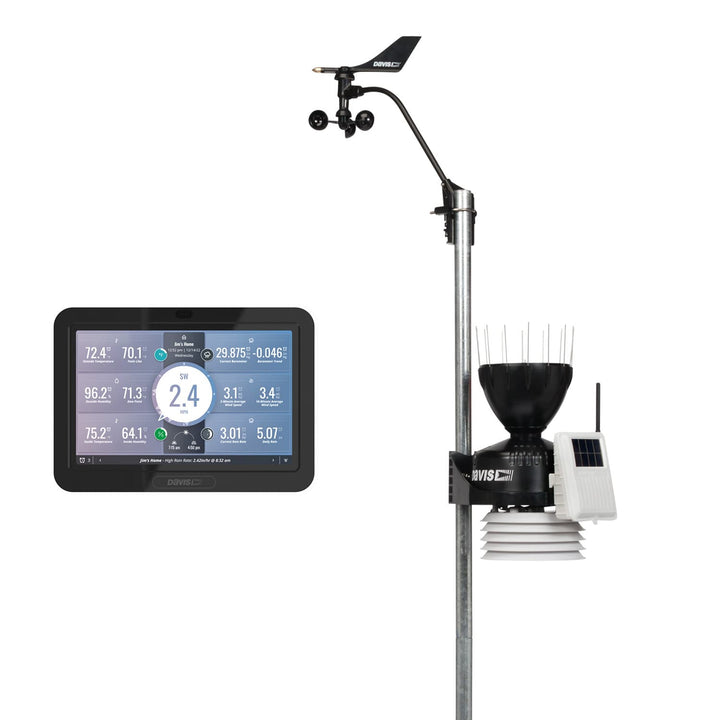

Where Is the Real Value in the Davis Instruments 6163 Wireless Weather Station
As I was preparing to take a look under the hood of this weather station, the Davis Instruments 6163 Wireless Weather Station, I was really pondering some key points.
- Point 1 would be, is a weather station worth that much more than another weather station? Is the value increase real or is it a perceived value difference to the new owner? Why would I pay over $1000 for a weather station compared to let’s just say a weather station costing you $139.95 currently on Amazon?
- Point 2 If the value does increase is it worth all the extra expense, the real expense that it is going to cost you.
- Point 3 So If the value is that much more for you then will you make the investment in yourself to obtain that markedly obvious added value.
Will you make the investment to the professional type of weather station you didn’t know you wanted but now after reading our detailed report on all that is there at your fingertips, then the investment will be very worthwhile for you to make.
“It is Exceptional Weather Equipment, You Won’t Be Disappointed!”
Display
So now let’s take a serious look at the display console that is used. This alone would be enough to convince me of the 6163’s real value. Then further along after we look at the console, many other areas are discussed and you can see for yourself just how professional this weather station unit is.
The model 6163 has a very interesting display console that is used by it, to present the weather data that its remote sensors are continuously gathering. Here are a couple of photos to help you understand better, what is presented and how the information is presented to you as well.
The following types of data are collected and displayed on the console for you, some are available on recall for you.
- Daily Data . . . . . . . . . . . . . Includes the earliest time of occurrence of highs and lows; period begins/ends at 12:00 am
- Monthly Data . . . . . . . . . . .the period begins/ends at 12:00 am on the first of the month
- Yearly Data . . . . . . . . . . the period begins/ends at 12:00 am on the first of January unless otherwise noted
- Current Display Data . . . . . . . . . Current display data describes the current reading for each weather variable. In most cases, the variable lists the most recently updated reading or calculation.
&
Davis Instruments 6163 Wireless Weather Station

The console also displays icons to show what your current weather outside is.
These icons are as follows. Weather forecast icons used are the sun, partly cloudy, clouds, rain, or snow.
The display will also take you through 8 Moon phases each lunar cycle.
The graphing part of the console is really cool. It will graph out for you all types of different weather data collections.
Some examples that Davis provides as a guideline for what you can do are as follows:
- Current Graph Data . . . . . . . . . . . . . . Current graph data appears in the right-most column in the console graph and represents the latest value within the last period on the graph; totals can be set or reset. Display intervals vary. Examples include: Instant, 15-min., and Hourly
- Reading; Daily, Monthly, High and Low Graph Time Interval . . . . . . . . . . . . .1 min., 10 min., 15 min., 1 hour, 1 day, 1 month, 1 year (user-selectable, availability depends upon variable selected)
- Graph Time Span . . . . . . . . . . . . . . . 24 Intervals + Current Interval (see Graph Intervals to determine time span)
- Graph Variable Span (Vertical Scale) . . . . . . . . . . . .Automatic (varies depending upon data range); Maximum and Minimum value in range appear in the ticker
Other features that can be viewed on the Davis display console are any of the following highlights. Some may intrigue you, others may not. But they all are possibilities for you and are provided by your Davis Instruments 6163 Wireless Weather Station.
So moving along to some need-to-know things about the Davis Instruments 6163 Wireless Weather Station.
The Davis Instruments 6163 Dimensions
- ISS sensor dimensions Vantage Pro2 with Fan-Aspirated Rad Shield . . . . . . 20.8″ x 9.4″ x 16.0″ (528 mm x 239 mm x 406 mm)
- Display Console Dimensions-Console with antenna down (L x H x D) is . . . . . . . . 10.625″ x 6.125″ x 1.625″ (270 mm x 156 mm x 41 mm)Console with antenna extended up (L x H x D) is . . . . . 10.625″ x 9.625″ x 1.625″ (270 mm x 245 mm x 41 mm)
Davis Instruments 6163 Wireless Weather Station Video
Transmission Information
- Wireless transmission-good for up to 1000 feet
- Transmission interval . . . . . . varies with transmitter ID code from 2.25 seconds (#1=shortest), to 3 seconds
- Update interval . . . . . . . . . varies with sensor
Instrument Sensors
The Integrated Sensor Suite(ISS) includes the following, instrument sensors that will measure the weather for you.
- Thermometer for Indoor temp reading
- Anemometer-a cup anemometer is supplied to record the wind speed
- Rain Gauge-for measured precipitation
- Outside temperature and humidity sensor
- Barometer-to provide the barometric pressure
Software
The software that is provided by Davis Instruments as add-ons are listed below for you. These are all accessory software packages that may be purchased. They too are listed below with some tips about the programs included below the list.
Also please go to our review on the Davis Instruments 6250 Vantage Vue Wireless Weather Station which may be FOUND HERE to read in more detail our section on these data logger software additions.
Yes, the software may be purchased and used with the Davis 6163. The constantly updated readouts will provide you with current weather conditions from your station’s remote sensor readings.
Davis makes available for separate purchase 8 different software products. Some of these are smaller features for sections of the sensor program but some are entire software packages for the entire weather station.
We list some suggestions to look at below for your research and purchasing ease. You can click on any of these links to get today’s special Low Price
Davis 6510Ser Weatherlink For Vantage Vue & Pro2 Series
Davis Instruments WeatherLink USB Software
Davis Instruments 6316 Wireless Weather Envoy
Davis WeatherLink 6550 Software Data Logger for Emergency Response Teams
Davis WeatherLink for Irrigation Control
Please realize that your weather data as it is accumulated is automatically saved to Davis’s web servers. This actually provides four times the storage that the data logger does.
If you wish to become part of the WeatherLink Network, then you can use the WeatherLinkIP data logger.
The WeatherLink Network is a collection of websites containing customer weather information that is stored on a server owned by Davis Instruments.
Here is some exciting news to tell you. Being part of the WeatherLink Network and having a site on WeatherLink.com means you are part of a community of weather enthusiasts who use the WeatherLink Network to view their own weather data.
All who are a part of this network share that weather data with friends and people across the world quickly and easily. This can bring a great deal of enjoyment and satisfaction to your hobby and work.
Manufacturer Support
Davis Instruments3465 Diablo AvenueHayward, California 94545-2778 U>S>A>
E-mail: info@davisnet.com
Site: www.davisnet.com
Phone for support (510) 732-9229
Fax: (510) 732-9188
How Powered
ISS(Integrated Sensor Suite) is powered by either the solar-powered or the battery backup
Battery (ISS SIM /Fan-Aspirated) . . . . . . . . . . . . . . . . . . . CR-123 3-Volt Lithium cell / 2 – 1.2 Volt NiMH C-cells
The console is powered by:
AC Power Adapter . . . . . . . . . . . 5 VDC, 300 mA, regulatedBatteries . . . . . . . . . . . . . . . . . . . 3 “C-cells”
Pros
Integrated Sensor Suite Includes a solar-powered aspirated fan
This wireless weather station has a transmission range up to 1000′
Come with an aspirated fan Has a UV radiation shield unit to guard and protect your temperature sensors from giving you incorrect readings
Many data controlling (data Loggers) may be added as accessories. As an example, you may add a soil moisture sensing unit to your Davis 6163
A customizable station with a wide range of options and sensors to help professionals and hobbyists measure, monitor, and manage weather data
Cons
Many features may be obtained only by purchasing extra programs.
They are not included in your original purchase.
The anemometer cups are plastic.
Some believe this can be a problem in how accurate the wind speed is recorded.
Please make sure you are receiving the new aero cone (the new cone rain gauge).
There are some additional weather instruments that you may add on as additional expenses
In Summation: My Feelings on the Davis Instrument 6163 Wireless Weather Station
After much study and reading, I have decided this weather station should be rated as a 4.5 Star rating.
In doing so I decided on this being a great entry point for someone who wants to jump up to the level of professional equipment.
Yes, I have decided the real value I talked about at the beginning of this article is indeed real value, not just perceived value.
With that in mind, I really think that there is really great value in owning this weather station.
In spending or as I would like to think (investing) in this weather equipment, I am setting myself up for the best weather experience, I have ever personally had.
I am not a trained meteorologist, but I get to be like a real meteorologist using this wonderfully built weather equipment.
So if you are a big fan of weather, or as I say, George Loves Weather (I Really Do), please take a serious look at the Davis Instruments 6163 Wireless Weather Station.
Davis Instruments Vantage Pro2: A Detailed Look at This Professional-Grade Weather Station
If you are serious about weather and want a personal weather station that goes well beyond basic temperature and rainfall readings, the Davis Instruments Vantage Pro2 deserves a very close look.
The Vantage Pro2 has been one of the best-known personal weather stations for serious weather observers for many years.
It's built to be rugged and gives detailed weather measurements.
It also offers flexible installation options.
On top of that, you can expand the system later with extra sensors and data-logging equipment.
This is not simply a weather station designed to tell you whether you need a jacket before heading outside.
It is a weather-monitoring system designed for people who want to collect, study, and use their own local weather data.
Davis describes the Vantage Pro2 as an industrial-grade weather station designed for demanding environments, and the current system continues to be offered in both wireless and cabled configurations.
Why the Davis Vantage Pro2 Gets So Much Attention
There are many personal weather stations available today, but the Vantage Pro2 occupies a different part of the market.
It is designed for the weather enthusiast who wants more detailed information and greater flexibility than a typical consumer weather station provides.
Depending on the configuration you choose, the Vantage Pro2 can measure:
- Outdoor temperature
- Outdoor humidity
- Barometric pressure
- Dew point
- Wind speed
- Wind direction
- Rainfall
- Rain rate
- Heat index
- Wind chill
- Historical weather information
- Solar radiation
- Ultraviolet radiation
The Vantage Pro2 can also be expanded with additional Davis sensors and transmitters, giving you the opportunity to build a more sophisticated local weather-monitoring system over time.
Davis says the system can accommodate up to seven additional special-purpose sensors or stations when used with the appropriate console or receiver configuration.
That expandability is one of the features I find particularly attractive about the Vantage Pro2.
Why Not Take a Deeper Look At the Davis Vantage Pro2?
Vantage Pro2 Wireless or Cabled?
One of the first decisions you will need to make is whether you want a wireless or cabled Vantage Pro2.
The wireless version uses a solar-powered transmitter with battery backup to send weather information from the sensor suite to the receiving console.
Davis specifies a transmission range of up to 1,000 feet (300 meters) line-of-sight under suitable conditions.
The cabled version connects the sensor suite using cable rather than radio transmission.
Why Choose Wireless?
A wireless Vantage Pro2 can make installation considerably easier because you don't have to run a long cable from your outdoor sensor suite back to the house.
It also gives you additional flexibility when deciding where to place the outdoor instruments.
Wireless transmission can be especially useful when the best location for your sensors is some distance away from your home.
Why Choose a Cabled System?
A cabled system may make sense if you prefer a direct physical connection between the sensor suite and your console.
Davis describes the cabled version as an economical installation option and notes that wireless can be advantageous where reducing the potential for lightning-related damage is important.
Your property and installation location should ultimately determine which configuration makes the most sense.
The Integrated Sensor Suite
The heart of the Vantage Pro2 is the Integrated Sensor Suite, commonly called the ISS.
The standard sensor suite brings several important weather instruments together in one outdoor system.
It includes:
- Temperature sensor
- Humidity sensor
- Rain collector
- Wind speed sensor
- Wind direction sensor
- Radiation shield
The temperature and humidity sensors are housed inside the radiation shield to help reduce the effects of direct solar heating on the measurements.
One of the most useful design features is that the anemometer can be separated from the remainder of the sensor suite.
That gives you considerably more flexibility when installing the station.
The Separate Anemometer Is a Major Advantage
Wind measurement can be one of the most difficult parts of installing a home weather station correctly.
Your wind sensor needs to be positioned where surrounding buildings, trees, fences, and other obstacles will interfere with the wind as little as possible.
The Vantage Pro2's anemometer can be installed separately from the main sensor suite.
Davis supplies a 40-foot (12-meter) cable for connecting the anemometer to the rest of the sensor suite, allowing you to place the wind instruments in a better location when your property requires it.
That is an important advantage over weather stations where all of the outdoor sensors are permanently mounted together.
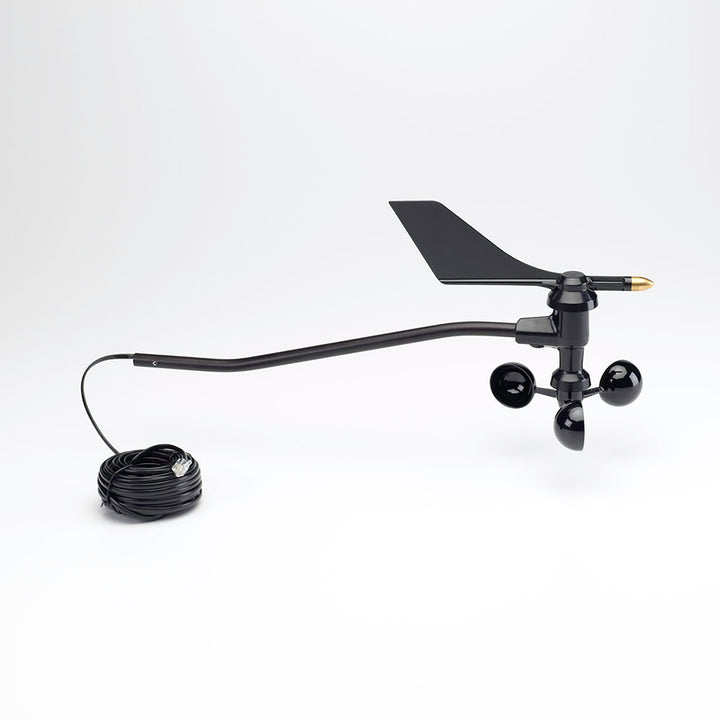
Vantage Pro2 and Wind Measurement
If wind is one of the reasons you are interested in buying a serious weather station, the Vantage Pro2 deserves special attention.
Davis says its traditional anemometer has been wind-tunnel tested to 200 mph (322 km/h).
It is designed to measure both wind speed and wind direction while remaining sensitive to lighter winds.
But there is an even more remarkable story associated with the Vantage Pro2.
The 199-MPH Hurricane Irma Wind Gust
During Hurricane Irma in September 2017, a Vantage Pro2 weather station on St. Barts survived the storm's front eyewall and recorded a 199-mph wind gust.
The station was located on a bluff on the north coast of St. Barthelemy and was mounted on a 21-foot pole.
According to Davis, the 199-mph measurement was the highest wind speed recorded by a personal weather station on the Weather Underground network at the time.
The station also recorded a minimum pressure of 916 mb as the eye passed over the island, matching the pressure recorded at St. Barts airport.
There is an important detail to this story: the station eventually was destroyed by the back eyewall of the hurricane.
That doesn't diminish the significance of the measurement.
Instead, it illustrates just how demanding the conditions were.
For someone shopping for a rugged personal weather station, this is certainly an impressive part of the Vantage Pro2's history.
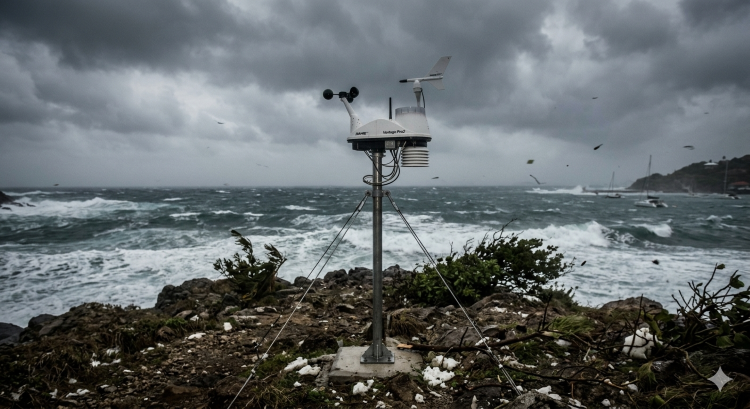
Davis Vantage Pro2 On St. Bart's Island
Vantage Pro2 Plus Adds Solar and UV Measurements
If you want more than the standard weather measurements, you can look at the Vantage Pro2 Plus.
The Plus configuration adds:
- Solar radiation measurement
- UV radiation measurement
These sensors are pre-installed on Plus models.
For the average homeowner, solar and UV measurements may not be essential.
For weather enthusiasts, gardeners, researchers, solar-energy enthusiasts, and people who simply want to collect more detailed environmental information, they can make the additional investment worthwhile.
How Quickly Does the Vantage Pro2 Update?
One of the strengths of the Vantage Pro2 is how frequently many measurements are updated.
Davis lists update intervals as fast as approximately 2.5 seconds for some weather measurements.
This is particularly useful when watching rapidly changing wind conditions.
The station provides frequent updates for wind speed and direction, while measurements such as temperature, humidity, solar radiation, and UV radiation update at different intervals.
The exact behavior can vary depending on the sensor, system configuration, and console being used, so I would not treat every measurement as updating at the same rate.
The Vantage Pro2 Console
The console is where the Vantage Pro2 really becomes a weather-information center.
Rather than displaying only the current temperature, the system can provide a large amount of information about what is happening outdoors.
Depending on the console and configuration, you can monitor current conditions, highs and lows, rainfall totals, wind information, barometric pressure, forecasts, historical information, and graphs.
Davis says its current Vantage Pro2 system can provide historical graphing for weather variables covering periods ranging from the previous 24 days to months and years without requiring a PC.
Classic Console or WeatherLink Console?
This is an important consideration when purchasing a Vantage Pro2 today.
Older Vantage Pro2 systems were commonly paired with the classic 6312 console.
Davis now also offers Vantage Pro2 configurations using its newer WeatherLink Console.
If you are purchasing a new station, I strongly recommend checking exactly which console is included rather than assuming every Vantage Pro2 package is the same.
Davis maintains separate specifications for classic-console systems and newer WeatherLink Console systems.
Connecting Your Vantage Pro2 to the Internet
A modern weather station is much more useful when you can access your information away from the physical console.
Davis provides several ways to move weather data from the Vantage Pro2 into digital systems.
One important option is WeatherLink Live.
WeatherLink Live can receive data from compatible wireless Vantage Pro2 systems and transmit the information to the WeatherLink cloud over Wi-Fi.
Davis says WeatherLink Live can receive information from multiple transmitting stations.
This will make it useful for people who want to expand beyond a single sensor suite.
There is an important compatibility issue to remember, however.
WeatherLink Live does not support a cabled Vantage Pro2 sensor suite.
Davis states that cabled systems require other compatible solutions, such as an appropriate USB data logger, Vantage Connect, or EnviroMonitor equipment.
That is exactly the kind of detail you want to understand before purchasing accessories.
What About Vantage Connect?
Another Davis option is Vantage Connect, which is designed to move weather information from a weather station to the internet without requiring the same type of traditional computer-based setup.
This is more of a specialized solution and may be more than the average homeowner needs.
If you are building a serious remote weather-monitoring installation, however, it is worth investigating.
Because Davis has changed and updated its product lineup over the years, I recommend checking the current Davis product and support pages before purchasing a Vantage Connect system or another older accessory.
Data Logging and WeatherLink
If collecting weather data is important to you, you should pay close attention to the data-logging options available for the particular Vantage Pro2 configuration you are considering.
Older Vantage Pro2 systems used accessories such as the WeatherLink USB Data Logger and other legacy data-loggers.
Some of these older products and connection methods are no longer the best choice for a new installation.
Davis currently provides support information for Vantage Pro2 data logging, WeatherLink, WeatherLink Live, and newer WeatherLink Console systems.
My recommendation is simple:
Don't purchase an older data logger simply because you find one available online.
First verify that it is compatible with the exact Vantage Pro2 console and configuration you are buying.
That can save you money and frustration.
Mounting the Vantage Pro2
There is another important expense that prospective buyers need to remember.
The mounting arrangement is not necessarily included with every Vantage Pro2 package.
You need to consider where you will mount the ISS and, separately, where you will position the anemometer.
The quality of the installation can have a major effect on the quality of the weather data.
For example, placing a wind sensor too close to a house, garage, trees, or other structures can produce wind readings that don't accurately represent the surrounding environment.
If you are spending this much money on a weather station, don't overlook the importance of proper siting.
Why Proper Weather Station Siting Matters
I consider this one of the most important topics for anyone purchasing a high-end weather station.
A very expensive weather station installed in a poor location can produce less useful information than a less expensive station installed correctly.
Pay particular attention to:
- Height above the ground
- Distance from buildings
- Nearby trees
- Obstructions affecting wind
- Exposure to direct sunlight
- Proper rain-gauge placement
- Accessibility for maintenance
- Local drainage and terrain
The Vantage Pro2 gives you considerable flexibility, but that flexibility puts some responsibility on the owner.
You need to take the time to install the instruments correctly.
Console Power and Backup Batteries
The console can be powered from an AC adapter, with batteries providing backup power.
If you are using a classic Vantage Pro2 console, check the exact specifications for your particular model because Davis has produced multiple console generations and configurations over the years.
This is another reason I recommend identifying the exact model number before ordering replacement parts or accessories.
Expandability: One of the Vantage Pro2's Biggest Strengths
For me, one of the most attractive things about the Vantage Pro2 is that you don't necessarily have to stop with the basic sensor suite.
Davis offers additional sensors and transmitting stations that can expand what your weather station can monitor.
Depending on the configuration, you can add equipment such as:
- Additional temperature sensors
- Humidity sensors
- Leaf wetness sensors
- Soil moisture sensors
- Solar radiation sensors
- UV sensors
- Additional transmitting stations
Davis specifically notes that a Vantage Pro2 console can receive data from one primary sensor suite while also supporting additional special-purpose sensors or stations within the system's limits.
This makes the Vantage Pro2 much more than a simple backyard thermometer.
Pros of the Davis Vantage Pro2
Pros
- Excellent reputation for durability
- Very extensive weather measurements
- Wireless and cabled configurations
- Separate anemometer provides installation flexibility
- Fast weather-data updates
- Expandable sensor system
- Optional solar and UV measurements
- Strong history of performance in severe weather
- Multiple ways to collect and access weather data
- Designed for serious weather enthusiasts
- Long-standing Davis support ecosystem
Cons of the Davis Vantage Pro2
Cons
- Considerably more expensive than basic consumer weather stations
- Additional sensors and accessories can become expensive
- Proper installation requires planning
- Mounting equipment may be an additional expense
- There are multiple generations of consoles and accessories, which can make compatibility confusing
- Some older data-loggers and accessories are discontinued
- It can be more weather station than the average homeowner actually needs
Who Should Buy a Davis Vantage Pro2?
I would not recommend the Vantage Pro2 simply because it is an expensive weather station.
The better question is: What do you want to do with your weather data?
If you simply want to know the temperature outside, there are much less expensive options.
But if you want to monitor wind, rainfall, humidity, temperature, barometric pressure, historical conditions, and other weather variables—and you want the ability to expand your system—the Vantage Pro2 becomes much more interesting.
I think it is particularly well suited for:
- Serious weather enthusiasts
- Homeowners who want detailed local weather data
- Amateur meteorologists
- Weather observers
- Gardeners and agricultural users
- People maintaining long-term weather records
- Users who want internet-connected weather data
- Anyone who wants a weather station they can expand over time
Is the Davis Vantage Pro2 Worth the Money?
This is where I think you need to look beyond the initial purchase price.
Yes, the Vantage Pro2 costs considerably more than many consumer weather stations.
But you are not simply buying a temperature sensor, rain gauge, and wind sensor.
You are buying into an expandable weather-monitoring system.
Davis has built the Vantage Pro2 around durability, flexibility, and detailed weather information.
The company says its weather stations undergo extensive testing and are engineered for demanding conditions, including winds up to 200 mph.
That does not mean every homeowner needs one.
Maybe you check the weather station every morning, watch the wind during a storm, or track rainfall totals.
Maybe you like comparing this year's weather to past years, or just want to know exactly what's happening in your own backyard.
If any of that sounds like you, the Vantage Pro2 starts to make a lot more sense.
My Take on the Davis Instruments Vantage Pro2
The Davis Instruments Vantage Pro2 is one of those weather stations that is difficult to evaluate simply by looking at its price.
It is definitely not the least expensive personal weather station you can buy.
That isn't really the point.
The attraction is the combination of rugged hardware, detailed measurements, installation flexibility, expandability, and a long history among serious weather observers.
The 199-mph wind gust recorded during Hurricane Irma certainly makes for an impressive story, but I think the larger reason to consider the Vantage Pro2 is its overall design.
It gives a serious weather enthusiast room to grow.
You can start with the basic sensor suite and later add equipment as your interests and needs change.
You can monitor your local conditions from the console, collect data, and connect your system to Davis's broader WeatherLink ecosystem.
For someone who is truly fascinated by weather, that flexibility can be worth paying for.

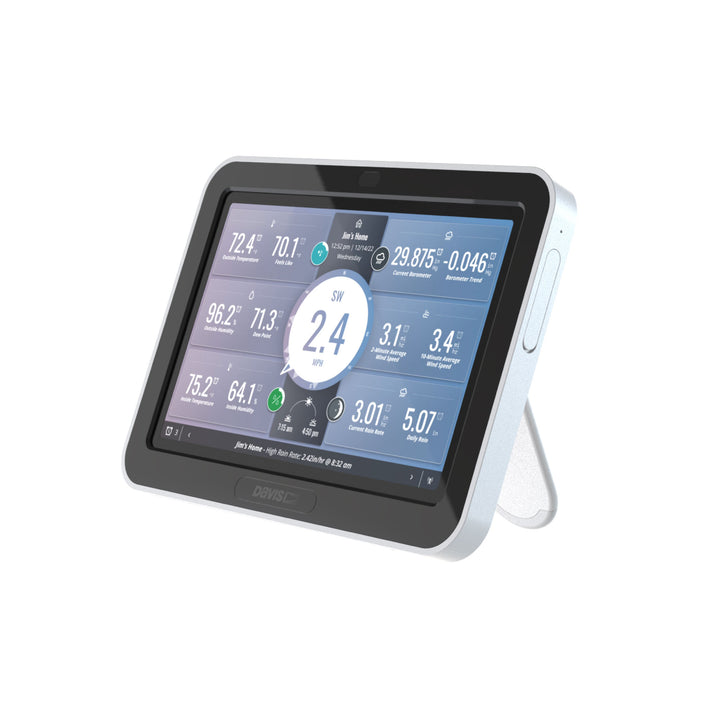
Before You Buy: Five Things I Would Check
Before ordering a Vantage Pro2, I would take a few minutes to answer these questions:
- Do I want wireless or cabled?
- Which console is included?
- Do I need the standard Vantage Pro2 or Vantage Pro2 Plus?
- Where will I install the ISS and anemometer?
- How do I want to collect and view my weather data?
Those five decisions can make a major difference in the system you ultimately purchase.
I would also check the current Davis compatibility information before buying any used or older accessory.
Final Thoughts
The Davis Instruments Vantage Pro2 has earned its reputation for a reason.
It combines the features that serious weather enthusiasts look for: accurate measurements, rugged construction, fast updates, expandability, and the ability to build a weather-monitoring system around your particular needs.
It may be more weather station than the average homeowner needs.
But if you are someone who wants to understand the weather around your home—not just glance at the temperature—the Vantage Pro2 is a system that deserves serious consideration.
For me, that is the real appeal of the Vantage Pro2.
It isn't simply a weather station.
It is a platform for becoming more involved with your local weather.
Davis Instruments Support and Resources
Davis maintains an extensive online support library containing manuals, specifications, installation diagrams, FAQs, and other documentation for the Vantage Pro2 family.
Before purchasing accessories, replacement parts, or older Vantage Pro2 equipment, I recommend checking the current Davis documentation to verify compatibility.
Official Davis Instruments Vantage Pro2:
Davis Instruments Vantage Pro2
Davis Instruments Support:
Davis Instruments Support Center
Vantage Pro2 Specifications:
Vantage Pro2 FAQs
Davis Vantage Pro2 Weather Station-6152 Reviewed


What’s a Davis Vantage Pro2 Weather Station Look Like?

If you are at the serious level of interest in a weather station, then you will be intrigued by the Davis Vantage Pro2 weather station.
It brings most of the professional level of weather equipment all into an enjoyable weather station package.
Some things that make the Vantage Pro series different than the other series of weather station the Vantage Vue series by Davis Instruments.
With the Vantage Vue the highlights are the instruments it presents to the user.
- Weather vane for wind direction
- Anemometer for wind speed
- Temperature and Relative humidity sensor
- Rain gauge
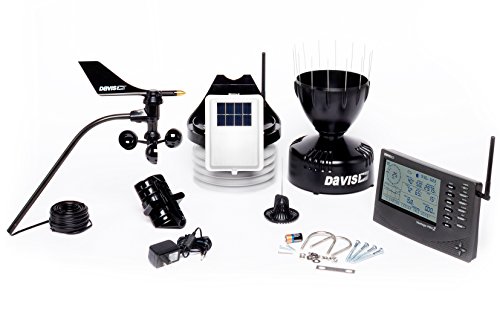
Then with the Vantage Pro2 the top-level professional level weather station you the user have the following presented to you. This is a review for the Davis 6152 wireless Vantage Pro2 weather station.
Here are the instruments we are looking at with this model. As you compare, you will see more instruments and more depth in the information.
- The wind vane for wind direction
- The anemometer for wind speed
- Temperature relative humidity sensor, this is covered with a heat shield
- Rain gauge-tippable rain gauge included with the new Bird Spikes
- A dew point sensor
- It has a solar panel to recharge the units battery power supply
As you can see what the two sets below, it’s the Davis Vantage Vue weather station vs the Davis 6152 Wireless Vantage Pro2 weather station. You can see what you will be receiving as an owner.

Company is Davis Instruments
We Recommend Buying From Amazon Via Davis Instruments. You May Go Here Now To See What We Are Talking About.
Price Range:
The price today on Amazon is a little bit over $500.00. This is a Davis listed price of $595.00 on the Davis Vantage Pro2 Weather Station. Today this would be a 15% discount if you purchased via Amazon.
If you are pricing the less expensive Davis Instruments Vantage Vue weather station, you will be able to price it out at today’s price by going here, Click Here for a closer look at the Vantage Vue.
The price does change sometimes without notice. Sometimes weekly even daily once in a while. So with that being said you need to check for yourself to see today’s price for you.
So Who Would This Be Best For?
This model would be a very good fit for a farmer, a large garden owner, a highly enthusiastic weather fan, or even a landscape business owner.
A snowplowing business, a nursery owner, etc. …. you know businesses and other people occupations that are similar to these examples.
This is professional-level equipment and would be well received by these folks.
An amateur weather person, probably wouldn’t get much from this weather station. They may not easily understand all of the great information it provides.
An Overview
It features a graphing of data. It can display for you up to 80 different graphed situations. These can be of time periods such as 24 hours, one week, one month, one year.
It can be of many situations that you find that are interesting to you. You can tailor-make what you would like to have graphed for you.
This is a very interesting feature. The other feature I would recommend to you is the ticker tape reading from along the bottom of the console.
It can read up to 100 messages to you.
Pros: Reasons to Purchase the Davis Vantage Pro2 Weather Station Model
-
- Use the included standard passive radiation shield to get excellent temperature data. This shield will ensure more accurate outside, daytime temperature readings.
6462 AeroCone w/Bird Spikes, Debris Screen
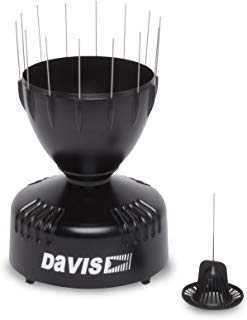
- You can retrofit your station with the optional Daytime Fan-Aspirated Radiation Shield for even better temperature data. This will only work during the daylight hours of your day.
- It is covered with 24-Hour fan‐aspirated temperature accuracy. It combines passive shielding with a solar‐powered fan that draws outside air in over the temperature and humidity sensors
- The aluminum-plated tipping bucket is self-emptying, corrosion resistant and laser-calibrated for exceptional accuracy.
Please note here that the tipping bucket will only start recording at the point that you have had two small buckets of rain collected and emptied.
- You are able to purchase either a cabled version or a wireless version of this weather station. Cabled is the cheapest way to go, but the wireless is the easiest way for installation
- No more bird problems! Check out the next spiked rain collector
 that is included in this model
 - uses a solar-powered transmitter with battery backup to keep your data flowing
- The Vantage Pro2 can be coupled with the Davis Instruments Vantage Vue. They will work hand in hand with each other.
The Vantage Pro2’s transmitters are radio-compatible with Vantage Vue, so you can mix and match components. You may like to add a Vantage Vue console to your Vantage Pro2 system
Cons Against Buying The Davis Instruments 6152 Vantage Pro2
- With the backlight turned on, the console will not be giving you a correct indoor temperature reading. Your reading will be higher than it really is.
- The leaf filter in ther rain gauge is too large. It allows random small pieces from nature to get into it. It gets plugged up to easily.
- It doesn’t have any USB connection
- Software that it is compliant with is older looking and outdated programs. Needs to be updated to modern, today’s applications.
- Doesn’t have an Atomic Clock
- The 5-in-1 sensor array is running entirely on solar power. Lower power source if you have many clouds daily in your climate.
- The console is hard to see under some conditions. Conditions such as the angle you are looking at it from.
- Can not change the screen contrast at all
Guarantee:
When purchasing from Amazon you are always able to purchase with the knowledge that you are getting top customer service. Service that is very hard to come by, often in our busy world today. Please check out the famous Amazon A-Z Guarantee purchase policy from our image.

Great Value Is Built Into A Davis Instruments Weather Station :
In my research on Amazon for this Davis 6152 Vantage Pro2 weather station, one certain thing was a common thread as I read hundreds of customer reviews.
The one thing that was very apparent was that a Davis weather station will last much longer on average than many models from its top competitors.
People talk of their past purchases lasting 10-12 years. This is really a stand out quality. Many other weather stations may last 5 years, but seldom is heard, the cry that I had my Weather Station for 10 years.
A remarkable testament to the Davis Instruments Company.
Read More About Davis Instruments Weather Stations-View Related Posts Below
 Davis Instruments Vantage Pro2 Plus Wireless Weather Station-a Review
Davis Instruments Vantage Pro2 Plus Wireless Weather Station is reviewed in great detail. This is a personal weather station that will please the more sophisticated weather fans. The Davis weather instruments supplied with this are very accurate instruments, producing the best results for you.
 Weather Stations For Farmers-You Can Use the Davis Instruments 6162
Weather stations for farmers is a post about using the Davis Instruments 6162 model of the Vantage Pro2. From This product Line By Davis is a great example of what to look for. It is a perfect compliment to running a great farm using a weather station.
Weather Stations For Farmers-You Can Use the Davis Instruments 6162

Use Davis Instruments Weather Stations For Farmers
Farmers today use many different technological developments to their advantage.
You can use weather stations from Davis Instruments to help you on your farm.
Advantages may be had, by using weather station instrument data gathering tools.
I have decided to talk to you about the Davis Instruments 6162 Vantage Pro2 Plus weather station.
Why the Davis Instruments 6162 Vantage Pro2 Plus You Ask?
This is a very good question from a farmer to me. Let’s dig in, and I will share my points with you.

With the 6162, you have access to near-professional-level weather readings. Areas where a farmer finds himself using weather information include the following measurements.
These readings can be supplied by agricultural weather stations made by Davis Instruments.
- Air temperature
- Rain or snow precipitation amounts
- The weather forecast
- The wind speed
- The wind direction
- Soil moisture content
So weather stations can help farmers with the tough job they do all year long. A weather station for farmers by Davis Instruments is their top line of Vantage Pro2 weather stations.
These stations help the most by providing rapidly updated weather readings from various weather instruments.
In looking at these measurements, what the farmer will be looking at the most are ways to increase his crop yield and then also ways to prevent any losses of any crops or animals.
I have discussed in detail the ways that farmers specifically use weather stations. I crafted the post titled How Weather Stations Help Farmers, which may be read by clicking on this link: farmers’ weather stations.
As you can see, once you have caught up on what the farmer needs to do, you may then understand why this weather station, the Davis Instruments 6162 Vantage Pro2 Plus, will work wonderfully for you as a farmer.
The 6162 Reviewed As One Of The Top Weather Stations For Farmers
Here is a list of the main features the 6162 will give you in return if you decide to purchase its use.
- Accurate weather data updates every 2.5 seconds
- Provides you with a 12-hour forecast with icons and a ticker-tape feature; 24- to 48-hour weather forecasting at the bottom of the console
- Provides the time of sunset and also the sunrise time and date of highs/lows and time and date of a graphed data point
- 3 times greater transmission distance than the competition. Improved transmission through multiple walls and greater immunity from RF interference
- A five-position trend arrow shows whether barometric pressure is rising, falling, or steady
- The normal console area shows outside temperature, humidity, and barometric pressure at all times
- The Umbrella icon appears when it is raining. View last 24 storm totals with start and end dates.View daily, monthly, and yearly rainfall totals
- It has a status indicator that lets you know all data packets are being received
- Ticker-tape messaging can display up to 100 messages
- It graphs the last 24 hours of readings. Over 80 graphs are available
- More than 70 alarms are available to be set up
- The compass rose shows 16 points and shows current and dominant wind direction
You Are Buying A Davis Instruments Weather Station Via Amazon
When you purchase from Amazon, you will be getting Amazon’s Satisfaction Guarantee. All of their features that millions of satisfied customers enjoy daily can be yours.
I have provided an image of the page from the Amazon.com site. Just click on the Image for a Much Larger View so that you may read the Amazon A-Z Guarantee.
Where the Price Range Is Generally
Over a period of time, the price range for the Vantage Pro2 has usually been over $900.00 to the current $1,160.00 on Davis Instruments own site.
So, as you can see, by buying through Amazon you can experience savings of up to 22%.
Typically, you can expect the savings range to vary a bit; no prices are guaranteed, as they change sometimes almost daily.
But one stable thing you do know is that when you purchase from Amazon, you usually will save money, and you might get Prime free shipping as well to come with your purchase.
So what do you have to lose by using Amazon as your buying source?
Who Is This Weather Station For
This weather station is built for serious weather people. Whether you are a serious weather fan, or you are a farmer, a horticulturist, or owner of a lawn care business, you will find the professional quality assurance built into the Davis Instruments products a large plus for your performance.
Use all the advantages of a good farmer’s weather forecast. It can give you great, up to minute-by-minute detailed readings to make your decisions easier.
You will find the decisions are easier to make when you are sure of certain weather factors from hour to hour. The ability to set up alerts for any number of sensor readings will help you tremendously.
Let’s say a quick example might be that you need to know when the sun comes up and when the sun goes down today. Next, you need to know if the sun is going to shine and when the max temperatures are happening, and then you are able to enter a field when it is the driest for the day.
You need to cut and condition a crop of alfalfa, let’s say. You can use the instruments to help you figure out your work performance for the day. The many sensors and the extra-long reception transmission help with where you are able to place a sensor and still be able to get an accurate reading that you can count on.
This is a top-level weather station and gives you much flexibility along with accurate readings. The history may be stored, so that you can use the data to study months, weeks, and certain time periods throughout the year.
You Can Add Additional Weather Sensors Too
You may attach additional sensors to this weather station. You can use your detailed knowledge of weather affecting agriculture, and you can see added features you can take advantage of.
Please use this list to help you out with the possibilities.
- Can retransmit to additional consoles up to 1000 feet
- Solar radiation: when an extra sensor is installed, it shows the highs for the day, month, and year, as well as temperature/humidity/sun/wind index, set alarms for high readings
- When an optional UV Sensor is installed, view the current UV Index. UV index for the day. The daily, monthly, and yearly highs. Or you can change the scale to UV, and then set an alarm to warn of high UV dose/index.
- The additional sensor will give you evapotranspiration rates
- UV Index, leaf wetness, wind chill, dew point, and two different heat indices
Value for money:
Davis Instruments 6162 Vantage Pro2 Plus Wireless Weather Station with UV SensorI believe that as a farmer, you are comfortable with the idea of spending money to help your farm and its effective production of food crops and animal harvesting or milking.
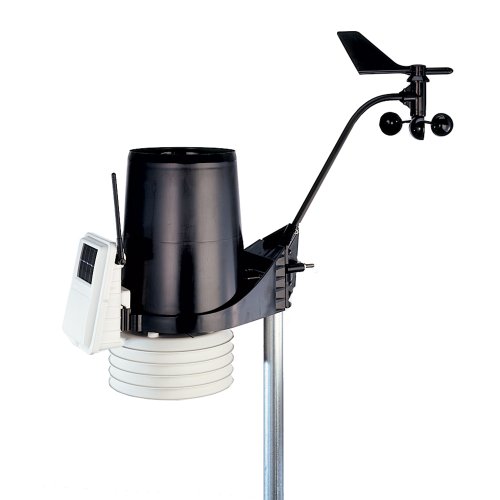
So you understand that you will need to invest in your business operation to keep your work at top efficiency.
I found this great article for you to read if you are considering investing in your own weather station for your farm. The article is titled, 6 tips to get started with on-farm weather stations.
This weather station will be able to handle all of the demands of running a farm better. You will be very pleased with a tool that you deserve to own and use in all of your chores in running your farm.
So if you are looking to buy this professional-level Davis Instruments weather station, you may click here to check out the current price for owning a Davis Instruments 6162 Vantage Pro2 Plus weather station.
My Top Suggested Accessory Item
6462 AeroCone w/Bird Spikes and Debris Screen With Davis LogoIn researching and studying questions and answers about this model weather station, and other Davis instrument stations, I came across the perfect additional purchase item to add to your weather station.
It is the 6462 AeroCone w/Bird Spikes and Debris Screen
This rain collector can reduce wind-induced errors. It is designed to produce a more aerodynamic path for the area around the rain collector.
This design will also improve the rain-collection data for you. Especially in high-wind situations.
It causes the rain to be able to settle into the collector cup instead of being blown over the cup and not being collected for measurement.
It is also designed to dramatically reduce the splash-out rate of the rain.
The new debris screen locks into place, ensuring that it remains in place during high winds and heavy rainfall events.
The AeroCone comes standard with 2017 and later Vantage Pro2 stations (not compatible with Vantage Vue).
It can also be used as an extra sensor, which you can add to your weather sensor collection instruments.
Read More About Davis Instruments Weather Stations-View Related Posts Below
 Davis Instruments Vantage Pro2 Plus Wireless Weather Station-a ReviewDavis Instruments Vantage Pro2 Plus Wireless Weather Station is reviewed in great detail.This is a personal weather station that will please the more sophisticated weather fans.The Davis weather instruments supplied with this are very accurate instruments, producing the best results for you.
 Davis Instruments 6250 Vantage Vue Wireless Weather Station ReviewThe Davis Instruments 6250 Vantage Vue is a professional-level personal weather station.It is reviewed here in great detail. And as a big fan of climatology and meteorology, I am excited to be doing a review. This is a highly respected weather station. The Davis Instruments 6250 Vantage Vue offers some of the best equipment options for the outside.
Davis Instruments 6250 Vantage Vue Wireless Weather Station Review
The Davis Instruments 6250 Vantage Vue Critically Looked At
As a big fan of climatology and meteorology, I am excited to be doing a review of a highly respected weather station.
The Davis Instruments 6250 Vantage Vue offers some of the best equipment options for the outside elements fan.
Not only is this unit filled with top-notch integrated sensors for collecting all types of climate data, but it is also extremely “down to earth” functional.
The user will find this unit to be perfect for providing all of the weather readings you would like to see.
The sensors provided are very professional-grade and owners report many years of uninterrupted service.
As one person put it these are serious weather instruments, not the toy-like ones you will get with cheaper alternatives available to be purchased.
Description of The Davis Instruments Vantage Vue 6250
The Davis Vantage Vue comes in different models. This family of station units includes the Vantage Pro2 Plus family, the Vantage Pro2 family, and the Vantage Vue Wireless family.
These are listed in the order of more expensive and more features to the least expensive and less featured models.
Plenty to choose from. We are reviewing the 6250 Vantage Vue, which is part of the Vantage Vue Wireless family.
These units are highly rated by purchasers for not only their numerous screen options but also because they are configurable. You get to choose what you are looking at when you check your console daily and hourly.
This is a much-admired situation and one of the biggest reasons for the large popularity in the market.
The Vantage Pro2 series is more intricate and can be found on other pages of our site. Here are some top features of the Vantage Vue. Let’s look at the console and what it offers.
In the current weather mode, the console screen looks like this with many different exciting modes featured. As you can see the following are examples of areas that are included.
- graph of a selected variable
- wind rose compass
- moon phase
- forecast icons
- alarm settings
Some more of the features on the console screen as we progress clockwise is the time & date
- sunrise/sunset times
- inside/outside temperatures
- Inside/outside humidity
as well as
- barometric air pressure & trend
- rain data & ET
- wind chill/dew point
- heat index
- Weather Center with additional information
Davis Instruments 6250 Vantage Vue Wireless Weather StationOne of the really neat things is how Davis Instruments uses weather icons to help you understand your weather situation.
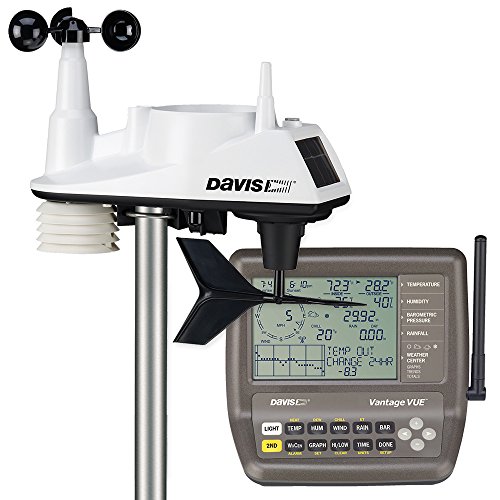
There are 5 weather forecasting icons listed. They are the following; Mostly Clear, Partly Clear, Mostly Cloudy, Rain, and Snow.
The Moon phases are broken down into the following 9 phases, New Moon, Waxing Crescent, First Quarter, Waxing Gibbous,
Full Moon, Waning Gibbous, Last Quarter, Waning Crescent, New Moon.
Please note that the moon phases icons used are for the Northern Hemisphere. If you are in the Southern Hemisphere the order of the icons is reversed.
Also please be aware of the use of the following icons on the console’s screen.
- Alarm Bell— appears when setting an alarm. Blinks on and off when an alarm is triggered. Up to 22 different alarms may be set.
- Graph— Indicates that graph mode is currently being displayed. Up to 50 graphs can be generated and viewed separately on the console screen.
- 2nd— Indicates that 2nd was pressed and all the alternate key functions (printed above or below each key) can be used. For a rather detailed explanation of the 2nd key please go to the 6250 Manual by clicking here, MANUAL (http://www.vantagevue.com/product_documents/weather/manuals/07395-260_GSG_06250.pdf ) Pages 7-12 will be where you can read about this. Very informative and a great toggle feature to use.
- Antenna—Displays the current status of the console’s reception. An antenna with waves indicates a signal from a station. An antenna with no waves indicates re-synchronization. No antenna means loss of signal.
- Arrow —Indicates the current variable selected or the variable currently being graphed if in graph mode.
- Umbrella—appears when it is currently raining
[toc]Below the console’s display is the brain/activity center. This is in the form of a keyboard/push-button area.
On the console’s keyboard, the buttons labeled, LIGHT, TEMP, HUM, RAIN, WIND, BAR, WxCEN (weather center), 2ND (toggling between, whenever you see “Press 2ND and Another Key:”) GRAPH, HI/LOW, TIME, DONE are the rest of the button descriptions.
Also, some other things are to be seen on the console.
- Time and Date: View the current time/date or the time of sunrise/sunset for today.
- Weather Center: provides additional information for each weather variable, such as daily highs and lows, temperature changes by the hour, and barometric value changes. Also displays astronomical data such as meteor showers.
- Barometer: This area shows a variety of positions that the trend arrow is currently. The current barometric pressure is seen as either rising, or falling, or it is currently stable.
- Temperature: you will see updates every 10 seconds for the outside temperature, and the inside temperature is updated every 60 seconds.
- Humidity: The outside humidity reading updates every 50 seconds while the inside humidity is updated every 60 seconds.
- Rain: The display console will show you updates every 25 seconds on rain rates, and rain totals for the last 25 hours, days, months.
- Wind Speed: See wind speed updates every 2.5 seconds. The wind speed is shown in miles/hour, meters/second, kilometers/hour, and knots.
We have found out that many buyers are absolutely thrilled with the timeliness of these updates. This seems to be an area of excitement that leads to many high praises in customer reviews. Provides the average and high wind speed for two-minute and ten-minute intervals.
All data is reported in US standards for your comfort of use. If you are from outside the US please be aware of this.
Type of Instruments
Provided instruments in the ISS (Integrated Sensor Suite)
- Thermometer
- Anemometer
- Rain Gauge
- Barometer
- Relative Humidity
The software can be integrated for data logging but does not come with the station’s purchase. This will be an additional purchase.
Instrument Sensors
The remote sensor unit is solar-powered with stored energy backup. The solar panel energizes the station during the day. The supercapacitor (Solar Power) provides power at night. Size C Lithium batteries are needed to provide the backup when needed.
Rain Collector: Self-emptying tipping spoon measures rain with 0.01-inch resolution.
Davis Instruments 6250 Vantage Vue Wireless Weather Station
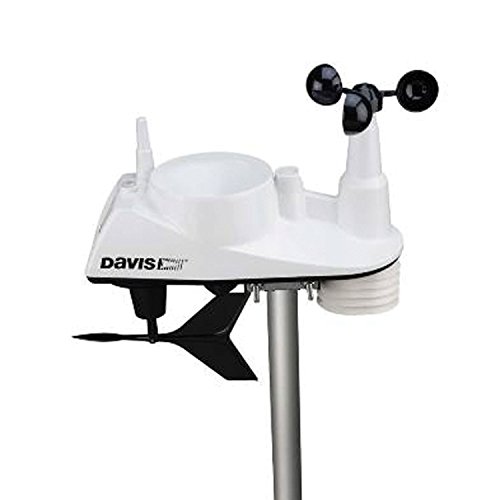
Anemometer: The Vantage Vue records wind speeds as low as 2 mph (3 km/h) and as high as 150 mph (241 km/h). Wind direction is measured in compass points or degrees. Temperature/Relative Humidity: Outside temperature readings from -40 to 150 degrees Fahrenheit (-40 to 65 degrees Celsius). The relative humidity is measured from 0 to 100 percent.
The following 4 areas are highlighted in the sensor housing/protection.
- Weather Proof Cover: is corrosion-resistant and extremely durable. Electronics are potted or over-molded for added moisture shielding.
- Radiation Shield: protects from solar radiation and other sources of radiated and reflected heat.
- Easy installation with included mounting hardware kit.
- A bubble level is provided which allows for more accurate installation and better data collection
Type of Transmission
Wireless: Frequency-hopping spread spectrum radio frequency from 902 to 928 MHz. This ensures consistent transmission up to 1,000 feet (300 m) from the integrated sensor suite to the console.
Updates start as quickly as every 2.5 seconds.
The manufacturer has done extensive testing and the equipment survived cyclic corrosion tests simulating wear in extreme weather environments.
You should also be aware that this unit’s transmission is excellent is compared to many other cheaper models on the market.
The U.S. version uses a U.S. radio frequency from 902 to 928 MHz. If the product transmits data via cellular connection, the included SIM is for use in the USA only and requires a U.S. Service Plan.
Display
Davis Instruments 6250 Vantage Vue Wireless Weather StationThe Davis Vantage Vue Console as a display console is Amber colored, and not as attractive as a colored screen would be.
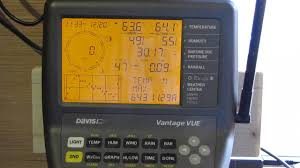
However we found the display’s console includes forecast icons, moon phases, sunrise/sunset times, graphing of weather trends, and many alarm settings.
It features an easy-to-read backlight, 3 by 4.375-inch LCD display with a glow-in-the-dark keypad.
All you need to do is press LIGHT to toggle between Backlight on• Backlight off
Here are some notes concerning the backlighting system.
If the console is running on AC power: the backlight will remain on until you turn it off.
If the console is running on battery power: the backlight will remain on as long as you continue pressing various keys. If you press any key while the light is on, it will stay on for 60 seconds. Otherwise, it will stay on for 15 seconds.
The backlight will not come on when battery power is low.
Software Choices For Vantage Vue 6250
Yes, the software may be purchased and used with the Vantage Vue 6250. The constantly updated readouts will provide you with current weather conditions from your station’s remote sensor readings.
Davis Instruments makes available for separate purchase 8 different software products. Some are smaller features for sections of the sensor program but some are entire software packages for the entire weather station.
We list some suggestions to look at below for your research and purchasing ease. You Can Click on any of these links to get today’s special Low Price
Davis 6510Ser Weatherlink For Vantage Vue & Pro2 Series
Davis Instruments WeatherLink USB Software
Davis Instruments 6316 Wireless Weather Envoy
Davis WeatherLink 6550 Software Data Logger for Emergency Response Teams
Davis WeatherLink for Irrigation Control
The software and data logger transfer your Vantage Pro or Vantage Pro2 Remote Sensor weather data to your computer, allowing you to create a permanent weather database.
You may also use a Weather Envoy with the Vantage Vue 6250. This will make it possible to send data logging directly to your computer, without the need for a console’s involvement.
So if you wanted to buy the remote sensor unit and use a Weather Envoy, you would not need to purchase the console. As an example, maybe you are just studying the data, or just interested in sending it to weather collection sites like Weather Underground.
Once stored in the database, your weather information can be used to generate a wide variety of reports and graphical displays. In addition, the WeatherLinkIP data logger automatically uploads your console
or Envoy information to a web server provided by Davis Instruments that lets you see your weather data via the Internet without having to set up your own web page.
Davis WeatherLink IP Software for Vantage Pro and Weather Envoy by Davis InstrumentsYour weather data is automatically saved to Davis’s web servers which provide four times the storage of the data logger.
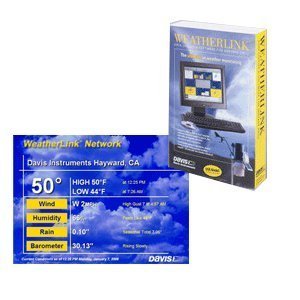
Using the WeatherLinkIP data logger lets you become part of the WeatherLink Network, a collection of websites containing customer weather information that is stored on a server owned by Davis Instruments.
Being part of the WeatherLink Network and having a site on WeatherLink.com means you are part of a community of weather enthusiasts who use the WeatherLink Network to view their weather data and share that weather data with friends and people across the world quickly and easily.
WeatherLink Software Features:
Here are just a few of a long list of the best features offered.
- Displays the current station data in a real-time “bulletin” on the computer.
- Allows you to set and clear data in the station’s console (time and date, highs and lows, alarm thresholds, calibration numbers, etc.) from the computer.
- Graphs archived climate data on an hourly, daily, weekly, monthly, or yearly basis.
- Generates Weather Watcher reports in the National Climatic Data Center (NOAA) format.
- Collects data from multiple climate stations on the same computer.
- APRS data protocol allows volunteers in the Citizen Weather Observer Program (CWOP) to send real-time weather data to the National Weather Service(NWS).
- Gives you multiple options for connecting to your WeatherLinkIP data logger.
- WeatherLink Data Logger Features
- Automatically sends data to Weatherlink.com without connection to a computer.
- Automatically uploads archive data to the Weatherlink.com website
Manufacturer/Support
Website: www.davisnet.com
3465 Diablo Ave., Hayward, CA 94545-2778 the USA
If you have any questions or encounter problems installing or operating your Vantage Vue weather station, please contact Davis Technical Support
(510) 732-7814 — Monday-Friday, 7:00 a.m.- 5:30 p.m. Pacific Time
Davis Instruments is unable to accept collect calls
(510) 670-0589— Technical Support Fax
support@davisnet.com— E-mail to Technical Support
info@davisnet.com— General e-mail.
Dimensions
Sensor unit dimensions: 12.95″ x 5.75″ x 13.40″ (329 mm x 146 mm x 340 mm)
Console display unit Dimensions: 7.5″ x 5.75″ x 4.5″ (190 mm x 146 mm x 114 mm) Mounted on the wall: 7.5″ x 7.0 ” x 3.0″ (190 mm x 178 mm x 76 mm) Display screen measurements: 4.13″ x 3.0″ (105 mm x 76 mm)
Data Logger’s dimensions
6.00″ Width,x 9.00″ Height x 1.63″ Depth (152 mm x 229 mm x 42 mm) weight is 9.0 oz.
How Powered
The ISS (Integrated Sensor Suite) is solar-powered with stored energy backup is a 3-volt button cell lithium battery. The Solar power stored up lasts well into the night.
The console is powered by Power AC 5 VDC, 300 mA
The console backup power is 3 “C-cell” batteries. A good idea is to have a set of batteries installed in the console just to make sure you always have the console operating, in case of power outages.
Pros
 It uses forecast icons that will tell you what to expect. Whether it is sunny, partly sunny, clouds, rain, or snow.

Provides a large variety of updated information every minute. The console has a wonderfully designed user-friendly keypad. It had domed buttons, that are easy to sense and press. The glow-in-the-dark keypad offers day and night usability. You can extend your transmissions up to an additional 1000 ft. Many graphs can be provided. You are able to see and study graphs for the last 25 hours, 25 days, or last few months. Up to 50 graphs may be viewed on your console and all may include temperature, rain, rain rate, wind, and barometric pressure. Updates are done all the time. If you like up-to-the-minute updates, you will get them with the Davis Vantage Venue 6250. One of the great advantages of owning. A “This Time Yesterday” feature is available. A data point is provided on a graph indicating the weather during the same time yesterday. This can be used to compare and analyze day-to-day weather trends. You are able to set up to 22 simultaneous, different alarms to warn of dangers such as high winds, freezing temperatures, rain rate, flood warning, and more. Moon Phases are presented: See the eight phases of the moon from new to full. Electronics are potted or over-molded for added moisture shielding. Highly recommended and quickly responsive customer service Found the manuals to be very fact-filled and contain very specific information. Much information to absorb.
Cons
 In order to connect with weather information gathering sites like Weather Underground you must make outside purchases of one of three available data loggers to use to communicate the information from your sensor station to the network. Console display screen is an amber color. This color is rather dated and can sometimes be hard to be seen from an angle. The manuals can be confusing in how they are organized. Lifetime use appears to be 5-6 years for most parts. At that point in time parts need to be replaced. This requires money, time, and effort to keep up.
Vantage View 6250 Consumer Rating
In my research, I found that the Vantage Vue 6250, is a definite set of scientific class instruments. The console provides a vast collection of bells and whistles to be enjoyed by the most dedicated weather station owner.
When rating this weather station I would give it a 4.4-star rating. The quality is here and with it are provided top-notch instrument readings.
I doubt whether this unit will disappoint. For the most serious of us climate fans, it has a great balance of data provided, accurate readings, and updates constantly being done. A Win, Win, Win for you the meteorology buff.
The Davis Instruments model 6250 is very popular for many reasons. The price is a bit more than a serious watcher would pay for. But as a serious watcher, it has everything I personally look for.
Probably the biggest thing is that with all of the information available, you will want to use graphing, data logging, etc. So I found myself excited about what it provides but you will probably, if you are like me, want to plan on the extra $150-200 purchase for software, so you will be able to take full advantage of the readings information.
Price
Davis Instruments 6250 Vantage Vue Wireless Weather StationThis is the lower class of the Davis instrument models but proves to be a definite step up from the hobbyist/casual weather observer to the manic, well studied intensely interested owner of a station unit. We believe after examining that it will be well worth the extra money spent.
If you are a casual observer, then this is way too much weather station for you. But if you love weather as I do, then this should be a perfect fit. The price is very fair in trade for the quality of instruments, and a large number of settings possible on the unit’s display console.
The complete station is a great buy. The service is there for you and the accuracy and shelf life are there as well.
Read More About Davis Instruments Weather Stations-View Related Posts Below
 Davis Instruments 6163 Wireless Weather StationThe Davis Instruments 6163 Wireless Weather Station is very close to a Pro Weather Station. It is so close to that I believe, you will be getting a professional weather station without paying the price for a professional weather station.Davis Instruments Vantage Pro2 Plus Wireless Weather Station-a ReviewDavis Instruments Vantage Pro2 Plus Wireless Weather Station is reviewed in great detail. This is a personal weather station that will please the more sophisticated weather fans.
My Review of La Crosse Digital Rain Gauge 724-1415BLV2
La Crosse Digital Rain Gauge 724-1415BLV2: Is It Worth It?
Whether you're a dedicated gardener trying to nail your watering schedule or a backyard weather enthusiast who loves tracking local conditions, a reliable rain gauge can make a real difference.
The La Crosse Digital Rain Gauge Model 724-1415BLV2 has been making waves in the home weather monitoring space — but is it the right pick for you? Let's break it all down.
First Impressions
Right out of the box, the La Crosse 724-1415BLV2 feels like a thoughtfully designed device.
It's compact enough to sit on a table or mount on a fence post, and the wireless display console gives it a clean, modern look.
Setup is mostly straightforward, though a small number of users have noted some initial difficulty syncing the outdoor sensor to the display unit — so don't panic if it takes a few minutes to get them talking to each other.
Once it's up and running, though, you'll quickly see why this gauge has earned a loyal following.
Here's my comprehensive review, comparing it with another La Crosse model: the La Crosse Digital Rain Gauge 724-1409V2.
The La Crosse 724-1415 Digital Rain Gauge is a device that measures and displays the amount of rainfall in a specific area.
What Makes It Stand Out
Comprehensive Rainfall Tracking
This is where the La Crosse 724-1415BLV2 really shines.
Rather than just showing you how much rain fell today, it gives you a detailed breakdown across multiple time intervals: 1 hour, 24 hours, 7 days, monthly, yearly, and a running total.
That kind of historical data is genuinely useful — whether you're trying to figure out if your lawn needs watering or just satisfying your inner weather nerd.
Measurements are displayed in both inches and millimeters, with a range of up to 6 inches, and the wireless console makes it easy to check your data from inside the house.
The Self-Emptying Rain Bucket
One of the standout features of this gauge is its self-emptying mechanism.
After each rainfall, the bucket automatically resets itself — no manually dumping water, no residual moisture skewing your next reading.
It's a small convenience that adds up to much more accurate long-term data. Traditional gauges require you to remember to empty them; this one just handles it for you.
That said, a few users have reported occasional issues with the bucket not emptying properly, usually due to debris or insects finding their way in.
A quick periodic check to make sure the mechanism is clear will go a long way toward keeping your readings accurate.
The "Days Without Rain" Feature
This one is surprisingly handy, especially for gardeners.
The gauge visually tracks consecutive dry days, giving you an at-a-glance indicator of how long it's been since meaningful rainfall.
If you're trying to decide whether to run the sprinklers, this little feature takes a lot of the guesswork out of it.
It's a simple idea, but it's the kind of thoughtful detail that makes daily use much more intuitive.
Customizable Rain Alerts
You can set specific rainfall thresholds to trigger notifications, which is great for flood-prone areas or for anyone who wants to stay on top of heavy rain events.
This feature also doubles as a helpful tool for irrigation planning — you can program alerts so you know exactly when nature has done the watering for you.
Flexible Power Options and Multilingual Display
The gauge runs on either batteries or USB power, which gives you flexibility in where and how you install it.
Battery mode works well for most situations, though there is one catch (more on that in a moment).
The display also supports English, French, and Spanish, which is a thoughtful touch for a broader range of users.
Excellent Simple Rain Gauges For Your Home


A Few Things to Keep in Mind
No product is perfect, and the La Crosse 724-1415BLV2 does have a few quirks worth knowing about before you buy.
Backlight Limitations on Battery Power
If you're running the unit on batteries alone, the backlight fades pretty quickly.
Checking the display at night can be a bit of a squint.
If nighttime readability is important to you, keeping it plugged into USB power is the better option.
Awkward Button Placement
The control buttons are located on the back of the display unit, which feels a little counterintuitive — especially if you've got it mounted on a wall.
It's not a dealbreaker, but it can be mildly frustrating when you're trying to navigate through settings or reset data.
No Data Export or Smart Home Integration
If you're hoping to connect this gauge to a platform like Weather Underground or pull data into a home automation system, you'll be disappointed.
The 724-1415BLV2 is a standalone device with no export capability.
For casual users, this is no big deal — but tech-savvy weather enthusiasts who want to share or analyze their data elsewhere may find this limiting.
Occasional Accuracy Variations
Some users have noted that their readings differ slightly from manual gauges.
This is relatively common with automated gauges and is often a calibration or placement issue rather than a flaw in the device itself.
Positioning your sensor away from overhanging trees, gutters, or structures that could deflect rainfall will help ensure the most accurate results possible.

La Crosse Digital Rain Gauge 724-1415BLV2
Who Is This Best For?
The La Crosse 724-1415BLV2 hits a sweet spot between functionality and affordability.
It's an excellent choice for:
- Home gardeners who want to track rainfall and optimize watering schedules
- Weather hobbyists who enjoy monitoring local precipitation patterns
- Homeowners in areas prone to heavy rain who want customizable alerts
- Anyone who wants reliable, detailed rainfall data without spending a fortune
If you need advanced data export features or smart home connectivity, you may want to look at higher-end options.
But for the vast majority of users, this gauge delivers exactly what it promises.
Final Verdict
The La Crosse Digital Rain Gauge Model 724-1415BLV2 is a well-rounded, user-friendly device that punches above its price point.
The self-emptying bucket, detailed historical tracking, and the clever "Days Without Rain" display make it genuinely useful in everyday life.
A few minor design quirks aside, it's a solid investment for anyone who wants to take their rainfall monitoring seriously — without overcomplicating things.
If you've been on the fence about upgrading from a basic manual gauge, this is a great place to start.

La Crosse Rain Gauges Manual