George Loves Weather

Have a Better Life By Using Weather Instruments

  • Mounting
  • Reviews
    • AcuRite
    • Ambient
    • Davis Instruments
    • La Crosse
  • Kids
  • Learning
  • About
    • All About George
    • About George Loves Weather
    • I Own and Develop George Loves Weather-My Background
  • Contact Us

Captivating Smart Home Tech Weather Stations: Improve Your Life

In today’s world, technology is making our lives more convenient and efficient. Smart Home Tech Weather Stations are a thing people are looking at to make their lives easier and more efficient.

Sensors from these smart home tech weather stations are providing, gardening, water leaks in the home warnings, and many other normal weather instrument readings to homeowners.

One of the most exciting advancements is the integration of smart home technology with personal weather stations.

Smart Home Tech Weather Stations

Smart Home Tech Weather Stations

This combination not only enhances comfort and convenience but also provides homeowners with hyper-local weather data that can improve forecasting accuracy.

In this article, we’ll explore how smart homes and weather stations work together, the benefits of this integration, and

how you can set up your own weather-aware smart home using smart home tech weather stations.

Smart Home Tech Weather Stations Involve New Technology To Give Better Daily Life Decisions

Comparisons between you and I might be miles apart. We could experience vast age differences.

Vast differences in life experiences, and vast differences in our working knowledge of smart home technologies.

You may be comfortable around what the smart home technologies are like and how they work.

I may be uncomfortable using smart home tech weather stations. Heck I may also be against using any smart home tech. WHY Do I need this, I say to myself.

I may even be upset about it enough, that I don't even dare to say what I really think and feel about it. My reason, I am against it is because it makes me feel unprepared to deal with all of the changes it requires to keep up.

So let us inform you and help to take care of being unprepared, Let's get you prepared as you grow and begin to use the home tech in your home.

The Rise of Smart Homes and Weather Stations

Smart homes have gained popularity due to their ability to automate and optimize daily tasks.

From smart thermostats that adjust temperatures based on your routine to intelligent lighting systems that respond to occupancy, these technologies improve both comfort and energy efficiency.

Similarly, personal weather stations have become increasingly sophisticated, offering real-time data on temperature, humidity, wind speed, precipitation, and more.

By integrating these weather stations with smart home devices, homeowners can create a seamless system that reacts to changes in the weather instantly.

Benefits of Integrating Weather Stations with Smart Homes

Smart Homes Integration

Smart Homes Integration

1. Improved Energy Efficiency

Smart thermostats, such as Nest or Ecobee, can use weather station data to adjust indoor temperatures accordingly.

If a sudden cold front moves in, the system can preemptively heat the home, saving energy and keeping residents comfortable.


ecobee Smart Thermostat Premium WTH Smart Sensor & Air Quality Monitorecobee Smart Thermostat Premium WTH Smart Sensor & Air Quality Monitorecobee Smart Thermostat Premium WTH Smart Sensor & Air Quality Monitorecobee Smart Thermostat Enhanced - Programmable Wifi Thermostatecobee Smart Thermostat Enhanced – Programmable Wifi Thermostatecobee Smart Thermostat Enhanced - Programmable Wifi Thermostat


2. Enhanced Safety and Preparedness

Severe weather events can pose significant risks, but a smart home integrated with a weather station can enhance preparedness.

For example, if high winds are detected, a smart system can automatically close motorized shutters to protect windows or secure outdoor furniture.

3. Optimized Irrigation Systems

Smart irrigation controllers can use local weather data to optimize watering schedules.

If your weather station detects rainfall, the system can prevent over watering, conserving water and reducing utility costs.

4. Increased Comfort and Convenience

Weather-sensitive automation can improve everyday comfort.

Smart blinds can adjust based on sunlight intensity to maintain indoor temperatures, and voice assistants can provide hyper-local forecasts using your own weather data.

5. Data-Driven Decision Making

With access to accurate, localized weather data, homeowners can make informed decisions.

Whether it’s planning outdoor activities, adjusting HVAC settings, or monitoring environmental conditions, this integration provides real-time insights.

Telephone Controls Smart Home

Telephone Controls Smart Home

How to Set Up a Weather-Aware Smart Home

Step 1: Choose a Personal Weather Station

When selecting a weather station, consider factors such as sensor accuracy, connectivity options (Wi-Fi, Bluetooth, or smart home hub integration), and expandability.

Popular brands include Davis Instruments, Ambient Weather, and Netatmo.

Step 2: Connect to a Smart Home Hub

To automate actions based on weather data, your weather station needs to communicate with your smart home system.

Platforms like
Amazon Alexa, Google Home, and Apple HomeKit offer compatibility with various weather stations.

Step 3: Integrate with Smart Devices

Link your weather station with smart thermostats, irrigation systems, lighting, and security devices. For instance:

- A smart thermostat can adjust heating/cooling based on real-time outdoor temperature readings.

- Smart sprinklers can delay watering if rain is detected.

- Motorized blinds can adjust automatically based on sunlight and temperature.

Step 4: Automate Weather-Based Actions

Use IFTTT (If This Then That) or built-in automation tools to create triggers and responses. Examples include:

- “If wind speed exceeds 25 mph, close the motorized shutters.”

- “If temperature drops below 40°F, turn on the smart heater.”

Step 5: Monitor and Optimize

-Regularly check your system’s performance and make adjustments to improve efficiency.

-Many smart home apps provide analytics to help refine automation rules.

Let’s Take a Closer Look At Some Platforms For a Smart Home

Apple HomeKit & Your Personal Weather Station: A Perfect Match

If you have a personal weather station, integrating it with Apple HomeKit can take your smart home automation to the next level!

With HomeKit-compatible weather sensors, you can monitor temperature, humidity, wind speed, and more—all from the Home app on your iPhone, iPad, or Mac.

Even better, you can create automations based on real-time weather data.

For example:
☁️ High humidity? Trigger your dehumidifier.
?️ Rising temperatures? Adjust your smart thermostat.
? Strong winds detected? Get alerts before heading outside.

With HomeKit’s secure and seamless integration, your personal weather data becomes a powerful tool for making your home smarter and more efficient.

Are you using HomeKit with your weather station?

Google Home & Your Personal Weather Station: Smarter Weather Monitoring

If you own a **personal weather station**, integrating it with **Google Home** and **Google Assistant** can make tracking and responding to weather changes easier than ever.

Google’s smart home ecosystem lets you access real-time weather data, automate home devices based on conditions, and control everything with just your voice.

How Google Home & Assistant Work with Weather Stations

Google Home acts as the central hub for your smart home, while Google Assistant is your voice-activated helper.

By linking a compatible weather station or weather sensor (such as Netatmo, Ambient Weather, or Ecowitt), you can ask Google for weather updates or trigger automations based on real-time conditions.

Ways to Use Google Home with Your Weather Station

✅ **Voice Commands for Instant Weather Data**
- “Hey Google, what’s the temperature outside?”
- “Hey Google, what’s the humidity level?”
- “Hey Google, is it raining right now?”

✅ **Smart Automations Based on Weather Conditions**

- **Outdoor Lighting**: Turn on smart lights when it gets cloudy or at sunset.
- **High Winds Alerts**: Get notified if wind speeds exceed a set threshold before heading outside.
- **Freeze Prevention**: If temperatures drop below freezing, activate smart plugs to power outdoor heaters or a greenhouse heater.
- **Rain & Irrigation Control**: If rain is detected, prevent your smart sprinkler system from turning on.

✅ **Custom Routines & Alerts**
With **Google Assistant routines**, you can create custom alerts and actions based on weather data.

For example, set up a morning routine where Google tells you the outdoor temperature, wind speed, and if any storms are approaching.

best smart home tech weather stations

best smart home tech weather stations

Why Use Google Home with Your Weather Station?

✔️ **Hands-Free Convenience** – Just ask Google for real-time weather conditions instead of checking an app.
✔️ **Smarter Home Automation** – Optimize heating, cooling, and lighting based on your local environment.
✔️ **Energy Savings** – Prevent unnecessary heating or cooling by using real-time weather insights.
✔️ **Improved Safety** – Get immediate alerts about extreme weather conditions in your area.

Get Started Today!

If you have a personal weather station and a Google Home device, start integrating them today to make your home smarter and more responsive to the weather.

Do you use Google Home with your personal weather station?

Is there a financial cost to having Google Home?

Yes, there can be some financial costs associated with **Google Home**, but it depends on how you use it. Here’s a breakdown:


Table of Contents
1
Smart Home Tech Weather Stations Involve New Technology To Give Better Daily Life Decisions
2
The Rise of Smart Homes and Weather Stations
3
Benefits of Integrating Weather Stations with Smart Homes
1. Improved Energy Efficiency
2. Enhanced Safety and Preparedness
3. Optimized Irrigation Systems
4. Increased Comfort and Convenience
5. Data-Driven Decision Making
4
How to Set Up a Weather-Aware Smart Home
Step 1: Choose a Personal Weather Station
Step 3: Integrate with Smart Devices
Step 4: Automate Weather-Based Actions
Step 5: Monitor and Optimize
Apple HomeKit & Your Personal Weather Station: A Perfect Match
5
Google Home & Your Personal Weather Station: Smarter Weather Monitoring
6
How Google Home & Assistant Work with Weather Stations
Ways to Use Google Home with Your Weather Station
Why Use Google Home with Your Weather Station?
7
Is Google Home Worth the Cost?
3. Weather Alerts & Safety
4. Compatibility with Other Smart Devices
5. Long-Term Investment
8
Future Trends in Smart Homes and Weather Technology
###References

1. Cost of Google Home Devices

To use **Google Home**, you’ll need a compatible smart speaker or display, such as:
- **Google Nest Mini** (~$50) – Entry-level smart speaker
- **Nest Audio** (~$100) – Better sound quality
- **Nest Hub** (~$100–$230) – Smart display with touchscreen
- **Nest Hub Max** (~$230) – Larger display with a camera for video calls

2. Cost of a Personal Weather Station

If you want to integrate your **personal weather station**, you may need a compatible device, such as:
- **Netatmo Weather Station** (~$150–$200)
- **Ambient Weather WS-2902** (~$180)
- **Ecowitt or Davis Instruments stations** (~$200–$500)

Some weather stations may require **a premium subscription** for cloud storage or advanced data analysis, but basic functionality is usually free.

3. Google Assistant & Smart Home Control

- **Google Assistant is free** to use, so you won’t pay anything for voice commands or smart home automation.
- Many **smart home devices (thermostats, lights, etc.)** require a one-time purchase but no monthly fees.

4. Optional Subscription Costs

While Google Home works without subscriptions, you may pay for:
- **Nest Aware ($8–$15/month)** – If you have Nest security cameras and want cloud storage for recordings.
- **Smart Home Services** – Some third-party smart home platforms (e.g., IFTTT Pro) may charge for advanced automation.

Bottom Line: Is There a Cost?

? **Basic Google Home features? Free!**
? **Buying smart speakers/displays? One-time cost.**
? **Personal weather station? One-time cost (plus optional subscriptions).**
? **Advanced features (Nest Aware, premium weather services)? Subscription fees may apply.

best smart home tech weather stations

Best Smart Home Tech Weather Stations

Is Google Home Worth the Cost?

Whether Google Home is worth the investment depends on your needs and how much you value smart home automation. Here are some key factors to consider:

1. Convenience & Hands-Free Control

Google Home allows you to control your personal weather station, smart thermostat, lights, and other devices with simple voice commands.

This can be particularly useful for weather enthusiasts who want real-time updates without opening an app.

2. Home Automation & Energy Savings

By integrating weather data into your smart home system, you can:
- **Automatically adjust heating & cooling** based on outdoor temperatures.
- **Save energy by controlling fans or humidifiers** only when needed.
- **Prevent frozen pipes** by triggering heaters when the temperature drops.

3. Weather Alerts & Safety

With Google Assistant routines, you can set up **automated weather alerts** for storms, strong winds, or freezing temperatures. This helps you **stay prepared and protect your home** from extreme weather conditions.

4. Compatibility with Other Smart Devices

Google Home supports thousands of smart home devices, from security cameras to irrigation systems. If you already own **Nest products, Philips Hue lights, or a smart thermostat**, adding Google Home can enhance your ecosystem.

5. Long-Term Investment

While there’s an initial cost for hardware, **Google Home does not require a monthly fee** for most basic features. This makes it a **cost-effective solution** for automating your home and integrating your weather station into your daily routine.

Final Thoughts: Is Google Home Right For You?

If you already have a personal weather station and want to use it to improve your home’s efficiency, comfort, and safety, **Google Home is a great investment**.

The **voice control, automation, and smart integrations** make it a valuable tool for weather enthusiasts and smart home users alike.

Are you using Google Home with your personal weather station? **Let us know how it’s working for you!**

Future Trends in Smart Homes and Weather Technology

The future of smart home-weather integration is promising, with advancements such as AI-driven forecasting, machine learning for energy efficiency, and enhanced IoT connectivity.

In the coming years, we may see homes that proactively adjust to extreme weather conditions without any manual input.

###References

1. Smith, J. (2024). "Best Smart Weather Stations for Home Automation." *Smart Home Reviews*. Retrieved from [www.smarthomereviews.com](https://www.smarthomereviews.com)
2. Google Nest. (2023). "Technical Specifications and Integration Guide for Nest Thermostat." *Google Home Documentation*. Retrieved from [support.google.com](https://support.google.com)
3. Davis Instruments. (2022). Case Study: How Smart Homes Use Personal Weather Stations for Energy Efficiency." *Davis Instruments Blog*. Retrieved from [www.davisinstruments.com](https://www.davisinstruments.com)
4. Ambient Weather. (2023). "Weather Data and IoT Connectivity in Smart Homes." *Tech White paper*. Retrieved from [www.ambientweather.com](https://www.ambientweather.com
 

George

Weather Enthusiast’s Journey

From an early age, I discovered the profound impact weather has on our lives.

A stormy day can disrupt your plans, while perfect weather feels like a precious gift meant to be savored to its fullest.

Through this site, I’m passionate about sharing my expertise on weather instruments and their practical applications for enhancing your daily life.

I’ll show you how a personal weather station can transform your home experience, giving you valuable insights about conditions on your specific property.

Explore my discoveries and gain the knowledge to truly understand the weather patterns in your area.

Welcome to a community where weather isn’t just small talk—it’s a fascinating science that connects us all.

A Guide For Purchasing a Wireless Home Weather Station-Top 10 Problems

Wireless Home Weather Station

Making a Decision on a Wireless Home Weather Station

Back before my personal first purchase of a wireless home weather station, I realized I didn’t know that much about a personal residential weather station.

So I Started With What I Did Know at That Time

  • I knew what a storm front was
  • I knew what a high-pressure system was
  • I knew what a low-pressure system was
  • I was sure that I wanted to buy a wireless home weather station because they looked so neat! Just all the benefits that were presented to me, were really cool.
  • I knew that I liked it when the weather changed, and I liked to keep track of weather forecasts

So with this keen interest in weather, I started my research into a personal residential weather station.

I could have a wireless home weather station at my personal home. This was a starting point for me.

I thoroughly enjoyed checking out all of the bells and whistles that were built into many great selections from industry brands such as La Crosse Scientific Technologies, AcuRite, Davis Instruments, Oregon Scientific Instruments, and Ambient to name a quick handful.

Features of a Weather Station That Caught My Eye

So as I continued with my searching, I saw very clearly that there were definitely features of a wireless home weather station, that all brands were offering.

Wireless Home Weather Station

With this in mind, I started zeroing in on a few of these features that so intrigued me.

Here’s a Short List of My Top 5 Features of a Home Weather Station

  1. The weather station I liked needs an Anemometer
  2. I really liked the colored screen on the display console
  3. I was wiped away by the future weather forecasts that are calculated for you. Most wireless home weather stations provide a 12-hour forecast
  4. I knew for sure that my personal weather station must be wireless for transmission and that if it could use Wi-Fi to use an app that would be even sweeter
  5. I love rain gauges. So I knew a rain gauge was a must-have for me

My searching lasted a while, and during my searches, I became much more comfortable and knowledgeable in understanding what I was looking at.

Over the last 2 years, I have become much more educated and can with ease share with you, how to best look at purchasing a residential weather station.

So without further adieu here’s my Top 10 list of what to look for.

My Top 10 Things To Be Aware Of When Purchasing a Wireless Home Weather Station

In my experiences with buying a color home weather station I have learned quite a bit about the good things, and some of the limitations with picking a good station for myself.

Here is my list of the top 10 things you need to know about buying a weather station. These are not in any order of importance.

You will need to make up your own decision on where your own priorities lie on these items.

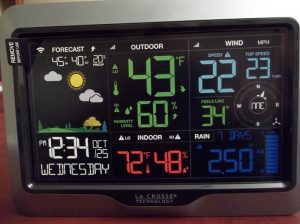
    1. The Display screen on your home console is a point where people have varied opinions on what they like. I found out that there really are two options that the bottom line really is important to the buyer. They are is the screen a real color screen? Or is it a black and white screen? Well actually I have found that the screen really isn’t black and white but rather a grey color. La Crosse Weather Station Display ConsoleWhen the backlight is on they are usually an amber color. Many customers prefer colored screens. The screen is really multi-colored, not a colored facing and it only makes the screen look colored. These types of screens, when viewed from the side or at any angles do not look colored at all. They only work when looked at straight on.
    2. The Accuracy of the Sensor Readings is Very Important

Some of the more inexpensive weather stations, sometimes do not have as great a range, nor do they present a long-range accuracy picture for you.

They don’t last very long. The accuracy can get tilted and inaccurate. The range of accuracy is usually supplied by the manufacturer.

Make sure you read customer reviews to see if people have had problems with the sensors remaining accurate over a period of time.

    1. The Backlight and Brightness on the Display Console Early on in my initial research phases, I was quick to realize that the backlight on the display console is a really big deal for most people. The problems apparently are outlined as follows. Most of these units have a power supply cord. Electrically powered. Most are backed up with battery power. The reason for this is that if the display is only powered by batteries, the backlight will only appear if a button is pushed. Then the screen will light up for only 10 seconds. So this allows you to read the screen, but only very quickly. With it being this way (with only battery power) the batteries will not last very long. If the backlight was on all the time the batteries would discharge quickly. So you will need to consider what way matters to you. The other thing is screen brightness. Most units have a very bright, mid-range brightness and dim setting. You may set which works best for you. Some people sleep in the room where their weather station console is set up, so brightness bothers them. Maybe the display may be set up where this brightness will not affect sleep for someone. All the models may be a little different, so be aware.
    2. Anemometers-the Material That They Are Built With and the Cup Size Conversion for Accurate Wind Speed
      As one of the biggies for weather sensors, I thought that having wind speed provided was very important to me.

I also felt that I would like an accurate wind sensor so that I have accurate wind speeds given to me.

I found out that not all anemometers are created equal. Some companies appear to give you a more accurate anemometer than some other ones.

The materials used would be plastic and metal. Each type of material may give you a very different accuracy range.

I checked the wind speed accuracy out closely, making sure I purchased a home weather station with a good anemometer.XXXX

The Actual Physical Size-Do I have Room For this read very carefully the dimensions of the following three things.

Number one is how small or large is the display console? Where am I going to keep this? Does it work well with my room?
Second, I need to know the actual size of the sensor unit, or the two sensor units.
This makes it easier, to effectively mount for the best instrument readings from the weather sensors.
Will I have room to wall mount the console or will I need to find a location where I can set it on the surface? I usually set mine up like a picture, standing up, and then I can angle it to get the best clarity for reading it. Third, where and how would I be able to actually mount this sensor suite or the group of sensors that were included with my residential weather station purchase. This does matter in the sense of I decided I wanted the best weather measurements possible. After a site survey, I would need to decide exactly where I could get the best possible readings from my equipment. I decided on a mounting pole, that I would need to mount my weather station from La Crosse.
Data Logging and Storage of Readings History
Another thing that I needed to learn about was how to store the data that the sensors are providing. I needed to figure out how each unit could store history.

And I guess I needed to answer this and if this was even important to me to have that ability. Some weather stations require extra purchases to actually connect as a bridge to your computer for data storage.

Please see the articles below that write about adding data logging, or connecting tools you can use with some weather stations.

Two such weather stations would be the AcuRite 01512 Pro Color Weather Station
and another station I reviewed was the
Davis Instruments 6250 Vantage Vue Wireless Weather Station

You can read these two reviews, to get an idea of what extra purchases would entail for a price, and you can read about them and what they will do for you.

In answer to this question, there are many different ways that the weather stations will have the ability to communicate with your personal computer.

Does It Have An Atomic Clock or Not
The atomic clock appears to be a big point for people. I would say you need to make sure that it has an atomic clock ability.

The reason for this is that the entire calendar function, you know the Time, Date, Year part of your console readings needs to be set with the world computer set time. Also many have automatic time changes that happen twice a year included.

This will ensure that it is always accurate, plus when the time changes in March and in October, then you are covered. Hassle-Free for you!
Snow Collects in the Rain Gauge Collection Tray

With many weather station owners living colder climate winters it has become increasingly more important than the rain gauge has a good track record on rain/precipitation collection and disposal.

This is very important to keep an accurate recording of rain, snow amounts properly. Any number of things can clog up the collection tray.

Things like, bird poop, flying seeds from local shedding trees, and then maybe also, leaves in the autumn getting stuck in the tray. This would cause it not to work anymore.

Please be aware of you need to keep the rain gauge free from debris, it can become a functioning problem, for the home weather station owner.

    1. How Well Does The Forecaster Program Perform

Many of the weather stations today are offering forecasts that are updated continuously by your weather station.

AcuRite 01512Pro Color Weather Station

The forecasts are calculated by using your local home weather station’s sensor readings to figure out a weather trending pattern for you.

“Fairweather is on the way”, or “It’s going to be raining”.

So you can have your very own weather forecast by looking at your display console and reading the forecaster display section.

These forecasts often use attractive colored weather icons

Forecast Weather Icons

to present you with what it thinks you will be experiencing in the next 12 hours.

Basically a local weather forecast for your location.

But how accurate is the forecast program? Many people are very happy with their results however, some people find this offering to be somewhat lacking according to their standards.

These local forecasters use some very colorful icons to highlight the upcoming weather conditions for your locality.

Most of these forecasters use the basic rising and lower barometric pressure, plus wind and temperature changes to give you what should be your 12-18 hour future weather conditions.

This is in a general sense obviously.

Be diligent in your research on the forecaster program you are looking at.

All three main manufactured choices for a home weather station offer the forecaster on their models. AcuRite, La Crosse, and Davis Instruments offer forecasters.

  1. How Well Does the Aspirating Fan Work

Checking out a weather station for the home can bring you another choice you may not be aware of. Many of the 5-in-1 sensor suites offer an aspirating fan with the sensor unit.

This fan is run by solar power and will be telling you it will be keeping the temperature reading at a realistic and accurate temperature reading.

You see, heat will build up in the sensor suite and cause the readings to trend towards reporting to you a false reading.

Not to your surprise, your outdoor temperature readings will transmit to you at inflated readings. Some aspirator fans reportedly work really well. Others, well maybe not?

You will need to decide on your own research, considering this matter.

My Summation on Buying a Residential Weather Station

I believe you can see, that buying a station from the many choices that many companies offer, can be a challenge.

I am sure if you read some of my reviews you will soon start understanding what all of these personal stations have to offer you.

Many of the home weather stations are very similar. Sometimes there are only one or two differences from another offered model.


Weather Interest George Loves Weather

You need to decide for yourself the following things. From this list, if you use the list, you will be successful in tracking down the best choice for you today.

  • You need to decide which company you trust the most for quality and performance
  • You need to figure out a price range you are comfortable with spending at this time
  • you will need to decide where your interest level is right now. I put together a little, simple info-graphic to help you decide where you are.

After you decide on these three things you can easily decide which personal weather station you are most comfortable with at this date.

Good Luck with your research, I sincerely hope that this article may help you out in purchasing your very own home weather station.

Read More About Buying Your Own Weather Station-View Related Posts Below

AcuRite Reviews
These are the detailed reviews of some of the best sellers from the AcuRite people.
La Crosse Reviews
If you are a new fan of weather, La Crosse weather stations would make a great entry place for you
George

Weather Enthusiast’s Journey

From an early age, I discovered the profound impact weather has on our lives.

A stormy day can disrupt your plans, while perfect weather feels like a precious gift meant to be savored to its fullest.

Through this site, I’m passionate about sharing my expertise on weather instruments and their practical applications for enhancing your daily life.

I’ll show you how a personal weather station can transform your home experience, giving you valuable insights about conditions on your specific property.

Explore my discoveries and gain the knowledge to truly understand the weather patterns in your area.

Welcome to a community where weather isn’t just small talk—it’s a fascinating science that connects us all.

Bluetooth Weather Station La Crosse Scientific Technologies #S87078

Bluetooth Weather Station

To Start the Review of the La Crosse Bluetooth Weather Station

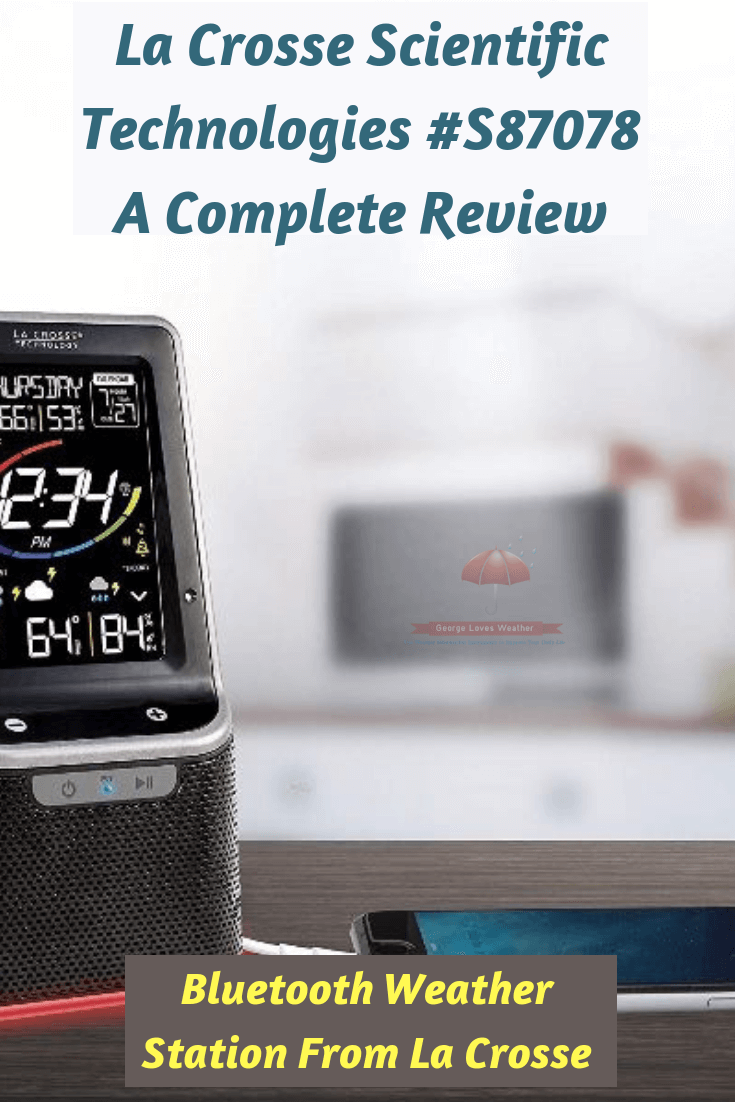
A very unique weather station choice can be yours if you choose the La Crosse S87078 Bluetooth Weather Station.

The weather station has three very different features that make it very attractive to a consumer.

I want to go over these three features with you now.

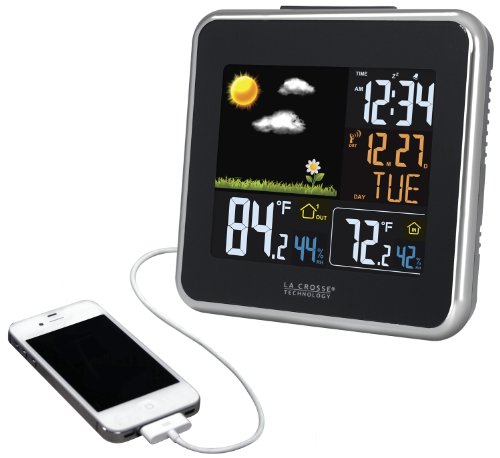
    • Feature 1  It has a USB Port for charging your I-phone or any mobile device. The charging port is a 1 amp charging port.
    • Feature 2  The Display screen is part of a Bluetooth speaker. This then makes it a Bluetooth weather station. You are able to play music from your mobile device through it.
    • Feature 3 It has a colored trim for the base. The trim is a LED trim that is very bright, colorful, and it is color-coordinated with the weather forecast that is predicted by trend indicators. The Trim LED actually has three settings on it.
      • 1 You can set your own preferred color
      • 2 It can be coordinated with the weather forecast
      • 3 It can be set on a loop of the seven colors and cycled through automatically from one color to the next

      Etc, Etc, Etc.

      How the Two Main Parts Are Powered

      Here are how the power is supplied to your La Crosse weather station with a Bluetooth speaker.

      Bluetooth Weather Station

      The display is powered by the supplied AC adapter. This is the main power source which is then backed up by using 3 “AAA” Alkaline batteries. The batteries are not included but must be purchased extra.

      The other part that needs power is the Thermo-Hygro Sensor. It will take 2 “AA” Alkaline batteries to power it up properly.

      I would recommend these batteries since they are used out of doors, they will need to be lithium batteries for longer life, due to outside weather conditions and temperature differences.

      Dimensions

      The following are for you to size up both the display units as well as the Thermo-Hygro sensor for their real size.

      • The display/Bluetooth speaker is: 4.61″ L x 2.85″ W x 8.33″ H
      • The Thermo-Hygro Sensor is measured at: 1.57″ L x 0.82″ W x 5.12″ H

      Instrument Sensor Ratings

      The display inside will show you all the sensor readings as currently collected. The display has indoor temperature and relative humidity readings that it will give you.

      • It will also display the outside current temperature and relative humidity to you. These outdoor readings are sensed and sent (transmitted up to 300 feet) to the display inside your home.
      • This outdoor sensor is the Thermo-Hygro sensor (part Id TX141TH-BV2) that is included in the La Crosse weather station with Bluetooth speaker purchase.
      • The relative humidity will be measured from 10% to 99%, and the temperatures indoors will be from 32 degrees F to 122 degrees F.
      • The outdoor temperature readings will be from -40 degrees F to 140 degrees F

      Display

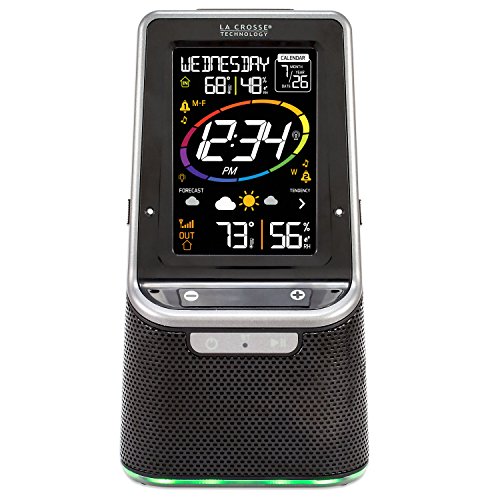
      As you move clockwise around the display’s featured information facing you have the Digital calendar information presented as well as both the indoor temp/relative humidity, and the outdoor temp and relative humidity.

      • The facing labels them as IN and OUT, so you will know which readings are from which location.
      • The large reading in the center is the time in whether 12 or 24-hour settings. Thus 12:24 pm or 13:24 for the 24-hour person.
      Display Face of La Crosse S87078 Bluetooth Speaker
      Display Face of La Crosse S87078 Bluetooth Speaker
      • Then we have near the bottom, the 12-hour weather forecast is presented with weather icons and an arrow is shown. The up arrow is pressure is raising (weather is getting better), or down arrow, the pressure is trending downward (bad weather coming) or an arrow points to the right which means the air pressure is holding steady. The weather is holding steady, without any changes as well.

      Pros

      ✅ You get to enjoy the Bluetooth-enabled speaker
      ✅ The dynamic color LCD with forecast icons and temperatures is fun to use
      ✅ It has dual alarms with 3 sound option
      ✅ Includes a USB charge port (the charging cord is not included)
      ✅ It has a color-changing LED trim on the base-stay entertained by the color-changing LED base light you can set to change based on the weather forecast, your choice of color, or a 7 color rotation (loop)
      ✅ The time is accurate as it is an atomic clock
      ✅ Can be used as an alarm clock
      ✅ Is highly functional as a trending weather forecast. It takes a little over 2 weeks to learn your locality, so it can supply you with an accurate weather forecast.

      Cons

      ❌ The display should be plugged into your electrical power source to avoid any interruption in sensor transmission
      ❌ Is not able to be connected to the La Crosse View app
      ❌ Can not be connected to a computer for data logging and storage
      ❌ Does not have a wind sensor
      ❌ Does not have a wind direction sensor
      ❌ Does not have a rain gauge

      In Summary, My Thoughts

      The La Crosse Weather Station with Bluetooth Speaker, model #S87078 is a very simple color wireless weather station.

Still yet from this simplicity, I learned that this is one of only a few Bluetooth weather stations for sale. This has two very hot features that attract people today.

The first is the Bluetooth speaker provides another choice source for winning with your mobility.

The second thing is that mobility is served again by the USB port for charging your mobile phone, i-pad, or other choices of mobility.

Mobility is king today. Keeping that in mind, this is and should be a winning combination, and a great way to introduce some of La Crosse’s best weather station features to the mobile crowd.

This does a good job of that. I like this choice or maybe you could choose from the one other La Crosse selection, which isn’t quite the same thing but does have the weather station USB port change station feature. You can go to either to get the USB charging port feature.

&

La Crosse Technology S87078 Wireless Weather Station w/ Bluetooth Speaker & USB PortLa Crosse Technology S87078 Wireless Weather Station w/ Bluetooth Speaker & USB PortLa Crosse Technology S87078 Wireless Weather Station w/ Bluetooth Speaker & USB PortLa Crosse Technology 308-146 Wireless Color Forecast Station w/ USB charging portLa Crosse Technology 308-146 Wireless Color Forecast Station w/ USB Charging PortLa Crosse Technology 308-146 Wireless Color Forecast Station w/ USB charging port

George

Weather Enthusiast’s Journey

From an early age, I discovered the profound impact weather has on our lives.

A stormy day can disrupt your plans, while perfect weather feels like a precious gift meant to be savored to its fullest.

Through this site, I’m passionate about sharing my expertise on weather instruments and their practical applications for enhancing your daily life.

I’ll show you how a personal weather station can transform your home experience, giving you valuable insights about conditions on your specific property.

Explore my discoveries and gain the knowledge to truly understand the weather patterns in your area.

Welcome to a community where weather isn’t just small talk—it’s a fascinating science that connects us all.

Amazon Affiliate Associate

We are a participant in the Amazon Services LLC Associates Program, an affiliate advertising program designed to provide a means for us to earn fees by linking to Amazon.com and affiliated sites.
Most of my posts do contain some affiliate links. I like to share weather gathering instruments and stations that may help you with your weather interests. These links do provide a small compensation to me that helps in the daily operating costs of this site.

Accessibility Statement | Affiliate Disclosure | Cookies Policy| Disclaimer | Privacy Policy | Sitemap | Terms and Conditions | © 2026 - George Loves Weather

We are using cookies to give you the best experience on our website.

You can find out more about which cookies we are using or switch them off in .

George Loves Weather
Powered by  GDPR Cookie Compliance
Privacy Overview

This website uses cookies so that we can provide you with the best user experience possible. Cookie information is stored in your browser and performs functions such as recognizing you when you return to our website and helping our team to understand which sections of the website you find most interesting and useful. Our Privacy Policy.

Strictly Necessary Cookies

Strictly Necessary Cookie should be enabled at all times so that we can save your preferences for cookie settings.

3rd Party Cookies

This website uses Google Analytics to collect anonymous information such as the number of visitors to the site, and the most popular pages.

Keeping this cookie enabled helps us to improve our website.