George Loves Weather

Have a Better Life By Using Weather Instruments

  • Mounting
  • Reviews
    • AcuRite
    • Ambient
    • Davis Instruments
    • La Crosse
  • Kids
  • Learning
  • About
    • All About George
    • About George Loves Weather
    • I Own and Develop George Loves Weather-My Background
  • Contact Us

AcuRite 01301 Pro 3-in-1 Color Station|An Updated Review

AcuRite 00622 Pro Color Weather Station

The AcuRite 01301 Pro 3-in-1 Color Station Replaced by New AcuRite 00622 Pro Color Weather Station

In updating our post today it is very apparent that the AcuRite 01301 Pro 3-in-1 color station that this review is written for isn’t available any more at this time.

It has been updated to the AcuRite 00622 model, which is available for purchase now.

The new AcuRite appears to be doing very well in sales on Amazon. It is highly rated and picks up where the older model left off.

Customers are still raving about the awesome colored screen on the display, and they also still like the ease with which the unit is set up.

The same annoyance is still there the screen is reportedly still difficult to read from a distance especially reading it from an angle is very difficult.

You can take a closer look at the AcuRite 00622 Pro by going to the sales page to examine it closely.

You will see that it is close to the same unit we have reviewed here but with a newer model number.

Let’s Look at the Original Review

As a big fan of the four seasons, we experience annually, I am also a fan of watching things daily on a very up-close scale. To do this properly you will need some measuring tools, to keep track of things for you.

I was doing some more searching for station choices, that’s how this review came about, here’s what I found.

The AcuRite 01301 Pro Color Weather Station is exciting and easy to use. It provides temperature changes, and relative humidity changes as well as measures and records the wind speed in your area.

So you have the basic tools at your disposal to start tracking daily any outdoor changes in whether you will be living with them. It will become a fun trip, and also an educational one.

This model from AcuRite is the perfect collector of data for the beginner or the amateur weather watcher.

If you just need something for you to look at quickly, and have a very general idea of what it is like outside today then this will provide the necessary information for you.

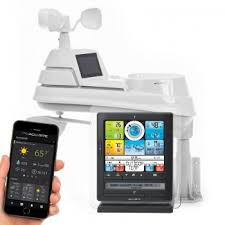
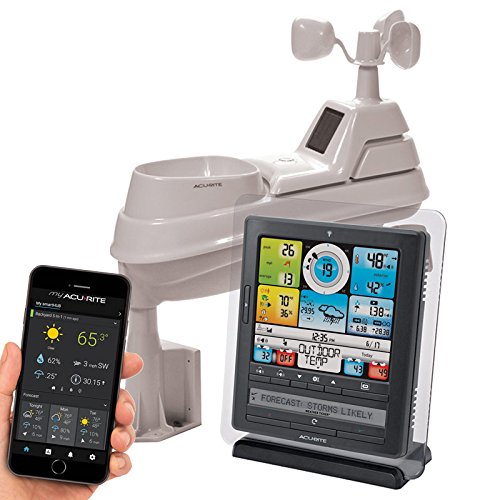
AcuRite 00622 Pro Color Weather Station with Wind Speed, Temperature and HumidityAcuRite 00622 Pro Color Weather Station with Wind Speed, Temperature and HumidityPlease note: If you are interested in the AcuRite 01301 Pro 3-in-1 Color Weather Station, it has been replaced with the AcuRite 00622 Pro Color Weather Station

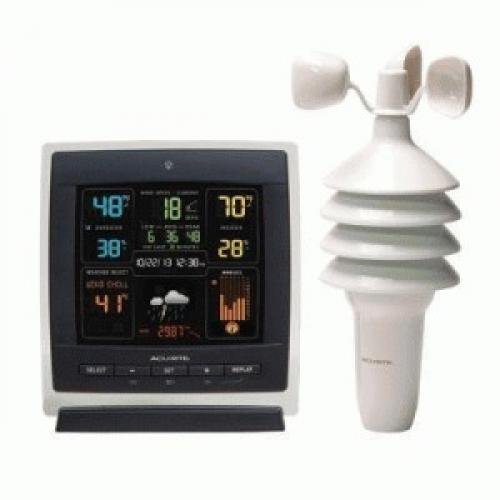
You can organize your outings better using the 01301 Pro. You will be prepared for that afternoon downpour from now on. You shouldn’t have to experience very many big weather surprises anymore.

Type of Instruments

  • Thermometer
  • Anemometer
  • Relative Humidity
  • Software

Instrument Sensors for the AcuRite 01301 Pro Color Weather Station

This model houses temperature and relative humidity sensors. It also has included with it a wind speed anemometer. The sensor can be installed in the outside location of your choice.

Your choice for placement should be to maximize the sensor’s accuracy and transmission. The AcuRite sensors are sensitive to surrounding environmental conditions.

acurite-01301ccdi-pro-3-in-1

The best way to place your 3-in-1 sensor is to find a place not directly in the sunlight, but a place that is in the open enough to pick up the wind blowing in your location.

The trick is to realize that the instrument sensors are very sensitive to direct sunlight as well as the anemometer will not do its job if you are in a sheltered area. Keep that in mind as you progress with your placement.

As we continue this review of the AcuRite 01301, another important bit of information is to be aware, there isn’t much space between the mounting hole (to fasten the sensor down) and your sensors.

Your mission is to find a piece of PVC pipe (3/4” schedule 40 PVC) where you can set the mounting piece onto the PVC pipe so that you may secure the sensor in the location you have picked out. This is one suggestion.

Another would be to locate it on the top of a fence post or mount it onto the outside corner of a tool shed, or a corner of your house. These are a couple of suggestions.

This could be a tricky thing, but if planned out properly, you will be able to handle it properly.

Please make sure there aren’t many things in the way. Find as open a location as possible. Some things to remember are, that the sensor must be within 330 feet (100 m) of the display companion unit.

Please try to place the sensor away from large metallic items, thick walls, metal surfaces, or other objects that may limit wireless communication.

Also realize that the sensor is best served away from heaters, air conditioners, chimneys, exhaust vents, as well as asphalt and concrete surfaces. Beware of surfaces that radiate heat, this would affect your sensors.

Avoid installing the sensor near pools, spas, or other bodies of water. Water sources may impact humidity accuracy. Also, it would be a good idea to make sure you are located away from any sprinkler systems. Forced water wouldn’t be a good idea either.

Anemometer Placement Tips

Locate the sensor in an open area, preferably above the ground a bit, so that you are ensuring as accurate as possible wind speed calculations.

Please be aware that the wind cups on top of the sensor, need to be free to spin.

They are how the wind speed is being measured. This is the reason the cups need to spin in a 360-degree fashion to properly measure the wind speed.

The sensor is recommended to be installed either on a pole mounting where it is suggested that you would use a 3/4” schedule 40 PVC, (this is not included), a side mount, or on a top mount. The sensor also has an A-B-C switch.

The A-B-C is located inside the battery compartment, midway down from the top of the sensor. It can be set to A, B, or C.

But you must be aware that you must select the same letter choices for both the sensor and the display unit it is being paired with.
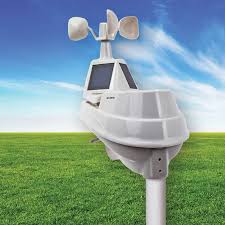
AcuRite Pro 3-in-1 Model 01301 color weather station

This is a must for the units to synchronize (communicate properly together).

In looking at the sensors you need to know how accurate and sensitive these sensors are.

The manufacturer has rated the instruments to have a range for fluctuation of the accuracy.

Some specs on the included sensors: Temperature sensors range- It will record accurately, temperatures from 32 to 122 degrees Fahrenheit (0 to 50 degrees Celsius).

The humidity range that the humidity sensor will accurately work for is the relative humidity of 1% to a relative humidity reading as high as 99% humidity. Wow, that is really humid.

The humidity accuracy error ranges, change in intervals as the relative humidity increases.

  • +/- 5% from 0% to 10% Relative Humidity
  • +/- 4% from 10% to 20% Relative Humidity
  • +/- 3% from 20% to 80% Relative Humidity
  • +/- 4% from 80% to 90% Relative Humidity
  • +/- 5% from 90% to 100% Relative Humidity

It appears the error rate is higher at lower humidity levels and the highest levels. It appears the ranges that are more normal from 20-80% humid is where the sensor is most accurate. This is a good thing.

The wind speed can be measured in the no wind up to 99 mph range, which is 0 to 159 kilometers per hour (kph ) It appears it is more accurate at lower wind speeds. It loses accuracy as the wind speed increases. Here are the wind speed accuracy ratings:

  • +/- 2 mph below 10 mph
  • +/- 3 mph from 10 to 30 mph
  • +/- 4 mph from 30 to 50 mph
  • +/- 5 mph from 50 to 99 mph

Type of Transmission

Wireless-there aren’t any wires or cords needed to transmit the information from the remote sensor to the display.

The top distance for transmitting well is 330 feet(100 meters)depending on the home construction materials you will be transmitted through.

Transmission is broadcast at 433 MHz Transmits data every 18 seconds

AcuRite 01301 Pro 3-in-1 Color Station Display

This is the heart and soul of the AcuRite 01301 Pro. Follow us through our views of this area, and everything that is part of this display unit.

Let’s take an in-depth look at the colored display of the 01301 Pro.

The Top Level Layer When you look at the display screen, it appears as two halves, the top-level layer, and the bottom-level layer.
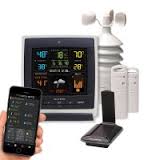
AcuRite 01301 Pro 3-in-1 color station

The top-level half has the outdoor temperature displayed on the upper-level corner. At this level, you also have the outdoor relative humidity displayed.

Then in the center of the top-level layer, you have the current wind speed displayed. Here you also will find the average wind speed of the last 30 minutes, as well as the last 30 minutes’ highest wind speed.

Most prominent in this area is the wind gust icon. This will show the wind speed for the current wind gusts.

Next up is the right-hand corner of the top-level layer. This is the home of the current indoor temperature, as well as the current relative humidity of the inside of your home.

The Bottom Half Layer On the lower left-hand hand of the bottom level layer is the wind chill displayed. The weather select button is also here.

This area displays the following various measurements and readings: Displays heat index, dew point or wind chill, daily, monthly, all-time high & low records indoor/outdoor temperatures and humidity and high for wind speed.

The center of the lower-level layer is the weather forecasting area. Then in the center of the bottom level half is probably my favorite area. This area is the weather prediction area.

The learning model will show for the first 14 to 21 days as the forecast calculating algorithm is learning to forecast your weather for your location. Also displayed here is the current barometric pressure outside.

The 12 to 24-hour Weather Forecast Self-Calibrating Forecasting sensor pulls data from the outdoor sensor to generate your personal forecast. The following icons are used to show the forecast for your location for the next 12-24 hours.

  • Stormy & Windy (Flashing icon when-Stormy)
  • Snow Likely
  • Snow/Rain Mix Likely (Flashing icon when-Snow & Rain)
  • Rain Likely
  • Mostly Cloudy

The lower right-hand level layer shows you the history chart for your location. This Multi-Variable History Chart displays the past 12 hours of data for pressure, temperature, and humidity. Pretty interesting stuff to a weather buff.

The last thing is the very center of the display. This is the home of today’s calendar date as well as the current time, displayed either in am or pm 12-hour mode.

You will need to remember this calendar and clock are not kept accurate by the atomic clock transmission.

They are not connected to the atomic clock, so you will need to keep a close eye on this, to ensure accuracy.

The Replay and Live data buttons are also housed in this center area of the display. This weather station stores historical data that can be viewed in Replay Mode. The data is recorded for the past 48 hours in 30-minute intervals. The data is collected on the hour and half hour.

This data when shown is also stamped with the time and date of the collection for your records.

To bring this up press the “REPLAY” button to enter Replay Mode. To manually exit Replay Mode at any time, press the “REPLAY” button. The display may show or flash the “LIVE” icon to confirm you are exiting the replay mode.

Display Backlight This weather station’s color display features three different lighting settings:

  • High (100%) brightness
  • Medium (60%) brightness
  • Low (30%) brightness

When using battery power alone, the backlight is available momentarily for 10 seconds by pressing the button.

But when the display is powered with the power adapter, the backlight remains on(at 100% brightness). But you can then dim down to 60% and 30% dimmer by pressing the “again, then again to dim.

Please note that something the dimmer will do is that it will dim according to the time of day, and time of year. It does this automatically.

Here is the dimmer time schedule for you.

MARCH 11- NOVEMBER 4 6:00 a.m. – 9:00 p.m. = 100% brightness 9:01 p.m. – 5:59 a.m.= 30% brightness

NOVEMBER 5 – MARCH 10 7:30 a.m. – 7:00 p.m.= 100% brightness 7:01 p.m. – 7:29 a.m. = 30% brightness

Another thing to be aware of is that the backlight (when using an AC Power adapter) is very bright and can be a real distraction to you at night time. Even on the maximized dimmer setting, the backlight can still be too bright for some people. Please be aware of this if you are very sensitive to bright lights at night.

Software

None provided

Manufacturer/Support

(877) 221-1252

info@chaney-inst.com

24/7 support at www.AcuRite.com

Chaney Instrument Co. Lake Geneva, WI 53147

Features

  • A high-precision 3-in-1 wireless weather sensor accurately measures the temperature, humidity, and wind speed
  • Daily, monthly, and all-time high and low records
  • History chart displays temperature, wind speed, and barometric pressure trends over the last 12 hours
  • Illuminated color display with adjustable dimmer; electric-powered with optional battery backup Easy setup and mounting

Dimensions

Display Measures:

  • 7.7” Height
  • 7.1” Width
  • 1.3” Depth

Sensor measures:

  • 9.3″ Height
  • 5.3″ Diameter

How Powered

The display unit is powered by 6 “AA” batteries. The unit also comes with a supplied AC adapter The Sensor is powered by 4 “AA” alkaline or Lithium batteries

Accessories

3-in-1 remote outdoor sensor model 06008RM, 11128-3N1TXCA1, or 11133-3N1TXR

AC adapter Model: #11188-1524589AD

AcuRite 01301 Pros

AC power adapter provided

Colored display screen

Current outdoor temperature displayed

Outdoor temperature trending icon

Current Indoor temperature displayed

Current indoor temperature trending icon

Current wind speed

Average wind speed for the last 30 minutes

Peak wind speed-highest for the last 30 minutes

Lowest Wind speed for the last 30 minutes

Display low battery indicator

12 to 24-hour weather forecasts

Multi-variable history chart

Replay & Live Icons

Clock and Date

Current indoor humidity

Current outdoor humidity

Outdoor sensor signal strength icon

Weather select icon

Cons


The backlight doesn’t stay on long enough when on battery power

No Software is offered

Does not connect data with a weather collector site like Weather Underground

The clock is not atomic, so the accuracy will slip at times

The date/calendar may not remain accuracy if the power source is interrupted

Transmission interruptions

Forecaster has times of showing an icon that doesn’t accurately match the real current weather

Batteries not included

The anemometer is inaccurate. Especially at higher wind speeds Hard to view the display at angles

Consumer Ratings

The AcuRite 01301 Pro is a highly-rated weather station. After examining this selection we would give it a 4.1-star rating. This rating of ours is based on it being purchased by a casual weather observer.

The thermometers and the relative humidity sensor are accurate enough to provide a reliable backdrop of temperature and humidity to live your daily life around.

However, if you are serious about the goings-on outside, then you will want to skip over this product. We found that there is some good evidence to suggest that the wind speed isn’t always calculated accurately.

Most weather displays of this type have regular instruments, but many do not venture into anemometers. That seems to be the dividing line from hobby/casual observer to serious weather geek, data collector type of people.

The more serious person would not be happy with the anemometer provided on the outside remote sensor pack.

So as ratings go, the ratings are generally correct for the type of purchasers that are buying this station from AcuRite. If I am a person who wants general temperature and a weather forecast to be there as a guide for me, then I would rate this in the range that hundreds of buyers have.

Please match up the seriousness in the person’s love for the weather, with the display unit/station you are looking to purchase.

I find the colored display to be attractive and to give the owner a good selection of interesting information to be very handy to have around. We recommend to this type of person as a very solid selection, one that wouldn’t disappoint

The last point that I would like to offer is that the temperature and relative humidity sensors appear to be very reliable, and very accurate. This should weigh in well with your decision to purchase or not. Dependable instruments are important.

AcuRite 01301 Price

We found that in many places the display unit appears to be sold separately from the needed remote sensor unit. In this recommended weather station you will find the display unit as described, along with the AC power adapter, and the outside sensor unit to be all included in one, great, lower price.

We like the three pieces being together as a station. The price is very much in line with competitive weather stations from other manufacturers.

One needs to just look at the eye appeal of this AcuRite model to be sold on the colorful display and its multiple offerings of local outside world instrument readings and data that is collected throughout the day for you.

A very good price, for an amateur entry into the weather station world. We believe money is well spent as a nice gift for someone who likes to do things outside. It will help them to better plan for outings, such as boating, fishing, golfing, picnics, gardening, short road trips, etc.

It appears that purchasing a new sensor or a new power cord, is easy and cost effective. This is in case of long-term use, one of these parts would not be in working order any longer.

In examining the price options it is offered for $20.00 more to buy the display with icons. Without the icons (Just Text) is offered at $20.00 less.

AcuRite 02008A1 Color Weather Station with Forecast, Temperature, Humidity, Barometric Pressure, Intelli-Time Clock-Full ColorAcuRite 02008A1 Color Weather Station with Forecast, Temperature, Humidity
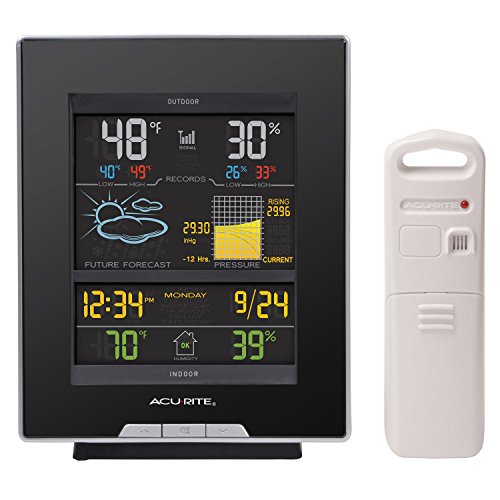
If you are looking at other AcuRite Models, this unit compares very favorably with the price on units that do not have an anemometer, but they do have a barometric readings area instead.

It appears to be less information and less cost for the Barometric pressure without the wind speed anemometer. The wind speed costs more to have, and you will be getting more information as well, but then you will be getting less information on the display.

An example of the barometric pressure, no anemometers, and less information are this model, AcuRite 02008A1 Color Weather Station with Forecast.

Read More About AcuRite Weather Stations-View Related Posts Below

AcuRite 01036 Pro Weather Station The AcuRite 01036 Pro Weather Station is a standard in the complete line of AcuRite professional weather instrument gathering stations. AcuRite 01512 Pro Color Weather StationThis review article is a look at the AcuRite 01512 Pro Color Weather Station.

George

Weather Enthusiast’s Journey

From an early age, I discovered the profound impact weather has on our lives.

A stormy day can disrupt your plans, while perfect weather feels like a precious gift meant to be savored to its fullest.

Through this site, I’m passionate about sharing my expertise on weather instruments and their practical applications for enhancing your daily life.

I’ll show you how a personal weather station can transform your home experience, giving you valuable insights about conditions on your specific property.

Explore my discoveries and gain the knowledge to truly understand the weather patterns in your area.

Welcome to a community where weather isn’t just small talk—it’s a fascinating science that connects us all.

AcuRite 01036 Pro Weather Station-A Complete Review

AcuRite 01036 Pro Weather Station Review

Great Pro Weather Station Choice

Those who want a more sophisticated device at a reasonable cost will appreciate the detail in my AcuRite 01036 Pro Weather Station review. You get a lot more information than on cheaper models, a great color display, and multiple ways to access the data – if you’re willing to go the extra mile.

This unit is a well-performing station by AcuRite. While many things are positive and good, other parts of the station do present challenges to you.

As I walk you through this set of weather equipment, I will point out some things that you should be aware of. Some of the things I liked and others I wasn’t that excited about.

We found this set to be more for the weather geek, and professional weather record keeper. If you are this person then you will be satisfied with the many facets of the AcuRite 01036.

If you are a casual observer of the weather, then this is probably too much equipment for you. Too many things going on. 

In a Hurry? >>>Get the AcuRite 01036 Pro Weather Station HERE!

Here is a sample list of the types of instruments that are here.

Type of Instruments

  • Thermometer-measure the air temperature
  • Hygrometer-measures the water content in your air
  • Self-Calibrating Forecasting-provides your forecast

of today’s conditions for the next 12 to 24 hours by collecting data from the sensor in your backyard. It generates a forecast with pinpoint accuracy

  • Data Logger-Electronic device that collects data over time to a location. Many times it is interfaced with a computer
  • Barometer instrument measuring atmospheric pressure. Used about forecasting weather and measuring altitude
  • Clock
  • Calendar
  • Rain Gauge
  • Anemometer-instrument that measures wind speed
  • Alarm
  • Heat index-a quantity that expresses the discomfort of the air from the combination of humidity and temperature of the air
  • Wind Chill Perceived decrease in air temperature felt by the body on exposed skin due to the flow of air
  • Dew Point-the temperature at which dew forms and is a measure of atmospheric moisture

AcuRite 01036 Instrument Sensors

In looking at the sensors, there are a few of them that I will list. Please realize that they are all rolled into one sensor unit. You will need to only install one unit, not several different pieces of equipment.

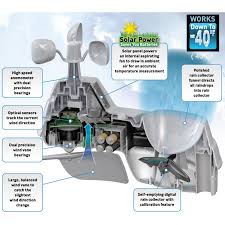
This is a list of sensors that are a part of the 5-in-1 outdoor sensor unit that you will be installing to collect your data for you. This sensor unit has a wind van, and an anemometer to measure the wind speed.

There is a barometric pressure sensor and a thermometer to collect data as well. There is a built-in aspirating fan that is there to breathe ambient air into the sensor to reduce false temperature readings. This fan is powered by a solar cell.

The other thing is that there is a rain gauge that has a filter cover on it to keep all types of debris out. Again preventing any false measurements of precipitation.

  • Thermometer
  • Temperature Range: 32°F (0°C) to 122°F (50°C) Indoor -40°F (-40°C) to 158°F (70°C) Outdoor
  • Hygrometer
  • Humidity Range: 16 to 98% Relative Humidity Indoor 1 to 99% Relative Humidity Outdoor
  • Anemometer
  • Wind Speed Range: 0 mph to 99 mph
  • Rain Gauge
  • Rainfall Range: 0 mil to 99.99″

Some words of wisdom to the purchaser. Make sure you have thought out well in advance where your location of the outside sensor package will be. This is very important before you purchase. Many different things should come into mind when planning this out.

acurite-01036-pro-weather-station

You will need a reasonably shaded area to protect the thermometers from being tainted by excessive direct sunlight.

You need to take the measurements of the sensor pack and make sure with the size of it that you still have the rain gauge out in the open, and the wind cups are free to perform their duty in logging in the wind speed.

Please help the anemometer do what it is designed to do.

5-in-1 Sensor Placement

The 5-in-1 sensor is designed to remain outdoors all year long. Choose an open location with no obstructions above or around the sensor for the most accurate measurements.

It would be a great idea to position sensors away from heaters, air conditioners, chimneys, exhaust vents, asphalt, and concrete (surfaces that radiate heat).

Another thing to avoid is installing sensors near any high sources of humidity, like pools, spas, or other bodies of water. Realize locating near a sprinkler system would be very bad, as an example.

Please remember to still have it close enough to your display unit inside so that you have an uninterrupted sensor transmission at all times. Please take into account how many walls, and what type of walls you will be transmitted through.

Also, be aware that you will need to be able to easily empty out the rain gauge should it get full of excessive rain or snow amounts. Having a rain gauge is something you really can use in many practical ways.

If you are a gardener, or on a larger scale a farmer, then collecting the lightfall amounts will help you out immensely. If you are raising crops that require a certain amount of moisture, during the germination period (shortly after planting), then you will know if you need to water the garden, or you will need to irrigate the field.

This will ensure a good crop, from the seeds you have planted. Another great thing about rain gauge information is that you are also aware of too much rain, so you may need to turn bales of hay or straw, or maybe even help to drain off excess moisture from a field or from the garden so that the crops (Plants)(your harvest) doesn’t rot from too much moisture.

One more thing before we move on. I found a very interesting dynamic happening with the unit’s solar panel and the aspirating fan.

The AcuRite people recommend heavily that you need to find a good spot for keeping the direct sunlight off of the thermometer sensors.

But then the solar panel is part of the sensor package. This panel powers the aspirating fan which doesn’t seem to do very well its job of keeping ambient (active hot) air from the thermometer sensors.

I would think the fan may be something that would bug me, especially if it wasn’t working that well.

To settle this back and forth, I would personally try hard to find a lightly shaded area where the direct sunlight wouldn’t toast my thermometers and yet where I was still receiving enough solar power to charge the solar cells.

Type of Transmission

Wireless Range: 330ft / 100m depending on home construction materials

Operating frequency: 433 MHz

Place both units at least 3 feet (.9 m) away from electronic devices (TV, computer, microwave, radio, etc.).

At this point, please be aware of the constant updating (transmitting) of the sensor to the display. Each individual situation should probably be thought about at the very least.

The question raised would be, is this transmission going to be affecting anything else close by that I have going on? For any other computer or electronic type transmissions, make sure you are aware that all of this may be affecting other things around it.

Display

The display is multifaceted. It has many exciting features which we will be examining closer. The display may be displayed in either of two languages. The owner will be choosing between either English or French.

As far as placing the display, look for a dry area free of dirt and dust. Then to make sure of the accuracy of the temperature measurement, place it out of direct sunlight and away from heat sources or vents.

The display unit stands upright for tabletop use or is wall-mountable if you choose.

acurite-01036-pro-weather-station

The display features a wind section, an outdoor temperature area, the current indoor readings section, and then the weather ticker display at the very bottom. There is a lot that goes into the AcuRite 01036 Pro.

The display is backlit (touch-activated) for a few seconds when the display is running only on AA battery power. It is backlit all the time when the AC adapter is being used.

Another thing to be upfront about is that the icons are not truly colored, but they only look colored because of a colored shield that is over them. Sometimes at an angle, this is very apparent. You may find that you can’t see the facing well at any angle just the direct straight-on look.

The current wind speed and direction are shown. Also, the past two wind directions are seen as well. The current outdoor temperature is shown as well as an arrow pointing to which way the temperature is trending.

As an example, it will show in the early afternoon the temperature at 75 degrees and the arrow shows it trending upward.

Outdoor information is prominent to the viewer. The current outdoor temperature is seen, and you will see that the outdoor temperature alarm is on.

The current humidity is shown and you will also see the humidity alarm is currently not set. The current humidity level is trending upward currently as well.

You will next see the measuring of any current rainfall. Also present is whether or not the rainfall alarm is set currently.

The 12 to 24-hour Weather Forecast Self-Calibrating Forecasting tool pulls data from your 5-in-1 sensor to generate your personal forecast.

On the right towards the center of the display center is the rainfall/precipitation area.

In that area, you are shown the current rainfall amount for today so far. Below are two readings. The one on the left is the current monthly amount of moisture, and on the right is the all-time rainfall record for the month.

The next portion of data provided is the low battery indicator for the sensor unit, then as you go left to right you have the current time, shown in either AM or PM, on the right side is the calendar month and date for your reference.

One thing to point out here is that this is not an atomic clock, so any power interruption could affect the accuracy of the clock.

At the very bottom of the display(as we move from left to right) is where the, very lowest temperature for the day(all-time low) is shown, and next to it is the all-time high for the date.

If you notice right above these two temperature numbers the high and low-temperature alarms can be set for the day.

These alarms could be used to alarm you as to a close to freezing outside temperature so that you could go cover your plants. Or a high temperature if you need to move some plants out of the sun because they are young and you don’t want them to dry up or get sunburnt, or dried out and wilted.

On the right of this is the current low for the day and the current high temperature for the day.

Weather Ticker & Forecast

The weather ticker can be used if you would like a current up-to-date instrument feed to be there to read all the time. You are able to personalize the types of information you would like to be seeing all the time.

When explaining the AcuRite weather prognosticator it is rather cumbersome. But here are the logistics involved. This patented prognosticating tool measures over 4000 barometric readings from your setup site. One reading for every 12 min. It collects the readings for 14 days.

It measures temperature readings as well and puts all of this information against the average global pressure which is (29.92 in Hg.). It then averages out your daily barometric pressure.

Once that is figured out, then it will start reacting and responding to what is actually happening outside in your world now, and it will come up with an actual forecast tailor-made for you.

Please keep in mind this is a process and with each successive new actual pressure reading the forecaster will become more and more accurate.

The Learning Mode icon disappears from the 01036 station screen (example pictured on left). At this point, the self-calibrated pressure is reasonably accurate (although the algorithm continues to run; 4,000 readings = 33.33 days) and the weather forecaster is ready for superior weather prediction.

The forecast icons for model 10306 are the following:

  • Storm Likely
  • Partly Cloudy
  • Cloudy
  • Rain Likely
  • Snow Likely
  • Chance of Mixed Rain & Snow

Back Of Display

At the back of the play area a few buttons and switches you should be aware of. First, there are the following buttons, a reset button which is for resetting the whole display unit. Just above it is the Clear Today button and the Clear All buttons.

The Clear Today button clears all recorded material since 12:00 am. and Clear All button, clears all recorded data without having to reset the time and date. Please be aware that the USB mode will be reset to Mode 2 by default.

Also present is the A-B-C Switch that is set to the same as the sensor’s A-B-C switch, so that the two units can synchronize. A is set in the display, A is set in the sensor unit as an example.

Software

The AcuRite 01036 Pro Weather Station comes with some software advantages. In looking at this you must be aware of what it will do for you and what it will not do for you.

This area was a rather hot button, with some customers. Many people were upset about some of the following items.

Some things to be aware of are that the Microsoft Windows program will need to be accessed by the software. The display does come equipped with a USB port, and also a USB cable to connect the display to a Windows connection.

It connects with the weather data collection center of the display unit. This data has been collected by the 5 in 1 sensor.

The display is set up to display logs (or stores) of data so that you can download it to a personal computer in a data file (CSV or comma-separated values file). The downloadable program is called either AcuRite Connect for Windows 8.1 / 8 / 7 or this program is called PC Connects for Windows Vista / XP SP2 or higher.

When conversing with AcuRite support techs it was reported that the program is not available for Windows 10 yet. So it is not compatible with Windows 10.

The technical support person also told me that the program once it is downloaded onto your PC, it has a customizable dashboard. Which data is shown is customizable. The headings and the widgets can be color-coded to help you organize all of the data your 5 in 1 sensor is collecting for you. The dashboard can very much be set up to what you would like to be using.

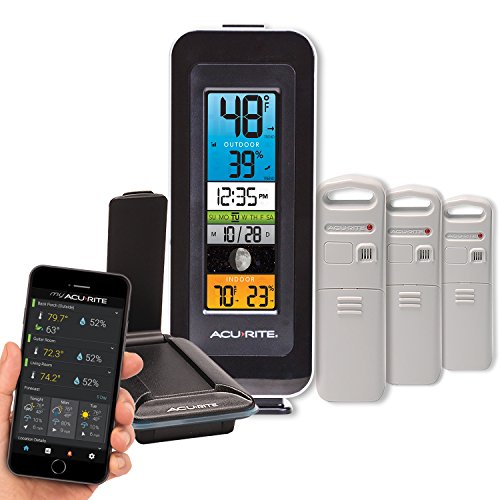
AcuRite 01060M Color Thermometer Display Smart Home Environment System with My AcuRite Remote Monitoring AppAcuRite 01060M Color Thermometer Display Smart Home Environment System with My AcuRite Remote Monitoring App

One thing here that needs to be highlighted for you is that the free apps, connections to phones, i-pads, etc will only work if you have a constant connection to the data logging. If that connection is not there then the apps will not perform.

So either you have a constant connection or you can use the Aculink Internet Bridge that they sell separately.

You will have to purchase the software internet bridge unit separate from AcuRite. This extra accessory piece will cost you around $80.00 to purchase in addition to the cost of the weather station.

One more thing that is excellent for the buyer is that you are able to connect with various weather collection sites like Weather Underground. Many kinds of weather fans very much like this, and look forward to submitting a steady flow of raw weather data to Weather Underground.

AcuRite 01036 Manufacturer/Support

Chaney Instrument Co. 965 Wells St. Lake Geneva, WI 53147

acurite-01036-pro-weather-station

(844) 228-5465

Support 24/7 at www.AcuRite.com e-mail at info@chaney-inst.com

Many happy customers rave about the excellent support. One gentleman even shared how upset he was with the software part of the AcuRite 01036.

He was actually called in the evening at home by the CEO of AcuRite. He was floored by the caring, and the top service that was given by the company’s top support agent after that call.

Features

Product Features: Thermometer, Hygrometer, Self-Calibrating Forecasting, Data Logger, Barometer, Clock, Calendar, Rain Gauge, Anemometer, Alarm, Heat index, Wind Chill, Dew Point

Readings: Temperature, Humidity, Atmospheric Pressure, Wind Speed, Wind Direction

The accuracy of the several gauges is very good. They are rated as such.

Temperature accuracy is +2/-2 degrees Fahrenheit Humidity accuracy is +/- 4% from 16% to 20% Relative Humidity +/- 3% from 20% to 80% Relative Humidity +/- 4% from 80% to 90% Relative Humidity +/- 5% from 90% to 98% Relative Humidity Wind direction indicators are 16 points. This means that the anemometer will measure the wind in sixteen termed directions. 4 main directions are North, South, East, and West. The 16 directions are NNE, NE, ENE, E, ESE, SE, SSE, S, SSW, SW, WSW, W, WSW, NW, NNW, N.

Wind Speed accuracy is as follows: +/-2 mph below 10 mph +/- 3 mph from 10 to 30 mph +/- 4 mph from 30 to 50 mph +/- 5 mph from 50 to 99 mph Rain Gauge accuracy is rated as such: +/- 0.05-inches per inch of rainfall

Dimensions

5 in 1 outdoor sensor: 10.8” Height 5.6” Width 13.8” Depth

Indoor Display Unit: 8.2” Height 7.4” Width 1.2” Depth

How Powered

Input Voltage: 4.5 V DC Power Source: AC Adapter, Battery Display powered by 6 “AA” batteries. It also comes with an included AC power adapter.

The 5-in-1 outdoor sensor is powered by 4 “AA” batteries. Please remember to use Lithium AA batteries if you live in colder climates, to ensure uninterrupted power service to the sensor.

Accessories

AcuRite 09155M AcuRite Access: Monitor Temperature, Humidity, and Weather Sensors from Anywhere on a Smart Phone, Tablet or Laptop

Pros

  • AC Adapter provided
  • 5-in-1 Sensor records outdoor temperature; relative humidity; rainfall; wind speed and direction
  • Solar panel on 5-in-1 sensor to run aspirating fan
  • Debris filters over the rain gauge to keep large debris from filling up the gauge’s collection area.
  • Programmable weather alarms for temperature, humidity, wind, rain, dew point, heat index, and storm alerts Remotely access weather data through Android and IOS apps or internet browser
  • Uses patented Self-Calibrating Technology to provide your forecast of 12 to 24-hour weather conditions Stream data to sites like Weather Underground and share it with friends
acurite-01036-pro-weather-station
  • PC connects has a customizable dashboard included in the program once it’s downloaded onto your PC
  • The illuminated color LCD includes indoor/outdoor temperature and humidity, wind speed /direction /chill, rain, barometric pressure, clock, calendar, and more
  • Personalize the Weather Ticker™ to stream the information you want programmable alarms alert you when weather conditions change
  • All important switches are located on the front, for ease of reach. Better than many other units where you must find the switches on the side of the back.
  • If the display is on the wall-mounted or sitting on a bookshelf, away from where you are, you will be very inconvenienced if the switches on not on the front

AcuRite 01036 Cons

  • Backlight only lights for less than 10 seconds when on only battery power
  • The display is difficult to read at angled views Rain gauge fills up and holds extra rain & snow
  • Transmission easily interrupted
  • Must buy the Aculink Internet Bridge as an extra purchase
  • Batteries not included
  • Not a true colored display. Uses a colored screen to make icons appear to be colored
  • Many customers talk of ill-conceived designs for the wind cups
  • PC connect means it must remain connected to your PC at all times to receive information on your other devices
  • PC Connects is currently not compatible with the Windows 10 program
  • The parts are made of plastic
  • The software doesn’t record history and doesn’t work with the Virtual Weather Software
  • The backlight is too bright at night when powered by an AC adapter
  • Spiders & Bugs can get into instruments
  • Aspirating fan on 5-1 sensor is ineffective

Consumer Ratings

Overall, this unit can do what it says although there are a few issues. I agree with online ratings and would give this unit 4.3 stars because – despite the few issues – you do get a lot more information than the typical entry-level model and yet for a fairly reasonable price. To get something without these few issues would likely cost twice the price.

The installation is easy and quick. The tools that are offered fit what would be needed by the more diligent weather enthusiast and the additional options for data collection and manipulation (by way of spreadsheets) give you something to do other than simply look at a display screen.

The bump in the road here really is the $80 computer Aculink Internet-Bridge should have been included in the price.

If you think about that, obviously the market price for the weather station would be quite a bit higher than it is selling for currently.

I do fully agree with some, that AcuRite could do a much better job explaining the computer, and program part of the sales information.

People often are glancing and not digging deep enough to make sure they understand what is included in the purchase package.

This product is recommended to the serious weather follower, who has some money to spend, but not enough to obtain the best equipment.

It is a far better step up from the many casual weather reporting stations that are available. You will have access to many more instruments, and much more weather data to look at.

If you are in need of a more professional set of weather equipment, I firmly agree with an excellent rating for this product, based on its versatility, the tools available, and the ease of using this whole weather station.

Having used the technical support system I found it to be reliable, able, and quick to use. My Questions were answered quickly and honestly.

Price

AcuRite 01036M Wireless Weather Station, PC Connect, My Remote Monitoring Weather AppAcuRite 01036M Wireless Weather Station, PC Connect, My Remote Monitoring Weather AppIf you are price-conscious, I think that you will be very happy with everything you will receive, with this weather station from AcuRite.

If you look at all of the features and weigh up the pros and cons, you would make the same decision we would. The purchase would be a very worthwhile one.

When the researcher looks at this model 01036 station from AcuRite, they should be able to see that the cost to the customer, is a fair price for the extensive services and more advanced tools that are provided.

When you compare what you are getting in this weather station against comparable competitors’ products then it should be easily seen that there is value here for the consumer.

The value added to me is the technical support and the quality of the equipment. You are not paying for the top weather equipment, but you are getting very effective, easy-to-use weather sensors that will help you analyze daily your weather world.

I would purchase the Internet Bridge, to fully capture the data stream that is available to you by using the 5-1 sensory.

With the fully customized dashboard, The AcuRite 01036 gets my recommendation for a weather observer.

You are not hardcore, but you are probably geek level, and a serious follower of the intricacies that make up our daily weather forecasts.

If you are a casual observer of the weather this is not for you, though. Do not spend the money on all of these instruments because you will not use them.

Read More About AcuRite Pro Series Weather Stations-View Related Posts Below

AcuRite 02064 Pro Weather Station
Highlights of the AcuRite 02064 Pro If you are looking for a great gift for a weather pro in your life look no further. This unit monitors both your indoor and outdoor temperature

Let’s Discuss the AcuRite 01078 Wireless Weather Station

Our detailed review of the AcuRite 01078 Weather Station reveals our 5 compelling reasons to buy this weather station.

George

Weather Enthusiast’s Journey

From an early age, I discovered the profound impact weather has on our lives.

A stormy day can disrupt your plans, while perfect weather feels like a precious gift meant to be savored to its fullest.

Through this site, I’m passionate about sharing my expertise on weather instruments and their practical applications for enhancing your daily life.

I’ll show you how a personal weather station can transform your home experience, giving you valuable insights about conditions on your specific property.

Explore my discoveries and gain the knowledge to truly understand the weather patterns in your area.

Welcome to a community where weather isn’t just small talk—it’s a fascinating science that connects us all.

AcuRite 75077 Weather Forecaster Review-A Deeper Examination

Let’s Take a Look at the AcuRite 75077

AcuRite 75077 Weather Forecaster Review

If you are mildly interested in the weather, and you use simple scientific information daily, but you are very busy, this unit may be for you.

We will review the AcuRite model 75077 in this post. After reading our information, you will add this as a very solid performing yet simple station.

You will be provided with the current outdoor temperature and current indoor room temperature. If you are wondering what tomorrow’s weather holds, this will be useful to you as well.

The atomic clock will get you where you need to be on time, and in case you are trying to figure what day it is in the morning, this will provide that for you as well.

The AcuRite 75077 Weather Forecaster, is a very reasonably priced and heavily reviewed, piece of weather equipment.

Many weather fans find this model to be the purchase, that gives them what they need in planning out their day.

I believe that if you are looking for a quick source for what your world is like outside before you leave to go somewhere, then this could be your answer.

But if you are really into weather information in a broader sense, then this product from AcuRite will not be enough for you.

In a Hurry>>> Get the AcuRite 75077 Weather Forecaster HERE

Type of Instruments

The 75077 provides two main things that purchasers seem to be pleased with. One, it gives you the temperature currently outside in your area, as well as the present room temperature inside your home.

It does this with the combination of an outdoor sensor unit that feeds information to a display screen you keep inside.

The other feature that many are complimentary of is the short-term predictor of the elements that is provided by the manufacturer.

The shopper needs to be fully aware when reading this review, that other popular weather instruments, such as rain gauges, barometers, and anemometers are not present.

What you are getting are the aforementioned temperature readings, a forecast of weather out 24 hours based on barometric pressure, and an atomic clock.

2-acurite-75077

I find that this is fine if you are more of a casual observer of the elements than a student, or a big fan of nature’s daily patterns, of wind, sun, humidity, etc.

If you have a medium to strong interest then this unit is just too simple because it lacks enough instruments to keep you occupied.

AcuRite 75077 Instrument Sensors

There is one outside sensor included with this model. That sensor needs to be positioned in an area away from direct sunlight and where it can have 360-degree access to the elements.

Hanging it from a tree branch protected from the sun is ideal and the way it’s designed – with an open space to place over a hook – makes it easy to mount. It sends data to the display sensor every 16 seconds so it’s extremely up to date.

It’s water-resistant so it can be left out in rain and snow.

The sensor operates on a 433 MHz signal – a common range for devices meant to provide information to a receiver in close proximity. This sensor has a range of 330 feet so it needs to be within that distance from the indoor display screen.

The sensor measures barometric pressure – the weight of the air around it – and the outdoor temperature and feeds that information through the manufacturer’s patented weather forecaster program. That information is used to forecast the weather ahead for you.

In studying this review, when you first set up the sensor and turn on the display, you’ll see a learning mode icon in the upper left corner of the screen.

The forecasting program needs 14 days of data from your yard to achieve its best level of accuracy. That icon will let you know how far you are into that 14-day learning period.

The sensor seems to be fairly accurate for gauging the outdoor temperature. The manufacturer states that it is accurate within 2 degrees and this lines up with most users’ experience.

However, there is a small percentage of users who say it is consistently off from 3-6 degrees. It’s hard to tell if that small population is impacted by all being in areas of high humidity or high altitude but that is my guess based on the fact that those reports seem focused on areas like California and New Mexico.

This would make sense, too, once we remember that this weather station does not record humidity and, therefore, cannot fold that information into the forecasting program.

It also does not account for altitude although some of that impact may be gleaned from the barometric information the sensor is measuring in your backyard.

There’s one additional sensor inside the display unit that measures your room’s internal temperature and this seems to be very accurate.

The outdoor sensor can read temperatures in a range from -40 to 158 F; and -40 to 70 C and the indoor sensor in the display can read internal temperatures in a range from 32 to 122 F; and 0 to 50 C.

Type of Transmission

This is a wireless transmission weather piece that is rated for transmission up to 330 feet away. Please be aware that the type of construction materials your house is built with may also affect the transmission.

While this initially seems unimportant it is still something that should be known. In case you are experiencing any transmission problems, you need to be able to move the display unit so that you are able to receive a better transmission signal.

acurite-75077

Viewers did mention this, but it appears to be more of a minor thing to be aware of than a reason not to purchase.

It is probably best to keep the transmission distance under 200 feet if possible. The unit does tap into transmissions of the atomic clock to display the most accurate time and date information and will automatically adjust for daylight savings time.

There are no other connections you need to worry about. This device does not use wireless transmission, does not connect to a laptop or smartphone app, and does not use Bluetooth. The sensor only uses the 433 MHz signals to reach the screen display.

AcuRite 75077 Display

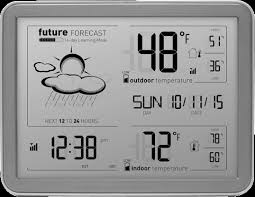
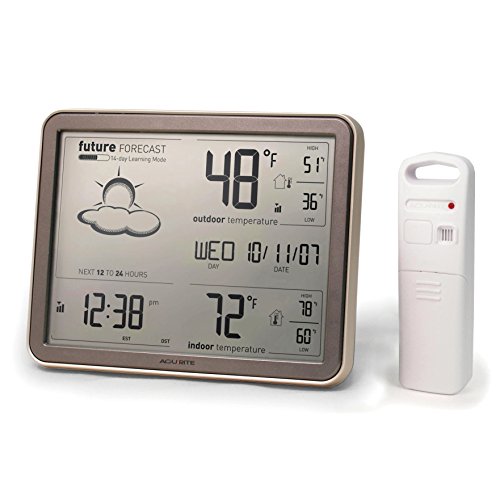
Probably among its most popular, feature according to owners is the display screen that you get with the AcuRite 75077. The screen is an extra-jumbo large display screen and can be easily seen.

In examining the screen it can be viewed at a distance by most people. All of the possible readings that are present are favorites with the buyers.

As you go left to right, the upper left-hand area is for the upcoming forecast. The temperatures, both interior, and exterior can be seen on the right hand of the display.

The current outdoor temperature along with the daily record high and recorded low is shown. One note about the high and low records – these are only the highest and lowest temperatures recorded since midnight.

Please Note: they do not tell you the highest and lowest historical records older than your sensor’s own experience from your yard. In the lower right corner is the current indoor temperature, along with its recorded high since midnight and then the recorded indoor low temp since midnight.

The lower left-hand corner is home to the atomic clock. Also shown here is the transmission strength for the signal coming from the clock.

4-acurite-75077

Many people like to have their displays backlit for ease of nighttime viewing, but this screen is NOT backlit. Some did comment in reviews of this product, that they were still able to view it well at night anyway. You should decide if this is important to you, as this was also a major item that was listed as a concern in customer comments.

The display contains display icons and the two most important are the outdoor temperature icon which is 2” and the indoor temperature icon which is 1½ inches in height. They should be large enough to be easily spotted.

Your display shows a learning mode icon for the first 14 days. The unit uses information gathered in those 14 days to build historical data for use in its algorithm for your yard. In this learning mode, the sensor sends data to the display which is run through the algorithm and used to generate your 12-24 hour forecast.

The forecast is shown as a symbol (clouds, sun, rain, etc.). Let’s take a closer look at the icons that could present themselves to you, each representing a forecast for your weather. All the icons are plenty large enough to be seen readily.

Here is the description list for the 14 icons that are used

  • Winter Storm Conditions Developing
  • Chance of Mixed Rain & Snow
  • Wintry Mix Storm Conditions
  • Rain & Snow Mix Likely
  • Rain Turning To Wintry Mix
  • Mostly Cloudy
  • Storm Conditions Developing
  • Cloudy
  • Chance of Light Rain
  • Partly Cloudy
  • Rain Likely
  • Mostly Clear Skies
  • Snow Likely
  • Clear Skies

The jumbo display shows atomic clock signal strength. The atomic clock shows in hours and minutes with an am/pm notation.

Continuing to examine the display you will see a selected time zone show, a low battery indicator, and it shows the day of the week (Sun, Mon, Tues, etc.) along with the date in the mm/dd/yy format.

The current indoor temperature and next to that it shows the high temp recorded since midnight and the low temp recorded since midnight is seen as well.

Next is one of my favorites, the outdoor temperature, and next to that the outdoor high recorded since midnight and the outdoor low recorded since midnight is supplied to you.

In rounding out the area it shows outdoor sensor signal strength, as well as an outdoor low battery indicator.

These all provide a quick study of present conditions and the past 24 hours, and then your all-important upcoming expected conditions.

Manufacturer/Support

If you are concerned about the manufacturer’s support, then you will be glad to hear, that all AcuRite products are manufactured by the Chaney Instrument Company, located in the State of Wisconsin.

Their address is, Chaney Instrument Co., Lake Geneva, WI 53147. This product is supported for seven different time zones. The following time zones are covered by support:

HAST, AKST, PST, MST, CST, EST, AST

  • AST – Atlantic Standard Time / Atlantic Time (Standard Time)
  • EST – Eastern Standard Time / Eastern Time (Standard Time)
  • CST-Central Standard Time/ Central Time (Standard Time)
  • MST-Mountain Standard Time/ Mountain Time (Standard Time)
  • PST-Pacific Standard Time/ Pacific Time (Standard Time)
  • AKST – Alaska Standard Time (Standard Time)
  • HAST – Hawaii-Aleutian Standard Time (Standard Time)

Keep in mind that the unit is supported for proper operation in these time zones, and there are no guarantees if you buy to use it in other time zones in the world.

It would make sense to also be aware that the equipment will probably work anywhere in the world, but the atomic clock will probably only be operational in these 7 time zones.

Dimensions

The display unit’s dimensions are:

  • Height: 6.2″
  • Width: 7.9″
  • Depth: 1″

It can be mounted on the wall or set on a desk for your convenience.

The dimensions for the sensory unit are:

  • Height: 4.8-inches
  • Width: 1.6-inches
  • Depth: 0.9-inches

How Powered

The sensory unit is powered by: 2 “AA” alkaline or Lithium* batteries

Please note that the use of Lithium batteries will enhance this sensory unit in temperatures of zero and below. 3-acurite-75077 This is very important to continue with the life and activity of the sensory unit.

The display unit is powered by: 3 “AA” alkaline batteries

Model #75077 does not come with included batteries.

It is very important to note, that this unit does not come with an A/C power adapter. With this in mind, you will need to plan ahead and have plenty of batteries on hand. Also, remember you may need lithium batteries on hand for the outdoor sensor if you live in colder climates.

AcuRite 75077 Pros

✅ Large jumbo display screen✅ Keeps a great time✅ 1-year warranty✅ Accurate calendar✅ Wireless✅ Easy to install✅ Low battery indicators on the display for both the screen and the sensor

Cons

❌ Does not measure humidity❌ Not enough instruments for real weather lovers❌ Display screen not backlit❌ Inclement weather can cause sensors to use up batteries quickly❌ Shelf life reported by some is as little as 2 years. Some report getting A good return with five years of use❌ No weather alerts or notifications❌ No AC power option for the display screen so you will need to keep batteries on hand for both the sensor and display

Consumer Ratings

In reading the hundreds of customer reviews, it appears that the consumer is getting a pretty fair shake for the service that this product provides.

I believe that proper setup is vital to ensure this for yourself. I really don’t believe there is much room for error on the setup, however.

I also believe, if you are purchasing this for a weather information seeker, who most needs to know the temperature for proper dressing to go to work or to go to a social event then this will work very well for that type of owner.

In conclusion, this model, the AcuRite #75077 for the right user is a modestly reasonable purchase. This isn’t anything spectacular, but a great solid purchase for the upwardly mobile person, who doesn’t have the interest nor the time to get all detailed about weather metrics.

In fact, the type of people this will work for are the people who are planning out planting crops, the home gardener who needs to know when they can tend to get their garden started,

the person who is going golfing tomorrow, or the fisherman who has a friend coming over to go fishing.

It is the social person who is planning the large family reunion, or the picnic for neighbors this weekend.

AcuRite 75077A3M Wireless Weather Station with Large Display, Wireless Temperature Sensor and Atomic ClockAcuRite 75077A3M Wireless Weather Station with Large Display, Wireless Temperature Sensor and Atomic Clock

These people and many more not mentioned will benefit from buying or receiving as a gift the AcuRite 75077 weather station.

Simple temperatures, a simple day or two ahead forecast, and the keeping and providing of a good timepiece. Very valuable, but simple information.

Very little upkeep is needed and you will find it to be a carefree yet very reliable weather station for the novice, beginner type of weather person.

But if you really love the weather, and understand and want to record, observe, and be a part of a daily weather walk, this is not for you.

Read More About AcuRite Home Weather Stations-View Related Posts Below

Acurite 02007 Weather Station-With Morning, Noon & Night ForecastingThe latest exciting home weather station selection from Acu-Rite is featured in this review.We take an in-depth look at the morning, noon & night precision forecaster this is included in this station.AcuRite 02077RM Color Weather StationHighlights of AcuRite 02077RM Color Weather Station When you own an Acurite color weather station you have a special weather instrument.

George

Weather Enthusiast’s Journey

From an early age, I discovered the profound impact weather has on our lives.

A stormy day can disrupt your plans, while perfect weather feels like a precious gift meant to be savored to its fullest.

Through this site, I’m passionate about sharing my expertise on weather instruments and their practical applications for enhancing your daily life.

I’ll show you how a personal weather station can transform your home experience, giving you valuable insights about conditions on your specific property.

Explore my discoveries and gain the knowledge to truly understand the weather patterns in your area.

Welcome to a community where weather isn’t just small talk—it’s a fascinating science that connects us all.

« Previous Page

Amazon Affiliate Associate

We are a participant in the Amazon Services LLC Associates Program, an affiliate advertising program designed to provide a means for us to earn fees by linking to Amazon.com and affiliated sites.
Most of my posts do contain some affiliate links. I like to share weather gathering instruments and stations that may help you with your weather interests. These links do provide a small compensation to me that helps in the daily operating costs of this site.

Accessibility Statement | Affiliate Disclosure | Cookies Policy| Disclaimer | Privacy Policy | Sitemap | Terms and Conditions | © 2026 - George Loves Weather

We are using cookies to give you the best experience on our website.

You can find out more about which cookies we are using or switch them off in .

George Loves Weather
Powered by  GDPR Cookie Compliance
Privacy Overview

This website uses cookies so that we can provide you with the best user experience possible. Cookie information is stored in your browser and performs functions such as recognizing you when you return to our website and helping our team to understand which sections of the website you find most interesting and useful. Our Privacy Policy.

Strictly Necessary Cookies

Strictly Necessary Cookie should be enabled at all times so that we can save your preferences for cookie settings.

3rd Party Cookies

This website uses Google Analytics to collect anonymous information such as the number of visitors to the site, and the most popular pages.

Keeping this cookie enabled helps us to improve our website.