George Loves Weather

Have a Better Life By Using Weather Instruments

  • Mounting
  • Reviews
    • AcuRite
    • Ambient
    • Davis Instruments
    • La Crosse
  • Kids
  • Learning
  • About
    • All About George
    • About George Loves Weather
    • I Own and Develop George Loves Weather-My Background
  • Contact Us
You are here: Home / Home

Sainlogic Wireless Weather Station: A Reliable Choice for Home Weather Monitoring

When it comes to monitoring weather conditions at home or on your property, having an all-in-one solution can be a game changer.

The Sainlogic Wireless Weather Station with Outdoor Sensor offers just that, with an impressive array of features packed into one device.

Sainlogic FTO835 Wireless Weather StationSainlogic FTO835 Wireless Weather StationSainlogic Wireless Weather Station

This 8-in-1 weather station, The Sainlogic FTO835 brings together key weather parameters such as temperature, humidity, air pressure, wind speed, and more, all in a sleek, user-friendly package.

In this review, I will uncover and share its mounting ease, and overall design. I will talk about the functionality of each of its included instruments.

Ease of Mounting and Setup

One of the outstanding Wow features (to Me) of the Sainlogic Weather Station is its ease of mounting.

For those new to weather stations or those looking for a simple installation process, this product delivers.

You will not struggle in this area. Sainlogic makes this a piece of cake for you.

What Is a Sensor Array You Ask?

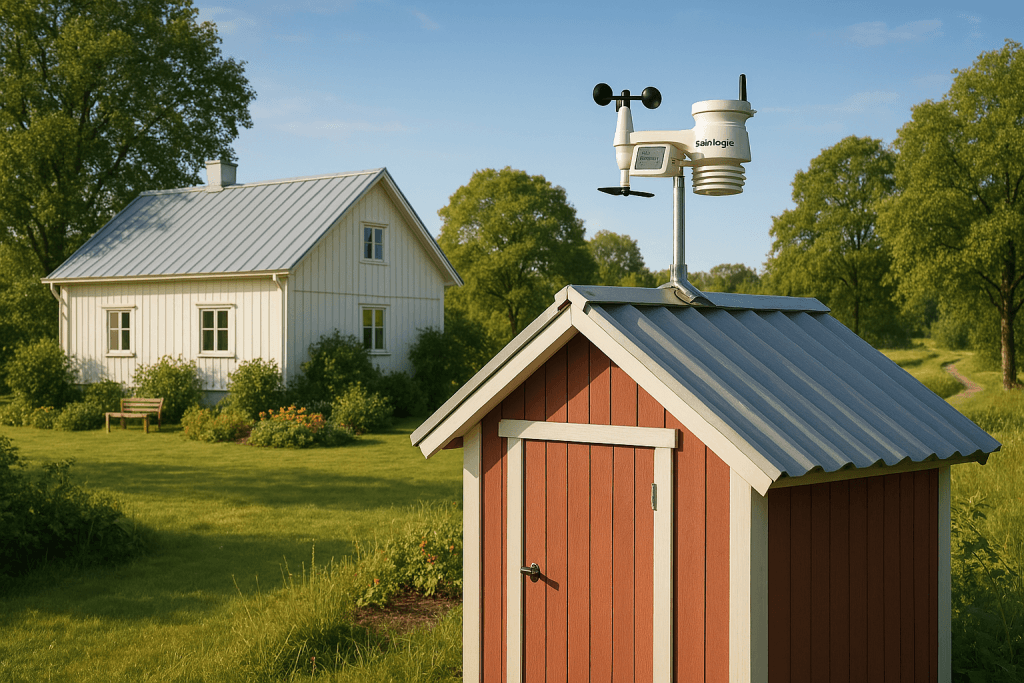
The station comes with a sturdy outdoor sensor, which is the main area of the weather instrument collection system.

This instrument home is called the Sensor Array. Every weather station has a sensor array to collect the weather data.

Sainlogic weather station reviews

Sainlogic Weather Station Reviews

Mounting Process

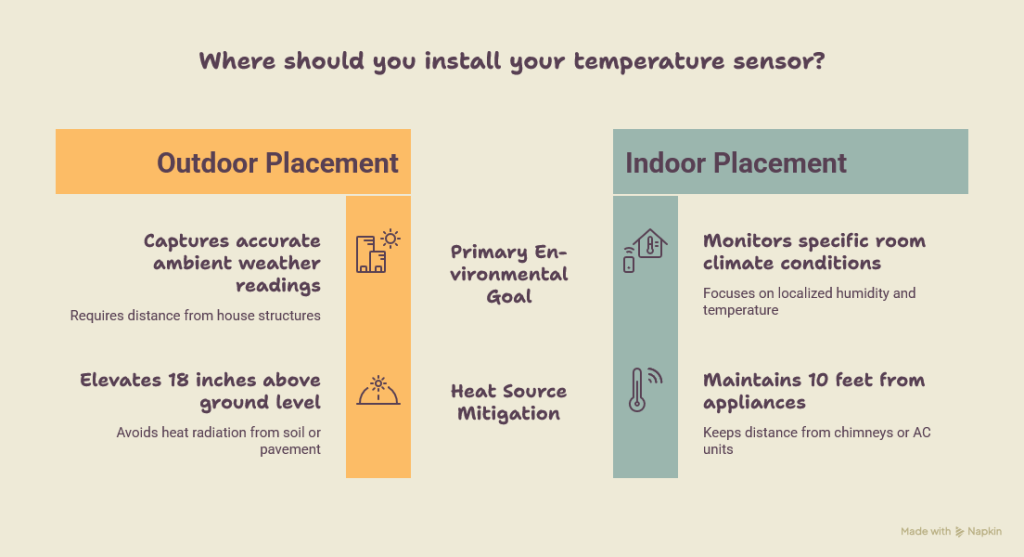
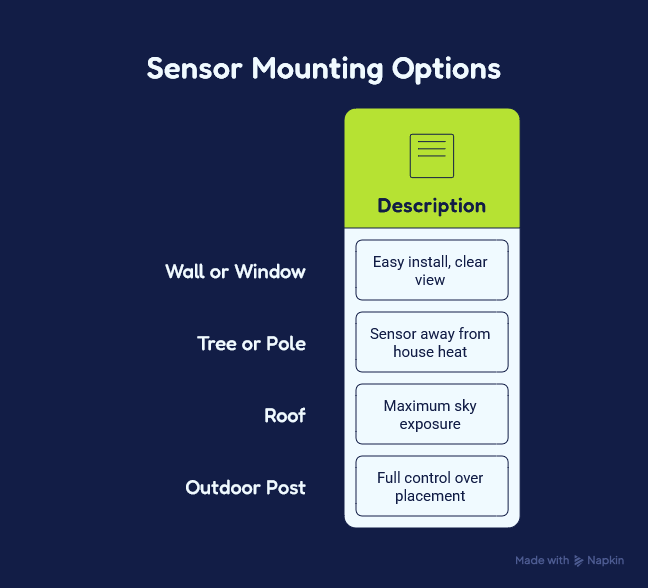
Mounting the sensor is straightforward, and you’ll find a convenient mounting bracket included in the package.

The bracket ensures that the sensor can be securely affixed to a wall, post, or other outdoor surfaces.

It features multiple adjustment angles, so you can place the sensor in the ideal location to maximize its exposure to the elements.

The sensor unit itself is lightweight yet durable, designed to withstand various outdoor conditions, including rain, wind, and direct sunlight.

The weather station provides instructions that are clear and easy to follow, making setup a breeze. See the Sainlogic FTO835 User Manual.

A simple screwdriver or drill is all that’s needed to secure it, and within minutes, the unit can be properly mounted.

Once the sensor is mounted, the next task is to sync it with the main indoor display unit. 

This is done wirelessly, and the weather station uses a reliable frequency to communicate between the outdoor sensor and the display.

After a brief setup, you’ll see the real-time data appear on your screen, allowing you to monitor weather conditions in no time.

Sainlogic wireless weather station manual pdf

Sainlogic Wireless Weather Station Manual PDF

Instruments and Their Features

The Sainlogic Wireless Weather Station doesn’t just track the basics—it’s a full suite of weather instruments rolled into one device.

Let’s take a closer look at the various instruments and how they contribute to its all-encompassing functionality.

1. Temperature Measurement (Indoor/Outdoor)

The weather station tracks both indoor and outdoor temperatures, providing an accurate reading in both environments.

The outdoor sensor is equipped with a high-quality thermistor that accurately measures temperature in the range of -40°F to 140°F (-40°C to 60°C).

It allows for easy comparison between the internal and external temperatures, which can be particularly useful if you live in an area with fluctuating weather.

You’ll have a real-time understanding of whether it’s colder or warmer outside compared to your home, which is handy when planning outdoor activities or adjusting your HVAC system.

2. Humidity Sensor (Indoor/Outdoor)

Humidity plays a key role in comfort, and the Sainlogic weather station doesn’t disappoint in this department.

It includes both indoor and outdoor humidity sensors, giving you insight into both environments.

The sensors are highly responsive, providing you with up-to-the-minute humidity readings.

Whether you’re monitoring indoor humidity for comfort or tracking outdoor conditions to understand local micro-climates, this weather station has you covered.

Having accurate humidity readings is especially important if you live in a region with extreme humidity, as it can impact your health and comfort levels.

Whether you're controlling the air quality in your home or preparing for an outdoor event, the humidity readings offered by the Sainlogic FTO835 will help you plan accordingly.


Table of Contents
1
Ease of Mounting and Setup
1.1
Mounting Process
1.2
Instruments and Their Features
1.3
1. Temperature Measurement (Indoor/Outdoor)
1.4
2. Humidity Sensor (Indoor/Outdoor)
1.5
3. Air Pressure Sensor
1.6
4. Wind Speed and Direction Gauge
1.7
5. Rain Gauge
1.8
6. Weather Forecasting
2
Display Unit and User Interface
2.1
Features and Instrumentation
2.2
2. Ease of Mounting and Setup
2.3
3. Display and Interface
2.4
4. Accuracy and Performance
3
Conclusion

3. Air Pressure Sensor

Barometric pressure is a critical component of weather forecasting, and the Sainlogic weather station features a highly accurate air pressure sensor.

This sensor gives you a continuous reading of the atmospheric pressure, helping to identify weather patterns and provide insights into potential upcoming weather changes.

A steady drop in pressure could indicate an approaching storm, while a rise might signal clear skies ahead.

This feature makes the weather station an invaluable tool for anyone interested in predicting the weather or simply staying prepared.

4. Wind Speed and Direction Gauge

Wind data is often overlooked in many home weather stations, but the Sainlogic model includes a robust wind gauge with both wind speed and wind direction readings.

The outdoor sensor is equipped with an anemometer and a wind vane, which work together to provide real-time wind measurements.

The wind speed is measured in miles per hour (MPH), kilometers per hour (KPH), and meters per second (M/S), while the wind direction is displayed on the screen as degrees or a directional arrow.

For those who live in areas with strong winds or are involved in outdoor activities like sailing, kite flying, or cycling, this feature adds significant value.

You’ll have a better understanding of wind conditions and can make more informed decisions when heading outdoors.

Sainlogic FTO835 weather station

Sainlogic FTO835 Weather Station

5. Rain Gauge

Another important component of the Sainlogic weather station is its rain gauge. This sensor tracks precipitation levels, measuring rainfall over time.

Whether you're monitoring for drought conditions or assessing how much rain has fallen during a storm, the rain gauge is a vital tool.

It gives you an accurate measurement of the rainfall in millimeters or inches, helping you stay up to date on local weather conditions.

This can be especially helpful for gardening, agriculture, or managing water resources.

6. Weather Forecasting

One of the most convenient features of the Sainlogic Wireless Weather Station is its ability to forecast the weather based on the data it collects.

The weather station uses a built-in algorithm to analyze local atmospheric conditions and predict upcoming weather patterns.

The display unit provides an intuitive weather forecast, complete with icons like sun, clouds, or rain, giving you a visual representation of what’s to come.

This feature is incredibly useful if you want a quick overview of the weather for the day without relying on external sources or apps.

Display Unit and User Interface

The main display unit is well-designed, offering an easy-to-read LCD screen with vibrant colors and intuitive icons.

All of the data is clearly presented, and the station can display multiple metrics simultaneously.

The weather station also includes a backlight feature, making it readable in low-light conditions.

The user interface is simple to navigate, with buttons for switching between the different readings and settings.

The station allows for customization of the display, so you can adjust which metrics are shown. It’s user-friendly, even for individuals who may not be tech-savvy.

Sainlogic weather station

Sainlogic Weather Station

Features and Instrumentation

Sainlogic Wireless Weather Station

Instruments Included: The Sainlogic weather station is an 8-in-1 model, offering a broad range of weather parameters. It provides measurements for temperature (indoor/outdoor), humidity (indoor/outdoor), air pressure, wind speed and direction, and rainfall.

It also features a weather forecasting capability.

Data Transmission: It uses a wireless sensor that transmits data back to the main display unit, which is common in modern weather stations.

Weather Forecasting: The weather station features built-in weather forecasting based on the data it collects. It shows a simple weather icon display, indicating the expected weather conditions for the next few hours.

Sainlogic weather station

Sainlogic Weather Station

2. Ease of Mounting and Setup

The Sainlogic system is known for its straightforward mounting process.

The outdoor sensor comes with an adjustable mounting bracket, making it easy to install on a wall, post, or other surfaces.

The wireless setup is simple to sync with the display unit, and the instructions are clear, allowing even beginners to get the system up and running quickly.

3. Display and Interface

The Sainlogic’s display unit features an LCD screen with color graphics and a clear user interface.

It shows a variety of metrics at once, and the backlight option ensures visibility in low light conditions.

The system is designed to be intuitive and user-friendly, even for first-time users.

4. Accuracy and Performance

The Sainlogic station gives accurate readings for most weather measurements and works well in many different weather conditions.

Many people who use this weather station say it performs reliably whether they live in hot, cold, or changing climates

However, the accuracy of its wind measurements and forecasting has been noted as slightly less precise than more premium models.

Sainlogic FTO835 Wireless Weather Station

Sainlogic FTO835 Wireless Weather Station

Conclusion

Overall, the Sainlogic Wireless Weather Station with Outdoor Sensor is an excellent option for anyone looking to monitor and analyze their local weather conditions.

From its easy mounting process to the comprehensive range of features, this 8-in-1 weather station offers fantastic value for the price.

Whether you're a weather enthusiast, a gardener, or simply someone who wants to keep track of the elements, this weather station will not disappoint.

Its accuracy, reliability, and user-friendly interface make it an ideal addition to any home or outdoor space.

Turn Your School Into a Weather Hub

How Schools Can Obtain a Weather Station

School Weather Station

School Weather Station

Weather stations have become invaluable educational tools in schools across the country.

These technological hubs provide students with hands-on learning experiences while contributing important meteorological data to broader weather networks.

If your school is considering implementing a weather program, here's what you need to know about acquiring a station, including options like the popular WeatherBug network.

Benefits of School Weather Stations

Weather stations offer numerous advantages for schools:

1. **Enhanced STEM Learning**: Students gain practical experience with science, technology, engineering, and mathematics through real-world data collection and analysis.

2. **Cross-Curricular Applications**: Weather data can be integrated into various subjects beyond science, including mathematics, geography, computer science, and even art.

3. **Community Connection**: Your school becomes part of the broader weather monitoring community, contributing valuable local data that benefits meteorologists and residents alike.

4. **Environmental Awareness**: Students develop a deeper understanding of climate science and environmental changes by observing patterns over time.

How To Get A Weatherbug Station

How To Get A Weatherbug Station

## WeatherBug Schools Program Overview

One of the most established networks for educational weather stations is the WeatherBug schools program.

This comprehensive initiative allows schools to become official WeatherBug weather stations, joining thousands of educational institutions nationwide that contribute to a vast meteorological network.

The WeatherBug school program provides professional-grade equipment coupled with educational resources designed specifically for classroom integration.

When your institution becomes a WeatherBug weather station, the data collected becomes part of what the program calls "Ground Truth WeatherBug" - actual measurements from your specific location that enhance weather forecasting accuracy for your entire community.


Options for Acquiring a Weather Station

Option 1: Apply for Grants

Many schools secure funding through:

- STEM-focused educational grants
- Local business sponsorships
- Parent-Teacher Association fundraising
- Community foundation support
- District technology initiatives

STEM Program Explanation?

I will explain how it works:

STEM stands for Science, Technology, Engineering, and Mathematics. It's an educational approach that integrates these four disciplines into a cohesive learning paradigm rather than teaching them as separate subjects. 

Here's an explanation of what STEM programs are and how they work:

Weatherbug School Program

Weatherbug School Program

Check Out Your Weather Station's Attachment

Every weather station comes with instructions. Please read the

What is a STEM Program?

A STEM program is an educational initiative that focuses on these four specific disciplines in an interdisciplinary and applied approach.

Rather than teaching science, technology, engineering, and mathematics as separate, discrete subjects, STEM integrates them into a cohesive learning model based on real-world applications.


Table of Contents
How Schools Can Obtain a Weather Station
Benefits of School Weather Stations
Options for Acquiring a Weather Station
STEM Program Explanation?
Check Out Your Weather Station's Attachment
What is a STEM Program?
How STEM Programs Works:
Implementation Methods:
Practical Applications:

Option 2: Join Existing Weather Networks
Option 3: Start Small and Expand
Installation Considerations
Educational Applications
Conclusion

How STEM Programs Works:

Core Principles:

1. **Integration** - Subjects are blended together rather than taught separately
2. **Inquiry-based learning** - Students learn by questioning and investigation
3. **Problem-solving focus** - Real-world challenges drive the learning process
4. **Project-based experiences** - Hands-on activities reinforce abstract concepts
5. **Collaboration** - Students work in teams, mirroring professional environments

Implementation Methods:

- **Dedicated STEM classes** - Specialized courses focused on integrated projects
- **STEM infusion** - Traditional subjects incorporate STEM principles and activities
- **After-school programs** - Extracurricular activities focused on STEM exploration
- **STEM labs** - Specialized spaces equipped with technology and materials for experimentation
- **Community partnerships** - Collaboration with local businesses and organizations to provide real-world context

Ground Truth Weatherbug

Ground Truth Weatherbug

Practical Applications:

In a STEM program, you might see students:
- Using weather stations to collect data (science), analyze patterns with software (technology), design improvements to measurement equipment (engineering), and create statistical models to predict future weather events (mathematics)

- Building robots that require understanding of electronics (science), programming (technology), structural design (engineering), and calculation of forces and distances (mathematics)

- Creating sustainable garden systems that incorporate knowledge of plant biology (science), monitoring systems (technology), efficient water delivery systems (engineering), and calculating growth rates and yields (mathematics)

Benefits:

- Prepares students for careers in high-demand fields
- Develops critical thinking and problem-solving skills
- Encourages innovation and creativity
- Builds resilience through experimentation and iteration
- Reflects how these disciplines are applied in the real world

weatherbug schools program

Weatherbug Schools Program

Would you like me to expand on any particular aspect of STEM programs, or explain how they specifically relate to weather station implementation in schools?

Option 2: Join Existing Weather Networks

The WeatherBug schools program cost varies depending on the equipment package selected and ongoing maintenance agreements.

While the initial investment typically ranges from $5,000-$12,000, many schools find the educational value well worth the expenditure. The program often includes:

- Professional-grade WeatherBug weather station equipment
- Software for data analysis
- Curriculum resources
- Technical support
- Network connectivity

For schools wondering how to become a WeatherBug weather station, the process typically begins with an application through their educational division.

Representatives will work with your school to determine the appropriate equipment package and installation requirements specific to your facility.

Option 3: Start Small and Expand

If budget constraints prevent immediate implementation of a comprehensive system, consider:

- Beginning with basic equipment and expanding over time
- Partnering with nearby schools to share costs and resources
- Exploring refurbished or previous-generation weather monitoring equipment

Installation Considerations

Learning how to get a WeatherBug weather station installed at your school involves several important considerations:

1. **Location Assessment**: The equipment needs proper placement away from buildings, trees, and other obstructions that could affect readings.

2. **Technical Requirements**: Most systems require reliable internet connectivity, power access, and sometimes IT department involvement for network integration.

3. **Maintenance Planning**: Establish a protocol for regular calibration, cleaning, and updates to ensure accurate data collection.

4. **Curriculum Integration**: Develop a plan for how teachers will incorporate the weather station into their lessons across grade levels.

Educational Applications

Weather stations offer countless opportunities for meaningful student engagement:

- Weather forecasting projects
- Data analysis and graphing
- Seasonal comparison studies
- Extreme weather event tracking
- Climate change discussions
- Software and coding projects using weather APIs
- Community weather reporting

Conclusion

Bringing a weather station to your school represents an investment in experiential learning that pays dividends through enhanced student engagement and scientific literacy.

Whether you choose to pursue the comprehensive WeatherBug weather station for school implementation or start with a simpler solution, the educational benefits make weather monitoring technology well worth considering.

By researching available options, securing appropriate funding, and developing thoughtful implementation plans, your school can join the network of educational institutions contributing to meteorological science while providing students with valuable hands-on STEM experiences.

Netatmo Weather Station Review-Apple Homekit Compatible

Netatmo Weather Station Review: Your Personal Smart Weather Monitor

Have you ever wished you could know exactly what the weather is like at your home, not just in your general area?

With the Netatmo Weather Station, you can transform how you monitor and understand your immediate environment.

This sleek, smart device offers you comprehensive weather tracking with seamless integration into popular smart home systems including HomeKit.

netatmo weather station homekit

Netatmo Weather Station HomeKit

If you're curious about whether this popular alternative to options like the home weather station Costco sells or the Ambient Weather WS models deserves a spot in your smart home setup, this in-depth review will help you decide.

Why the Netatmo Weather Station Is Compatible With the Apple Homekit

Here are a few reasons why the Netatmo Weather Station is Apple HomeKit compatible:

    1. Native HomeKit Integration – The Netatmo Weather Station seamlessly integrates with Apple HomeKit, allowing users to monitor indoor and outdoor conditions directly from the Home app on their iPhone, iPad, or Mac.
    2. Siri Voice Control – Thanks to HomeKit support, you can ask Siri for real-time weather updates, like "Hey Siri, what’s the temperature outside?", making it convenient to access weather data hands-free.
    3. Automation with Other HomeKit Devices – The Netatmo Weather Station can trigger automations within HomeKit. For example, if humidity levels get too high, it can activate a HomeKit-enabled dehumidifier, or if CO2 levels rise, it can turn on an air purifier.
    4. Secure Remote Access – HomeKit’s end-to-end encryption ensures that your weather data remains private and secure, whether you’re at home or checking conditions remotely via iCloud.
    5. Integration with Apple Ecosystem – You can view Netatmo’s weather data on multiple Apple devices, including iPhone, iPad, Mac, and even Apple Watch, keeping you informed no matter where you are
Native HomeKit Integration With Netatmo

Native HomeKit Integration With Netatmo

How To Set Up An Apple Homekit With a Netatmo Weather Station

#### **Step 1: Set Up the Netatmo Weather Station**
Before adding it to HomeKit, ensure your **Netatmo Weather Station** is properly set up:
1. **Download the Netatmo Weather App** from the App Store.
2. **Create a Netatmo account** if you don’t have one.
3. **Plug in the Indoor Module** and connect it to your Wi-Fi using the app’s setup instructions.
4. **Add the Outdoor Module** and other accessories, ensuring they are paired in the Netatmo app.

**Step 2: Add Netatmo to Apple HomeKit**
Once your station is working in the Netatmo app, follow these steps:
1. **Open the Netatmo Weather app** on your iPhone or iPad.
2. Go to **Settings (⚙️) > HomeKit** and select **Set up HomeKit**.
3. **Scan the HomeKit QR Code**: Find the **HomeKit setup code** on the Weather Station or in the app. Use your iPhone’s camera to scan it.
4. Follow the prompts to **assign the device to a room** (e.g., "Living Room" or "Backyard").
5. Tap **Done**, and your Netatmo Weather Station is now connected to HomeKit.**Step 3: Access Netatmo in the Home App**
Once added, you can:
✅ View temperature, humidity, and air quality in the **Apple Home app**.
✅ Ask **Siri** for weather updates:
- *"Hey Siri, what's the temperature inside?"*
- *"Hey Siri, how humid is it outside?"*
✅ Create **automations** with other HomeKit devices (e.g., turn on a fan if the temperature rises)

#### **Troubleshooting Tips**
- If the setup fails, ensure your **iPhone and Weather Station are on the same Wi-Fi network**.
- Restart the Netatmo Weather Station by unplugging it for a few seconds.
- Make sure you are using **the latest version of the Netatmo and Home apps**.

Would you like any specific automation ideas or troubleshooting help? 😊

netatmo outdoor module placement

Netatmo Outdoor Module Placement

What You Get With The Netatmo Weather Station

When you unbox your Netatmo Weather Station, you'll find a system that consists of two primary components: an indoor module and an outdoor module.

Unlike basic thermometers, this comprehensive system monitors a wide range of environmental factors:

      • The indoor unit tracks your home's temperature, humidity, CO2 levels, noise levels, and barometric pressure
      • The outdoor module monitors external temperature, humidity, and air quality

This dual-module approach gives you complete awareness of conditions both inside and outside your home.

And unlike some competitors like SmartThings weather station options, the Netatmo is designed specifically for detailed environmental monitoring with specialized sensors.

Many users in the Netatmo UK community and elsewhere appreciate this comprehensive approach to home weather monitoring, as it provides significantly more data than generic weather apps that might be reporting from a station miles away from your home.

When you place the Netatmo in your living space, you'll immediately notice its elegant design.

Unlike utilitarian weather devices, both modules feature sleek aluminum cylinders that complement modern home décor:


    • The indoor unit stands upright on any flat surface
    • The outdoor module can be wall-mounted or placed in a protected area

The premium aluminum finish gives the Netatmo a sophisticated appearance that won't clash with your carefully chosen interior design.

If aesthetics matter to you, you'll appreciate that this is one of the few weather stations you might actually want to display prominently rather than hiding away.

The Netatmo outdoor module placement is important to consider for accurate readings.

You'll want to install it in a location that offers some protection from direct rainfall while still being exposed to open air for accurate measurements.

The Netatmo Weather Station manual provides detailed guidance on optimal placement to ensure you get the most accurate readings.


Table of Contents
Netatmo Weather Station Review: Your Personal Smart Weather Monitor
Why the Netatmo Weather Station Is Compatible With the Apple Homekit
How To Set Up An Apple Homekit With a Netatmo Weather Station
What You Get With The Netatmo Weather Station
Features That Transform How You Monitor Your Environment
Accurate Sensors You Can Trust
Your Personal Weather Map and History
Smart Home Integration That Expands Possibilities
Mobile App That Puts Weather Insights in Your Pocket

Expand Your System with Additional Modules
Rain Gauge Add-on
Wind Gauge Add-on
Pros and Cons to Consider
What You'll Love:
Potential Drawbacks:
Price and Value: Is It Worth Your Investment?
Is the Netatmo Weather Station Right for You?
Final Thoughts: Your Personal Weather Network

Features That Transform How You Monitor Your Environment

Accurate Sensors You Can Trust

When you invest in a weather station, accuracy matters. The Netatmo consistently delivers reliable readings:

      • Temperature measurements within 0.5°C of reference equipment
      • Humidity readings with less than 3% variance from professional equipment
      • Barometric pressure readings that align closely with local weather stations

The CO2 monitoring is particularly valuable in helping you maintain healthy indoor air quality.

Many users specifically interested in Netatmo air quality review information appreciate this feature, as it helps you identify when it's time to ventilate a room, potentially improving your concentration and general well being.

Your Personal Weather Map and History

The Netatmo app transforms your raw sensor data into useful insights through the Netatmo weather map and historical tracking features.

You can:

      • View your current conditions at a glance
      • See hourly forecasts based on your local conditions
      • Explore historical graphs showing patterns over days, weeks, or months
      • Check minimum and maximum recordings for all measured parameters
      • Receive weather alerts for significant changes in conditions

When you explore the historical data, you'll likely discover patterns in your home environment that you never noticed before.

Perhaps you'll find that a specific room regularly experiences humidity spikes that could lead to mold growth, or that CO2 levels consistently rise during family gatherings.

For weather enthusiasts who contribute to community weather networks, you might be interested to know that while not as widely used as some alternatives,

Netatmo can be a best weather station for Weather Underground contributions with some additional configuration.

best weather station for weather underground

Smart Home Integration That Expands Possibilities

Your Netatmo seamlessly integrates with major smart home platforms:

      • Apple HomeKit compatibility
      • Amazon Alexa support
      • Google Assistant integration
      • IFTTT functionality for creating custom automation routines

This connectivity allows you to include weather data in your broader smart home automation scenarios.

You might adjust your thermostat based on indoor or outdoor temperature readings, or trigger air purifiers when CO2 levels exceed your preferred thresholds.

If you encounter any connection issues, the Netatmo thermostat troubleshooting guide also contains helpful information that applies to the weather station connectivity, as they use similar technology.

Mobile App That Puts Weather Insights in Your Pocket

The Netatmo Weather app serves as your control center, offering:

      • A clean, minimalist interface that echoes the hardware design
      • Intuitive navigation between indoor and outdoor readings
      • Customizable alerts and notifications
      • Easy access to historical data with flexible date range selection
      • Comparison views for identifying environmental patterns

The app performs reliably across both iOS and Android platforms, giving you quick access to your environmental data wherever you are.

Push notifications arrive promptly when environmental parameters exceed your defined thresholds, keeping you informed without constant app checking.

netatmo weather station homekit

Netatmo Weather Station HomeKit

Expand Your System with Additional Modules

While your base Netatmo Weather Station provides comprehensive monitoring, you can expand the system with additional sensors:

Rain Gauge Add-on

The optional rain gauge measures precipitation with remarkable precision, giving you real-time rainfall data.

If you're a gardener or simply interested in local precipitation patterns, you'll find this accessory provides valuable information that generic weather forecasts often miss.

Wind Gauge Add-on

For more comprehensive outdoor monitoring, you can add the wind gauge to measure both speed and direction.

This proves particularly useful if your activities are affected by wind conditions, such as gardening, outdoor sports, or drone flying.

smartthings weather station

SmartThings Weather Station

For those who have experienced the Netatmo camera review process, you'll find the weather station support experience similar—the company stands behind their products and offers responsive customer service when issues arise.

Battery Life and Maintenance You'll Appreciate

Your Netatmo Weather Station requires minimal maintenance:

      • The indoor module operates via USB power adapter (included)
      • Your outdoor module runs on 2 AAA batteries with an impressive 1-2 year battery life
      • Optional modules (rain gauge, wind gauge) also use AAA batteries with similar longevity
      • Firmware updates occur automatically through the app

During testing, battery levels in the outdoor module declined by approximately 15% over four months, suggesting the two-year battery life claim is realistic.

The app provides you with clear battery level indicators and advance warnings when replacement is needed.

The only regular maintenance you'll need to perform is occasional cleaning of the outdoor sensors, particularly after dusty or pollen-heavy periods.

Pros and Cons to Consider

What You'll Love:


      • Elegant design that enhances your home's appearance
      • Comprehensive environmental monitoring covering multiple parameters
      • Excellent smart home integration with major platforms
      • Intuitive mobile app with useful historical data visualization
      • High sensor accuracy compared to reference equipment
      • Expandable system with additional specialized modules
      • Minimal maintenance requirements with excellent battery life
      • Easy setup process with clear instructions

Potential Drawbacks:


      • Premium pricing compared to basic weather stations
      • Cloud dependency for some functionality
      • Outdoor module requires sheltered placement (not fully waterproof)
      • Limited solar radiation measurement unlike some competing stations
      • No emergency power backup for the indoor module during outages

Price and Value: Is It Worth Your Investment?

The Netatmo Weather Station positions itself in the premium segment:

      • Base station (indoor and outdoor modules): $179.99
      • Rain gauge add-on: $79.99
      • Wind gauge add-on: $99.99
      • Additional indoor module: $79.99

While this represents a significant investment compared to basic digital thermometers or options like what you might find at home weather station Costco locations, your Netatmo offers substantially more functionality and integration capabilities.

For smart home enthusiasts and those who value environmental awareness, the system provides good value despite its premium positioning.

When compared to other smart weather stations with similar capabilities like some Ambient Weather WS models, the Netatmo's pricing is competitive, particularly when considering its superior design aesthetic and expandability options.

Is the Netatmo Weather Station Right for You?

You'll likely find the Netatmo Weather Station ideal if you're:

      1. A smart home enthusiast looking to integrate environmental monitoring into your connected ecosystem
      2. Health-conscious and concerned about indoor air quality impacts on well being
      3. A weather hobbyist who enjoys tracking local microclimate conditions
      4. A homeowner interested in optimizing heating, cooling, and ventilation systems
      5. A gardener who wants precise local weather data to inform plant care
Netatmo weather station manual

Netatmo Weather Station Manual

However, it may not be your best choice if you're:

On a tight budget and only need basic temperature monitoring

  1. Without a smartphone or reliable Wi-Fi connectivity
  2. Looking for professional-grade meteorological equipment for specialized applications

Final Thoughts: Your Personal Weather Network

When you bring the Netatmo Weather Station into your home, you're not just buying a thermometer—you're creating your personal weather network.

The seamless integration with smart home platforms, particularly the excellent Netatmo Weather Station HomeKit compatibility, turns your weather data into an active participant in your connected home ecosystem.

After extended testing, this weather station earns its place as a cornerstone of a smart home setup.

The awareness it provides of both indoor and outdoor conditions leads to tangible improvements in comfort, potentially better energy efficiency, and a deeper connection to the environmental rhythms surrounding your home.

If you appreciate thoughtful design and view environmental awareness as an important aspect of modern living, you'll find the Netatmo Weather Station to be one of the most complete and user-friendly solutions currently available, especially for users in markets like the Netatmo UK community where smart home adoption is high.

Captivating Smart Home Tech Weather Stations: Improve Your Life

In today’s world, technology is making our lives more convenient and efficient. Smart Home Tech Weather Stations are a thing people are looking at to make their lives easier and more efficient.

Sensors from these smart home tech weather stations are providing, gardening, water leaks in the home warnings, and many other normal weather instrument readings to homeowners.

One of the most exciting advancements is the integration of smart home technology with personal weather stations.

Smart Home Tech Weather Stations

Smart Home Tech Weather Stations

This combination not only enhances comfort and convenience but also provides homeowners with hyper-local weather data that can improve forecasting accuracy.

In this article, we’ll explore how smart homes and weather stations work together, the benefits of this integration, and

how you can set up your own weather-aware smart home using smart home tech weather stations.

Smart Home Tech Weather Stations Involve New Technology To Give Better Daily Life Decisions

Comparisons between you and I might be miles apart. We could experience vast age differences.

Vast differences in life experiences, and vast differences in our working knowledge of smart home technologies.

You may be comfortable around what the smart home technologies are like and how they work.

I may be uncomfortable using smart home tech weather stations. Heck I may also be against using any smart home tech. WHY Do I need this, I say to myself.

I may even be upset about it enough, that I don't even dare to say what I really think and feel about it. My reason, I am against it is because it makes me feel unprepared to deal with all of the changes it requires to keep up.

So let us inform you and help to take care of being unprepared, Let's get you prepared as you grow and begin to use the home tech in your home.

The Rise of Smart Homes and Weather Stations

Smart homes have gained popularity due to their ability to automate and optimize daily tasks.

From smart thermostats that adjust temperatures based on your routine to intelligent lighting systems that respond to occupancy, these technologies improve both comfort and energy efficiency.

Similarly, personal weather stations have become increasingly sophisticated, offering real-time data on temperature, humidity, wind speed, precipitation, and more.

By integrating these weather stations with smart home devices, homeowners can create a seamless system that reacts to changes in the weather instantly.

Benefits of Integrating Weather Stations with Smart Homes

Smart Homes Integration

Smart Homes Integration

1. Improved Energy Efficiency

Smart thermostats, such as Nest or Ecobee, can use weather station data to adjust indoor temperatures accordingly.

If a sudden cold front moves in, the system can preemptively heat the home, saving energy and keeping residents comfortable.


ecobee Smart Thermostat Premium WTH Smart Sensor & Air Quality Monitorecobee Smart Thermostat Premium WTH Smart Sensor & Air Quality Monitorecobee Smart Thermostat Premium WTH Smart Sensor & Air Quality Monitorecobee Smart Thermostat Enhanced - Programmable Wifi Thermostatecobee Smart Thermostat Enhanced – Programmable Wifi Thermostatecobee Smart Thermostat Enhanced - Programmable Wifi Thermostat


2. Enhanced Safety and Preparedness

Severe weather events can pose significant risks, but a smart home integrated with a weather station can enhance preparedness.

For example, if high winds are detected, a smart system can automatically close motorized shutters to protect windows or secure outdoor furniture.

3. Optimized Irrigation Systems

Smart irrigation controllers can use local weather data to optimize watering schedules.

If your weather station detects rainfall, the system can prevent over watering, conserving water and reducing utility costs.

4. Increased Comfort and Convenience

Weather-sensitive automation can improve everyday comfort.

Smart blinds can adjust based on sunlight intensity to maintain indoor temperatures, and voice assistants can provide hyper-local forecasts using your own weather data.

5. Data-Driven Decision Making

With access to accurate, localized weather data, homeowners can make informed decisions.

Whether it’s planning outdoor activities, adjusting HVAC settings, or monitoring environmental conditions, this integration provides real-time insights.

Telephone Controls Smart Home

Telephone Controls Smart Home

How to Set Up a Weather-Aware Smart Home

Step 1: Choose a Personal Weather Station

When selecting a weather station, consider factors such as sensor accuracy, connectivity options (Wi-Fi, Bluetooth, or smart home hub integration), and expandability.

Popular brands include Davis Instruments, Ambient Weather, and Netatmo.

Step 2: Connect to a Smart Home Hub

To automate actions based on weather data, your weather station needs to communicate with your smart home system.

Platforms like
Amazon Alexa, Google Home, and Apple HomeKit offer compatibility with various weather stations.

Step 3: Integrate with Smart Devices

Link your weather station with smart thermostats, irrigation systems, lighting, and security devices. For instance:

- A smart thermostat can adjust heating/cooling based on real-time outdoor temperature readings.

- Smart sprinklers can delay watering if rain is detected.

- Motorized blinds can adjust automatically based on sunlight and temperature.

Step 4: Automate Weather-Based Actions

Use IFTTT (If This Then That) or built-in automation tools to create triggers and responses. Examples include:

- “If wind speed exceeds 25 mph, close the motorized shutters.”

- “If temperature drops below 40°F, turn on the smart heater.”

Step 5: Monitor and Optimize

-Regularly check your system’s performance and make adjustments to improve efficiency.

-Many smart home apps provide analytics to help refine automation rules.

Let’s Take a Closer Look At Some Platforms For a Smart Home

Apple HomeKit & Your Personal Weather Station: A Perfect Match

If you have a personal weather station, integrating it with Apple HomeKit can take your smart home automation to the next level!

With HomeKit-compatible weather sensors, you can monitor temperature, humidity, wind speed, and more—all from the Home app on your iPhone, iPad, or Mac.

Even better, you can create automations based on real-time weather data.

For example:
☁️ High humidity? Trigger your dehumidifier.
?️ Rising temperatures? Adjust your smart thermostat.
? Strong winds detected? Get alerts before heading outside.

With HomeKit’s secure and seamless integration, your personal weather data becomes a powerful tool for making your home smarter and more efficient.

Are you using HomeKit with your weather station?

Google Home & Your Personal Weather Station: Smarter Weather Monitoring

If you own a **personal weather station**, integrating it with **Google Home** and **Google Assistant** can make tracking and responding to weather changes easier than ever.

Google’s smart home ecosystem lets you access real-time weather data, automate home devices based on conditions, and control everything with just your voice.

How Google Home & Assistant Work with Weather Stations

Google Home acts as the central hub for your smart home, while Google Assistant is your voice-activated helper.

By linking a compatible weather station or weather sensor (such as Netatmo, Ambient Weather, or Ecowitt), you can ask Google for weather updates or trigger automations based on real-time conditions.

Ways to Use Google Home with Your Weather Station

✅ **Voice Commands for Instant Weather Data**
- “Hey Google, what’s the temperature outside?”
- “Hey Google, what’s the humidity level?”
- “Hey Google, is it raining right now?”

✅ **Smart Automations Based on Weather Conditions**

- **Outdoor Lighting**: Turn on smart lights when it gets cloudy or at sunset.
- **High Winds Alerts**: Get notified if wind speeds exceed a set threshold before heading outside.
- **Freeze Prevention**: If temperatures drop below freezing, activate smart plugs to power outdoor heaters or a greenhouse heater.
- **Rain & Irrigation Control**: If rain is detected, prevent your smart sprinkler system from turning on.

✅ **Custom Routines & Alerts**
With **Google Assistant routines**, you can create custom alerts and actions based on weather data.

For example, set up a morning routine where Google tells you the outdoor temperature, wind speed, and if any storms are approaching.

best smart home tech weather stations

best smart home tech weather stations

Why Use Google Home with Your Weather Station?

✔️ **Hands-Free Convenience** – Just ask Google for real-time weather conditions instead of checking an app.
✔️ **Smarter Home Automation** – Optimize heating, cooling, and lighting based on your local environment.
✔️ **Energy Savings** – Prevent unnecessary heating or cooling by using real-time weather insights.
✔️ **Improved Safety** – Get immediate alerts about extreme weather conditions in your area.

Get Started Today!

If you have a personal weather station and a Google Home device, start integrating them today to make your home smarter and more responsive to the weather.

Do you use Google Home with your personal weather station?

Is there a financial cost to having Google Home?

Yes, there can be some financial costs associated with **Google Home**, but it depends on how you use it. Here’s a breakdown:


Table of Contents
1
Smart Home Tech Weather Stations Involve New Technology To Give Better Daily Life Decisions
2
The Rise of Smart Homes and Weather Stations
3
Benefits of Integrating Weather Stations with Smart Homes
1. Improved Energy Efficiency
2. Enhanced Safety and Preparedness
3. Optimized Irrigation Systems
4. Increased Comfort and Convenience
5. Data-Driven Decision Making
4
How to Set Up a Weather-Aware Smart Home
Step 1: Choose a Personal Weather Station
Step 3: Integrate with Smart Devices
Step 4: Automate Weather-Based Actions
Step 5: Monitor and Optimize
Apple HomeKit & Your Personal Weather Station: A Perfect Match
5
Google Home & Your Personal Weather Station: Smarter Weather Monitoring
6
How Google Home & Assistant Work with Weather Stations
Ways to Use Google Home with Your Weather Station
Why Use Google Home with Your Weather Station?
7
Is Google Home Worth the Cost?
3. Weather Alerts & Safety
4. Compatibility with Other Smart Devices
5. Long-Term Investment
8
Future Trends in Smart Homes and Weather Technology
###References

1. Cost of Google Home Devices

To use **Google Home**, you’ll need a compatible smart speaker or display, such as:
- **Google Nest Mini** (~$50) – Entry-level smart speaker
- **Nest Audio** (~$100) – Better sound quality
- **Nest Hub** (~$100–$230) – Smart display with touchscreen
- **Nest Hub Max** (~$230) – Larger display with a camera for video calls

2. Cost of a Personal Weather Station

If you want to integrate your **personal weather station**, you may need a compatible device, such as:
- **Netatmo Weather Station** (~$150–$200)
- **Ambient Weather WS-2902** (~$180)
- **Ecowitt or Davis Instruments stations** (~$200–$500)

Some weather stations may require **a premium subscription** for cloud storage or advanced data analysis, but basic functionality is usually free.

3. Google Assistant & Smart Home Control

- **Google Assistant is free** to use, so you won’t pay anything for voice commands or smart home automation.
- Many **smart home devices (thermostats, lights, etc.)** require a one-time purchase but no monthly fees.

4. Optional Subscription Costs

While Google Home works without subscriptions, you may pay for:
- **Nest Aware ($8–$15/month)** – If you have Nest security cameras and want cloud storage for recordings.
- **Smart Home Services** – Some third-party smart home platforms (e.g., IFTTT Pro) may charge for advanced automation.

Bottom Line: Is There a Cost?

? **Basic Google Home features? Free!**
? **Buying smart speakers/displays? One-time cost.**
? **Personal weather station? One-time cost (plus optional subscriptions).**
? **Advanced features (Nest Aware, premium weather services)? Subscription fees may apply.

best smart home tech weather stations

Best Smart Home Tech Weather Stations

Is Google Home Worth the Cost?

Whether Google Home is worth the investment depends on your needs and how much you value smart home automation. Here are some key factors to consider:

1. Convenience & Hands-Free Control

Google Home allows you to control your personal weather station, smart thermostat, lights, and other devices with simple voice commands.

This can be particularly useful for weather enthusiasts who want real-time updates without opening an app.

2. Home Automation & Energy Savings

By integrating weather data into your smart home system, you can:
- **Automatically adjust heating & cooling** based on outdoor temperatures.
- **Save energy by controlling fans or humidifiers** only when needed.
- **Prevent frozen pipes** by triggering heaters when the temperature drops.

3. Weather Alerts & Safety

With Google Assistant routines, you can set up **automated weather alerts** for storms, strong winds, or freezing temperatures. This helps you **stay prepared and protect your home** from extreme weather conditions.

4. Compatibility with Other Smart Devices

Google Home supports thousands of smart home devices, from security cameras to irrigation systems. If you already own **Nest products, Philips Hue lights, or a smart thermostat**, adding Google Home can enhance your ecosystem.

5. Long-Term Investment

While there’s an initial cost for hardware, **Google Home does not require a monthly fee** for most basic features. This makes it a **cost-effective solution** for automating your home and integrating your weather station into your daily routine.

Final Thoughts: Is Google Home Right For You?

If you already have a personal weather station and want to use it to improve your home’s efficiency, comfort, and safety, **Google Home is a great investment**.

The **voice control, automation, and smart integrations** make it a valuable tool for weather enthusiasts and smart home users alike.

Are you using Google Home with your personal weather station? **Let us know how it’s working for you!**

Future Trends in Smart Homes and Weather Technology

The future of smart home-weather integration is promising, with advancements such as AI-driven forecasting, machine learning for energy efficiency, and enhanced IoT connectivity.

In the coming years, we may see homes that proactively adjust to extreme weather conditions without any manual input.

###References

1. Smith, J. (2024). "Best Smart Weather Stations for Home Automation." *Smart Home Reviews*. Retrieved from [www.smarthomereviews.com](https://www.smarthomereviews.com)
2. Google Nest. (2023). "Technical Specifications and Integration Guide for Nest Thermostat." *Google Home Documentation*. Retrieved from [support.google.com](https://support.google.com)
3. Davis Instruments. (2022). Case Study: How Smart Homes Use Personal Weather Stations for Energy Efficiency." *Davis Instruments Blog*. Retrieved from [www.davisinstruments.com](https://www.davisinstruments.com)
4. Ambient Weather. (2023). "Weather Data and IoT Connectivity in Smart Homes." *Tech White paper*. Retrieved from [www.ambientweather.com](https://www.ambientweather.com
 

Video Mounting An AcuRite Weather Station

We have a YouTube Channel Named George Loves Weather.
It may be examined for video content at https://www.georgelovesweather.com/YouTube

You may Subscribe to our channel there. There are other videos to view.

Here is our most viewed video.

AcuRite Iris 5-in-1 Weather Station Mounting An AcuRite Weather Station

« Previous Page
Next Page »

Amazon Affiliate Associate

We are a participant in the Amazon Services LLC Associates Program, an affiliate advertising program designed to provide a means for us to earn fees by linking to Amazon.com and affiliated sites.
Most of my posts do contain some affiliate links. I like to share weather gathering instruments and stations that may help you with your weather interests. These links do provide a small compensation to me that helps in the daily operating costs of this site.

Accessibility Statement | Affiliate Disclosure | Cookies Policy| Disclaimer | Privacy Policy | Sitemap | Terms and Conditions | © 2026 - George Loves Weather

We are using cookies to give you the best experience on our website.

You can find out more about which cookies we are using or switch them off in .

Weatherbug School Program
George Loves Weather
Powered by  GDPR Cookie Compliance
Privacy Overview

This website uses cookies so that we can provide you with the best user experience possible. Cookie information is stored in your browser and performs functions such as recognizing you when you return to our website and helping our team to understand which sections of the website you find most interesting and useful. Our Privacy Policy.

Strictly Necessary Cookies

Strictly Necessary Cookie should be enabled at all times so that we can save your preferences for cookie settings.

3rd Party Cookies

This website uses Google Analytics to collect anonymous information such as the number of visitors to the site, and the most popular pages.

Keeping this cookie enabled helps us to improve our website.